
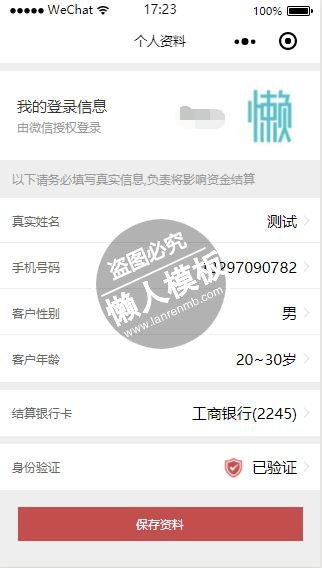
<!--pages/mine/information.wxml-->
<view class="container">
     <view class="userInfo bg-color-white">
      <view class="userInfo-hd">
          <text class="font-color-333 font-size-18">我的登录信息</text>
          <text class="font-color-999">由微信授权登录</text>
      </view>
         <view class="userInfo-bd font-size-18">{{userInfo.nickName}}</view>
         <image class="avatarsize" src="{{userInfo.avatarUrl}}" background-size="cover"></image>
     </view>
     <view class="hd-title font-color-999">
         以下请务必填写真实信息,负责将影响资金结算
     </view>
     <view class="listgroup" style="margin-top:0;">
           <navigator url="enterInput?type=name&name={{user.name}}" class="view-list arrow-right line-before-bottom " hover-class="weui-cell_active">
              <view class="list__hd">
                    <view class="weui-label font-color-666">真实姓名</view>
            </view>
            <view class="list__bd">
                 <view class="choose">{{user.name}}</view>
            </view>
           </navigator>
            <navigator url="enterInput?type=phone&phone={{user.phone}}" class="view-list arrow-right line-before-bottom" hover-class="weui-cell_active">
               <view class="list__hd">
                    <view class="weui-label font-color-666">手机号码</view>
                 </view>
            <view class="list__bd">
               <view class="choose">{{user.phone}}</view>
            </view>
           </navigator>
          <view  class="view-list arrow-right  line-before-bottom" >
                 <view class="list__hd">
                    <view class="weui-label font-color-666">客户性别</view>
            </view>
            <view class="list__bd ">
                <view class="weui-cell__bd">
                    <picker bindchange="bindSexChange" value="{{sexIndex}}" range="{{sexs}}">
                        <view class=" choose">{{user.sex || sexs[sexIndex]}}</view>
                    </picker>
                </view>

            </view>
           </view>
            <view class="view-list arrow-right" >
            <view class="list__hd">
                    <view class="weui-label font-color-666">客户年龄</view>
            </view>
            <view class="list__bd">
              <view class="weui-cell__bd">
                    <picker bindchange="bindAgeChange" value="{{ageIndex}}" range="{{ages}}">
                       <view class="choose">{{user.age || ages[ageIndex]}}</view>
                    </picker>
                </view>
            </view>
        </view>
     </view>
     <view class="listgroup">
           <navigator url="bankCard" class="view-list arrow-right" hover-class="weui-cell_active">
              <view class="list__hd">
                    <view class="weui-label font-color-666">结算银行卡</view>
            </view>
            <view class="list__bd">
                 <view class="choose">工商银行(2245)</view>
            </view>
           </navigator>
    </view>
     <view class="listgroup">
           <navigator url="authentication" class="view-list arrow-right " hover-class="weui-cell_active">
              <view class="list__hd">
                    <view class="weui-label font-color-666">身份验证</view>
            </view>
            <view class="list__bd">
                 <view class="choose"><image class="icon" src="/assets/images/my_rz@2x.png"></image>已验证</view>
            </view>
           </navigator>
    </view>
     <view class="butbox" style="margin:40rpx auto 30rpx; ">
             <view bindtap="backWind" class="but bg-color-c24e4e font-color-white">保存资料</view>
      </view>
</view>
|
/* pages/mine/information.wxss */
@import '/assets/styles/view-input.wxss';
.userInfo {
    margin-top: 20rpx;
    padding: 0 40rpx;
    display: flex;
    flex-direction: row;
    align-items: center;
    position: relative;
    height: 210rpx;
}
.userInfo .avatarsize {
  width: 150rpx;
  height: 150rpx;
  border-radius: 50%;
  margin-left: 40rpx;
}
.userInfo-hd {
  display: flex;
  flex-direction: column;
}
.userInfo-bd {
  display: flex;
  flex: 1;
  justify-content: flex-end;
}

.listgroup{
    margin-top: 20rpx;
}
.view-list .choose{
    display: flex;
    justify-content: flex-end;
    font-size:36rpx;
}

.view-list .choose .icon{
    width:50rpx;
    height: 50rpx;
    margin-right: 20rpx;
}
|
// pages/mine/information.js
const app=getApp();
Page({
  data:{
     sexs: ["男", "女"],
     sexIndex: null,
     ages:["20岁以下","20~30岁",'30~40岁','50~60岁','60岁以上'],
     ageIndex:null
  },
  onLoad:function(options){
    // 页面初始化 options为页面跳转所带来的参数
  app.getUserInfo((userInfo)=>{
      //更新数据
      this.setData({
        userInfo:userInfo,
        user:{
          name:'测试',
          phone:'13297090782',
          sex:'男',
          age:'20~30岁',
        }
      })
    })


  },
   bindSexChange(e) {
          console.log('picker account 发生选择改变,携带值为', e.detail.value);
          this.setData({
              "sexIndex": e.detail.value,
              "user.sex":this.data.sexs[e.detail.value]
          })
      },
  bindAgeChange (e) {
      this.setData({
          "ageIndex": e.detail.value,
           "user.age":this.data.ages[e.detail.value]
      });
  },
  backWind(){
     //关闭并返回
     wx.navigateBack({
       delta: 1, // 回退前 delta(默认为1) 页面
       success: function(res){
         // success
       },
       fail: function() {
         // fail
       },
       complete: function() {
         // complete
       }
     })
  },
  changeData(data){
     let changetype=data.name || data.phone;
     if(data.name){
       this.setData({
         "user.name": changetype
       })
     }else{
        this.setData({
         "user.phone": changetype
       })

     }
  },
  onReady:function(){
    // 页面渲染完成
  },
  onShow:function(){
    // 页面显示
  },
  onHide:function(){
    // 页面隐藏
  },
  onUnload:function(){
    // 页面关闭
  }
})
|
模板简介:该模板名称为【微信小程序酒业商城个人信息我的资料展示页面设计制作开发教程】,大小是,文档格式为.,推荐使用打开,作品中的图片,文字等数据均可修改,图片请在作品中选中图片替换即可,文字修改直接点击文字修改即可,您也可以新增或修改作品中的内容,该模板来自用户分享,如有侵权行为请联系网站客服处理。欢迎来懒人模板【小程序教程】栏目查找您需要的精美模板。
.jpg)
.jpg)




