
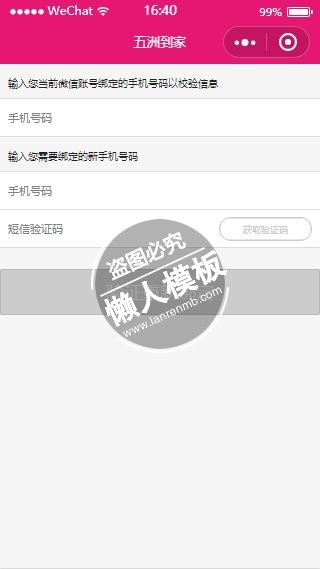
<!--pages/editphone/editphone.wxml-->
<import src="../../template/count-down/count-down.wxml"/>
<view class="phone-box">
    <view class="check-box">
        <view class="title">输入您当前微信账号绑定的手机号码以校验信息</view>
        <input class="input" type="number" value="{{oldUserPhone}}" placeholder="手机号码" bindblur="checkOldPhone"/>
    </view>
    <view class="edit-box">
        <view class="title">输入您需要绑定的新手机号码</view>
        <input class="input new-phone" type="number" value="{{newUserPhone}}" placeholder="手机号码" bindinput="updateNewPhone"/>
        <view class="code-box">
            <input class="input" type="text" value="{{code}}" placeholder="短信验证码" bindinput="updateCode"/>
            <template is="countDown" data="{{disabled: disabled, plain: plain, text: text}}" />
        </view>
    </view>
    <button class="bind-btn" type="primary" hover-class="none" disabled="{{isNotSubmit}}" bindtap="submit">验证重新绑定</button>
</view>
|
/* pages/editphone/editphone.wxss */
page {
  display: block;
  min-height: 100%;
  background-color: #f5f5f5;
}
.phone-box .title{
    font-size: 24rpx;
    color: #222;
    margin: 30rpx 0 20rpx 20rpx;
}
.phone-box .input{
    border: 1px #ddd solid;
    border-left: 0;
    border-right: 0;
    height: 88rpx;
    background-color: #fff;
    padding-left: 20rpx;
    font-size: 28rpx;
}
.phone-box .input.new-phone{
    border-bottom: 1px #ddd solid;
}
.phone-box .code-box{
    display: flex;
    align-items: center;
    justify-content: center;
    background-color: #fff;
    height: 88rpx;
    border-bottom: 1px #ddd solid;
}
.phone-box .code-box input{
    border: 0;
    flex: 1;
}
.phone-box .code-box button{
    border: 1px #e61773 solid;
    color: #e61773;
    border-radius: 99px;
    background-color: transparent!important;
    margin: 15rpx 20rpx 15rpx 0;
    font-size: 22rpx;
    height: 58rpx;
    width: 220rpx;
}
.phone-box .code-box button[disabled]{
    color: #ccc;
    border: 1px #ccc solid;
}
.bind-btn{
    margin-top: 50rpx;
}
|
// pages/editphone/editphone.js
var util = require('../../utils/util.js');
var ports = require('../../utils/ports.js');
//引入倒计时组件
var CountDown = require('../../template/count-down/count-down.js');
var appInstance = getApp();
Page({
  data:{
      oldUserPhone: '',
      newUserPhone: '',
      code: '',
      isNotSubmit: true,
  },
  judge: function(){
      if(!appInstance.globalData.userInfo.hasData){
          wx.navigateBack({
            delta: 2
          });
      }
  },
  checkPhone: function(phone){
      if(!/^1[34578]d{9}$/.test(phone) || phone === ''){
        return false;
      }
      return true;
  },
  checkOldPhone: function(e){
    this.countDown.setDisabledValue(true);
    if(!this.checkPhone(e.detail.value)){
        return wx.showToast({
          title: '旧手机号格式不正确或为空',
          duration: 1000
        });
    }
    var _this = this;
        util.getToken().then(token => {
            util.wxRequest({
                method: 'POST',
                url: ports.checkPhone,
                header:{ 'X-Auth-Token': token, 'content-type': 'application/x-www-form-urlencoded'},
                data: {
                    old_phone: e.detail.value
                }
            }).then((res) => {
              if(res.status !== 0){
                return wx.showToast({
                  title: res.msg,
                  duration: 1000
                });
              }
              _this.countDown.setDisabledValue(false);
              _this.setData({
                  oldUserPhone: e.detail.value
              });
            }).catch((err) => {
              return wx.showToast({
                title: err,
                duration: 1000
              });
            });
        });
  },
  updateNewPhone: function(e){
      this.setData({
        newUserPhone: e.detail.value
      });
  },
  updateCode: function(e){
      this.setData({
        code: e.detail.value
      });
  },
  _getCode: function(){
      if(!this.checkPhone(this.data.newUserPhone)){
        return wx.showToast({
          title: '新手机号格式不正确或为空',
          duration: 1000
        });
      }
      var _this = this;
          util.getToken().then(token => {
              util.wxRequest({
                  method: 'POST',
                  url: ports.sendMsg,
                  header:{'X-Auth-Token': token, 'content-type': 'application/x-www-form-urlencoded'},
                  data: {
                      phone: _this.data.newUserPhone
                  }
              }).then((res) => {

                wx.showToast({
                  title: '请查收手机验证码',
                  duration: 1000
                });
                _this.setData({
                    isNotSubmit: false
                });
                _this.countDown.run(60);
              }).catch((err) => {
                  return wx.showToast({
                    title: err,
                    duration: 1000
                  });
              });
          });
  },
  submit(){
      var _this = this;
      if(!this.checkPhone(this.data.newUserPhone)){
          return wx.showToast({
            title: '手机号格式不正确或为空',
            duration: 1000
          });
      }
      if(!/^d{6}$/.test(this.data.code)){
          return wx.showToast({
            title: '验证码为6个数字',
            duration: 1000
          });
      }
      util.getToken().then(token => {
          util.wxRequest({
              method: 'POST',
              url: ports.updatePhone,
              header:{'X-Auth-Token':token, 'content-type': 'application/x-www-form-urlencoded'},
              data: {
                  phone: _this.data.newUserPhone,
                  old_phone: _this.data.oldUserPhone,
                  verifycode: _this.data.code,
              }
          }).then((res) => {
            if(res.status === 0){
                appInstance.globalData.userInfo.phone = res.data.phone;
                wx.showToast({
                  title: res.msg,
                  icon: 'success',
                  duration: 1000,
                  success: function(){
                    setTimeout(function(){
                      wx.navigateBack({
                        delta: 1
                      });
                    }, 1000);
                  }
                });
            }else{
                return wx.showToast({
                  title: res.msg,
                  duration: 1000
                });
            }
          }).catch((err) => {
                return wx.showToast({
                  title: err,
                  duration: 1000
                });
          });
      });
  },
  onLoad:function(options){
    // 页面初始化 options为页面跳转所带来的参数
    this.judge();
    //初始化倒计时组件
    this.countDown = new CountDown(this);
  },
  onReady:function(){
    // 页面渲染完成
  },
  onShow:function(){
    // 页面显示
  },
  onHide:function(){
    // 页面隐藏
  },
  onUnload:function(){
    // 页面关闭
  }
})
|
模板简介:该模板名称为【微信小程序绑定手机号验证身份页面设计制作开发教程】,大小是,文档格式为.,推荐使用打开,作品中的图片,文字等数据均可修改,图片请在作品中选中图片替换即可,文字修改直接点击文字修改即可,您也可以新增或修改作品中的内容,该模板来自用户分享,如有侵权行为请联系网站客服处理。欢迎来懒人模板【小程序教程】栏目查找您需要的精美模板。
.jpg)
.jpg)




