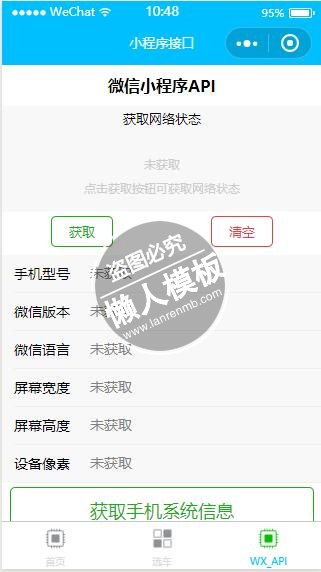
<view class="container">
    <view id="api_title">微信小程序API</view>

<!--获取网络类型API-->
    <view class="network_info_body">
        <view class="network_info_area">
            <view class="network_info_title">获取网络状态</view>
            <block wx:if="{{ hasNetworkType == false }}">
                <text class="network_info_prompt">未获取</text>
                <text class="network_info_prompt">点击获取按钮可获取网络状态</text>
            </block>
            <block wx:if="{{ hasNetworkType == true }}">
                <text class="info_network_type">{{ networkType }}</text>
            </block>
        </view>
        <view class="network_info_btn">
            <button size="mini" type="primary" plain bindtap="getNetworkType">获取</button>
            <button size="mini" type="warn" plain bindtap="clear">清空</button>
        </view>
    </view>
<!--获取系统信息API-->
    <view class="system_info_body">
        <view class="system_info_area">
            <view class="system_info_single">
                <text class="system_info_title">手机型号</text>
                <input class="system_info_value" disabled="{{ true }}" type="text" placeholder="未获取" value="{{ systemInfo.model }}"/>
            </view>
            <view class="system_info_single">
                <text class="system_info_title">微信版本</text>
                <input class="system_info_value" disabled="{{ true }}" type="text" placeholder="未获取" value="{{ systemInfo.version }}"/>
            </view>
            <view class="system_info_single">
                <text class="system_info_title">微信语言</text>
                <input class="system_info_value" disabled="{{ true }}" type="text" placeholder="未获取" value="{{ systemInfo.language }}"/>
            </view>
            <view class="system_info_single">
                <text class="system_info_title">屏幕宽度</text>
                <input class="system_info_value" disabled="{{ true }}" type="text" placeholder="未获取" value="{{ systemInfo.windowWidth }}"/>
            </view>
            <view class="system_info_single">
                <text class="system_info_title">屏幕高度</text>
                <input class="system_info_value" disabled="{{ true }}" type="text" placeholder="未获取" value="{{ systemInfo.windowHeight }}"/>
            </view>
            <view class="system_info_single">
                <text class="system_info_title">设备像素</text>
                <input class="system_info_value" disabled="{{ true }}" type="text" placeholder="未获取" value="{{ systemInfo.pixelRatio }}"/>
            </view>
        </view>
        <view class="system_info_btn">
            <button type="primary" plain bindtap="getSystemInfo">获取手机系统信息</button>
        </view>
    </view>
<!--图片API-->
    <view class="image_body">
        <view class="image_area">
            <picker range="{{ sourceType }}" bindchange="sourceTypeChange" value="{{ sourceTypeIndex }}">
                <view class="single_picker">
                    <view class="source_title">图片来源</view>
                    <view class="_source">{{ sourceType[sourceTypeIndex] }}</view>
                </view>
            </picker>
            <picker range="{{ sizeType }}" bindchange="sizeTypeChange" value="{{ sizeTypeIndex }}">
                <view class="single_picker">
                    <view class="source_title">图片质量</view>
                    <view class="_source">{{ sizeType[sizeTypeIndex] }}</view>
                </view>
            </picker>
            <picker range="{{ count }}" bindchange="countChange" value="{{ countIndex }}">
                <view class="single_picker">
                    <view class="source_title">数量限制</view>
                    <view class="_source">{{ count[countIndex] }}</view>
                </view>
            </picker>
        </view>
        <view class="images_select">
            <text >可选择/预览图片</text>
            <view class="images_list">
                <block wx:for="{{ imageList }}" wx:for-item="image">
                    <image src="{{ image }}" id="images_image" data-src="{{ image }}" bindtap="previewImage"></image>
                </block>
                <view class="image_plus" bindtap="chooseImage">
                    <view id="image_plus_horizontal"></view>
                    <view id="image_plus_vertical"></view>
                </view>
            </view>
        </view>
        <view id="image_btn">
            <button type="warn" plain bindtap="clearFile">删除图片</button>
        </view>
    </view>
<!--音乐组件-->
    <view class="music_body">
        <audio src="{{ src }}" poster="{{ poster }}" name="{{ name }}" author="{{ author }}" controls loop></audio>
    </view>
<!--用户登录API-->
    <view class="login_body">
        <view class="login_area">
            <block wx:if="{{ hasLogin === true }}">
                <text class="login_title">登录成功</text>
            </block>
            <block wx:if="{{ hasLogin === false}}">
                <text class="login_title">未登录</text>
            </block>
        </view>
        <view id="login_btn">
            <button type="primary" plain bindtap="login">微信登录</button>
        </view>
    </view>
<!--用户信息API-->
    <view class="userInfo_body">
        <view class="userInfo_area">
            <view class="userInfo">
                <text class="userInfo_title">头像:</text>
                <image src="{{ userInfo.avatarUrl }}" id="userImage" data-user-image="{{ userInfo.avatarUrl }}" catchtap="previewUser"></image>
            </view>
            <view class="userInfo">
                <text class="userInfo_title">网名:</text>
                <input class="userInfo_value" disabled="{{ true }}" type="text" placeholder="暂未获取" value="{{ userInfo.nickName }}"></input>
            </view>
            <view class="userInfo">
                <text class="userInfo_title">省份:</text>
                <input class="userInfo_value" disabled="{{ true }}" type="text" placeholder="暂未获取" value="{{ userInfo.province == 'Sichuan' ? '四川' : userInfo.province }}"></input>
            </view>
            <view class="userInfo">
                <text class="userInfo_title">城市:</text>
                <input class="userInfo_value" disabled="{{ true }}" type="text" placeholder="暂未获取" value="{{ userInfo.city == 'Guangyuan' ? '广元' : userInfo.city}}"></input>
            </view>
            <view class="userInfo">
                <text class="userInfo_title">性别:</text>
                <input class="userInfo_value" disabled="{{ true }}" type="text" placeholder="暂未获取" value="{{ userInfo.gender == 1 ? '男' : userInfo.genger }}"></input>
            </view>
        </view>
        <view id="getUserInfo">
            <button type="primary" plain bindtap="getUserInfo">获取用户信息</button>
            <button type="warn" plain bindtap="clearUserInfo" style="margin-top: 10rpx;">清除用户信息</button>
        </view>
    </view>
<!--支付API-->
    <view class="payment_body">
        <button type="primary" plain bindtap="payment">发起支付</button>
    </view>

</view>
|
#api_title {
    color: black;
    font-weight: bold;
    text-align: center;
    margin: 10px 0;
}
/*网络类型样式*/
.network_info_area {
    height: 250rpx;
    display: flex;
    flex-direction: column;
    align-items: center;
    background: #F8F8F8;
}
.network_info_title {
    margin-top: 10rpx;
    margin-bottom: 50rpx;
    font-size: 32rpx;
}
.network_info_prompt {
    font-size: 30rpx;
    margin-top: 20rpx;
    color: #ccc;
}
.info_network_type {
    font-size: 80rpx;
    font-weight: bold;
}
.network_info_btn {
    margin-top: 10rpx;
    display: flex;
}
/*系统信息样式*/
.system_info_body {
    margin-top: 20rpx;
}
.system_info_area {
    background: #F8F8F8;
}
.system_info_single {
    display: flex;
    align-items: center;
    margin-left: 30rpx;
    border-bottom: 1px solid #eee;
    height: 88rpx;
    font-size: 34rpx;
}
.system_info_title {
    width: 180rpx;
    color: #000;
}
.system_info_value {
    flex-grow: 1
}
.system_info_btn {
    margin-top: 10rpx;
    padding: 0 20rpx;
}
/*图片样式*/
.image_body {
    margin-top: 20rpx;
}
.image_area {
    background: #F8F8F8;
}
.single_picker {
    display: flex;
    justify-content: space-between;
    height: 100rpx;
    align-items: center;
    font-size: 36rpx;
    margin-left: 20rpx;
    padding-right: 20rpx;
    border-bottom: 1px solid #eee;
}
._source {
    color: #ccc;
}
.images_select {
    padding: 20rpx;
    margin-top: 10rpx;
}
.images_list {
    display: flex;
    margin-top: 20rpx;
    flex-wrap: wrap;
}
#images_image {
    width: 150rpx;
    height: 150rpx;
    margin: 10rpx;
}
.image_plus {
    width: 150rpx;
    height: 150rpx;
    margin: 10rpx;
    border: 1px dashed #999;
    position: relative;
}
#image_plus_horizontal {
    position: absolute;
    width: 80rpx;
    height: 4rpx;
    background-color: #d9d9d9;
    top: 50%;
    left: 50%;
    transform: translate(-50%, -50%);
}
#image_plus_vertical {
    position: absolute;
    width: 4rpx;
    height: 80rpx;
    background-color: #d9d9d9;
    top: 50%;
    left: 50%;
    transform: translate(-50%, -50%)
}
#image_btn {
    padding: 0 20rpx;
}
/*音乐样式*/
.music_body {
    margin-top: 20rpx;
    padding-left: 20rpx;
}
/*登录样式*/
.login_body {
    margin-top: 20rpx;
}
.login_area {
    height: 150rpx;
    display: flex;
    justify-content: center;
    align-items: center;
    background: #F8F8F8;
}
.login_cont {
    margin: auto;
}
.login_title {
    font-size: 60rpx;
}
#login_btn {
    margin-top: 10rpx;
    padding: 0 20rpx;
}
/*用户信息样式*/
.userInfo_body {
    margin-top: 20rpx;
}
.userInfo_area {
    background-color: #F8F8F8;
}
.userInfo {
    display: flex;
    align-items: center;
    height: 88rpx;
    font-size: 35rpx;
    border-bottom: 1px solid #eee;
    margin-left: 20rpx;
}
#userImage {
    width: 80rpx;
    height: 80%;
}
.userInfo_title {
    width: 150rpx;
    color: #000;
}
.userInfo_value {
    flex-grow: 1;
}
#getUserInfo {
    margin-top: 10rpx;
    padding: 0 20rpx;
}
/*支付样式*/
.payment_body {
    margin: 40rpx 0;
    padding: 0 20rpx;
}
|
// 获取小程序实例
var app = getApp()
var sourceType = [ ['camera'], ['album'], ['camera', 'album'] ]
var sizeType = [ ['compressed'], ['original'], ['compressed', 'original'] ]

Page({
    // 数据
    data: {
        hasNetworkType: false,
        systemInfo: {},

        /* 图片数据 */
        sourceTypeIndex: 2,
        sourceType: ['拍照', '相册', '拍照或相册'],

        sizeTypeIndex: 2,
        sizeType: ['压缩', '原图', '原图或压缩'],

        countIndex: 8,
        count: [1, 2, 3, 4, 5, 6, 7, 8, 9],
        // 获取缓存API
        imageList: wx.getStorageSync('imageList'),

        /* 音乐数据 */
        src: "http://dl.stream.qqmusic.qq.com/C200000NU7383cWdmL.m4a?vkey=E31E70383485A0459D7205BB83D038F37F75AF304BCEA8EF9CBAFB894A6DF31637EAB85BD4DBF49345768B96F6DBF709971AF5AA97D17B9F&guid=5261462800&fromtag=30",
        poster: 'http://y.gtimg.cn/music/photo_new/T002R300x300M000002dvsSx27UO6o.jpg?max_age=2592000',
        name: 'Until You',
        author: 'Shayne Ward',
    },
    onLoad: function() {
        this.setData({
            hasLogin: app.globalData.hasLogin
        })
    },
 /* 获取 网络类型函数 */
    getNetworkType: function() {
        var that = this;
        // 调取 网络类型API
        wx.getNetworkType({
            success: function(res) {
                console.log(res)
                that.setData({
                    hasNetworkType: true,
                    networkType: res.networkType
                })
            }
        })
    },
    // 清除 网络状态的数据
    clear: function() {
        this.setData({
            hasNetworkType: false,
            networkType: ''
        })
    },
/* 获取 系统信息函数 */
    getSystemInfo: function() {
        var that = this;
        // 调取 系统信息API
        wx.getSystemInfo({
            success: function(res) {
                console.log(res)
                that.setData({
                    systemInfo: res
                })
            }
        });
        // 3秒后 清空系统信息
        setTimeout(function () {
            that.setData({
                systemInfo: {}
            });
            // 消息提示框API
            wx.showToast({
                title: "持续3秒,数据已清空",
                duration: 2000,
                success: function() {
                    console.log("消息提示框API调用成功,持续2秒")
                }
            });
        }, 3000)
    },
/* 选择图片函数 */
    sourceTypeChange: function(e) {
        console.log(e);
        this.setData({
            sourceTypeIndex: e.detail.value
        });
    },
    sizeTypeChange: function(e) {
        console.log(e);
        this.setData({
            sizeTypeIndex: e.detail.value
        });
    },
    countChange: function(e) {
        console.log(e);
        this.setData({
            countIndex: e.detail.value
        });
    },
    // 选择函数
    chooseImage: function() {
        var that = this;
        // 选择图片API
        wx.chooseImage({
           sourceType:  sourceType[this.data.sourceTypeIndex],
           sizeType: sizeType[this.data.sizeTypeIndex],
           count: this.data.count[this.data.countIndex],
           success: function(res){
               console.log(res);
               console.log(res.tempFilePaths)
               //数据缓存API
               wx.setStorageSync('imageList', res.tempFilePaths);
               that.setData({
                   imageList: res.tempFilePaths
               })
               //模态弹窗API
               wx.showModal({
                   title: "上传成功",
                   content: "下次进入应用时,图片仍存在",
                   cancelColor: "red"
               })
           }
        })
    },
    // 预览图片API
    previewImage: function(e) {
        console.log(e)
        var current = e.target.dataset.src;
        // 预览图片API
        wx.previewImage({
            current: current,
            urls: this.data.imageList
        })
    },
    // 清除图片
    clearFile: function() {
        // 清除缓存API
        wx.removeStorageSync("imageList")
        this.setData({
            imageList: []
        })
        console.log("点击了清除图片按钮")

    },
/* 登录函数 */
    login: function() {
        var that = this;
        // 登录API
        wx.login({
            success: function(res){
                console.log(res)
                // 改变全局属性
                app.globalData.hasLogin = true;
                that.setData({
                    hasLogin: app.globalData.hasLogin
                })
            }
        })
    },
/* 获取用户信息函数 */
    getUserInfo: function() {
        var that = this;
        if (app.globalData.hasLogin === false) {
            // 模态框API
            wx.showModal({
                title: "还未登录",
                content: "请先登录..."
            })
        } else {
            // 调用获取信息函数
            _getUserInfo()
        }
        // 获取信息函数
        function _getUserInfo() {
            // 获取用户信息API
            wx.getUserInfo({
                success: function(res) {
                    console.log(res)
                    that.setData({
                        userInfo: res.userInfo
                    })
                }
            })
        }
    },
    // 预览用户头像
    previewUser: function(res) {
        var userImage = res.target.dataset.userImage
        var urls = []
        // 追加元素到数组
        urls.push(userImage)
        // 预览图片API
        wx.previewImage({
            current: userImage,
            urls: urls,
        })
    },
    // 清除用户信息
    clearUserInfo: function() {
        this.setData({
            userInfo: {}
        })
    },
/* 支付函数 */
    payment: function(res) {
        console.log(res)
        var that = this;
        console.log('时间戳:'  + that.createTimeStamp())
        console.log("随机字符串:" + that.createNonceStr())
        // 支付API
        wx.requestPayment({
            timeStamp: new Date().getTime(),
            nonceStr: that.createNonceStr(),
            package: "prepay_id=u802345jgfjsdfgsdg888",
            signType: "MD5",
            paySign: "70EA570631E4BB79628FBCA90534C63FF7FADD89",
            success: function(res) {
                console.log("支付成功")
            },
            fail: function(res) {
                console.log("支付失败")
            },
            complete: function() {
                console.log("支付结束")
            }
        })
        console.log("支付...")
    },
    // 随机字符串
    createNonceStr: function() {
        var nonceStr = Math.random().toString(36).substr(2, 15);
        return nonceStr;
    },
    // 时间戳
    createTimeStamp: function() {
        var timeStamp = parseInt(new Date().getTime() / 1000) + ''
        return timeStamp;
    }
})
|
模板简介:该模板名称为【微信小程序API接口获取页面样式设计制作开发教程】,大小是,文档格式为.,推荐使用打开,作品中的图片,文字等数据均可修改,图片请在作品中选中图片替换即可,文字修改直接点击文字修改即可,您也可以新增或修改作品中的内容,该模板来自用户分享,如有侵权行为请联系网站客服处理。欢迎来懒人模板【小程序教程】栏目查找您需要的精美模板。
.jpg)
.jpg)