
<!--bookDetail.wxml-->
<view class="detail-container">
  <view class="header-container">
    <image class="book-img" src="{{bookDetail.book.imgUrl}}"></image>
    <view class="header-right">
      <text class="name-text">{{bookDetail.book.name}}</text>
      <text class="author-text">{{bookDetail.book.author}}</text>
      <view class="star-container">
        <view class="stars">
          <block wx:for="{{[1,2,3,4,5]}}">
            <image wx:if="{{item>bookDetail.book.doubanScore/2}}" class="star-img" src="/images/star.png"></image>
            <image wx:if="{{item<bookDetail.book.doubanScore/2}}" class="star-img" src="/images/star_green.png"></image>
          </block>
        </view>
        <text class="score-text">{{bookDetail.book.doubanScore}}</text>
      </view>
    </view>
  </view>

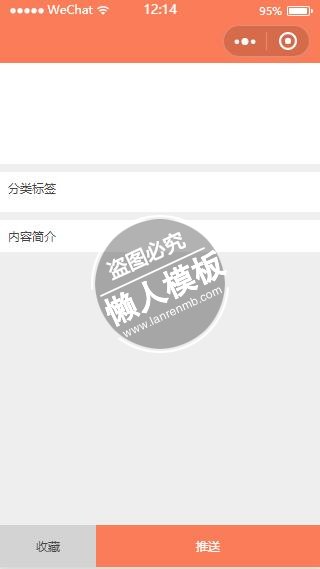
  <view class="tags-container">
    <text class="tags-title">分类标签</text>
    <view class="tags">
      <block wx:for="{{tags}}">
        <text class="tag-text">{{item}}</text>
      </block>
    </view>
  </view>

  <view class="content-container">
    <text class="content-title">内容简介</text>
    <text class="content-detail">{{bookDetail.book.content}}</text>
  </view>

  <view class="bottom">
    <text class="collect-btn">收藏</text>
    <text class="push-btn">推送</text>
  </view>
</view>
|
/* bookDetail.wxss */

page {
  height: 100%;
  width: 100%;
}

.detail-container {
  height: 100%;
  width: 100%;
  padding: 0rpx;
  background-color: #eee;
  display: flex;
  flex-direction: column;

}

.header-container {
  width: 100%;
  display: flex;
  flex-direction: row;
  background-color: #fff;
}

.book-img {
  flex: 1;
  padding: 20rpx;
  max-height: 200rpx;
}

.header-right {
  flex: 3;
  display: flex;
  flex-direction: column;
  padding: 20rpx;
  justify-content: space-between;
}

.name-text {
  font-size: 34rpx;
  color: #444;
}

.author-text {
  font-size: 28rpx;
  color: skyblue;
  margin-top: 25rpx;
}

.star-container {
  display: flex;
  flex-direction: row;
  height: 44rpx;
  width: 100%;
  margin-top: 20rpx;
  align-items: center;
}

.stars {
}

.star-img {
  height: 44rpx;
  width: 44rpx;
  margin-right: 5rpx;
}

.score-text {
  font-size: 28rpx;
  color: #444;
  margin-left: 20rpx;
}

.tags-container {
  width: 100%;
  display: flex;
  flex-direction: column;
  background-color: #fff;
  margin-top: 20rpx;
}

.tags-title {
  font-size: 30rpx;
  color: #444;
  margin: 20rpx;
}

.tags {
  width: 100%;
  display: flex;
  flex-direction: row;
  flex-wrap: wrap;
  background-color: #fff;
  padding: 10rpx;
}

.tag-text {
  border: 1rpx solid #fb7c58;
  color: #fb7c58;
  font-size: 26rpx;
  margin: 10rpx;
  border-radius: 50rpx;
  padding: 5rpx 20rpx;
}

.content-container{
  width: 100%;
  display: flex;
  flex-direction: column;
  margin-top: 20rpx;
  background-color: #fff;
}
.content-title{
  font-size: 30rpx;
  color: #444;
  margin: 20rpx;
}
.content-detail{
  font-size: 28rpx;
  color: darkgray;
  margin: 0rpx 20rpx;
  line-height: 50rpx;
  max-height: 400rpx;
  overflow: hidden;
  text-overflow: ellipsis;
}

.bottom {
  height: 100rpx;
  width: 100%;
  display: flex;
  flex-direction: row;
  position: fixed;
  bottom: 0rpx;
}

.collect-btn {
  height: 100rpx;
  width: 30%;
  background-color: lightgray;
  font-size: 30rpx;
  color: #444;
  text-align: center;
  line-height: 100rpx;
}

.push-btn {
  height: 100rpx;
  width: 70%;
  background-color: #fb7c58;
  font-size: 30rpx;
  color: #fff;
  text-align: center;
  line-height: 100rpx;
}
|
// bookDetail.js
Page({

  /**
   * 页面的初始数据
   */
  data: {
      bookDetail: {},
      tags: []
  },

  /**
   * 生命周期函数--监听页面加载
   */
  onLoad: function (options) {

    var book=JSON.parse(options.book);
    var title = book.name;
    this.requestData(book.id);
    wx.setNavigationBarTitle({
      title: title,
    })
  },
  requestData: function(bookId){
    var that=this;
      wx.request({
        url: 'http://www.kindlepush.com/m/auth/book/'+bookId,
        method: 'POST',
        header: {
          'auth': wx.getStorageSync('auth')
        },
        success: function(res){
          var tagsStr=res.data.book.tags;
          var tags=tagsStr.replace('[', '').replace(']', '').split(',');
          that.setData({
            bookDetail: res.data,
            tags: tags
          })
        },
        fail: function(err){
          console.log(err);
        }
      })
  },

  /**
   * 生命周期函数--监听页面初次渲染完成
   */
  onReady: function () {

  },

  /**
   * 生命周期函数--监听页面显示
   */
  onShow: function () {

  },

  /**
   * 生命周期函数--监听页面隐藏
   */
  onHide: function () {

  },

  /**
   * 生命周期函数--监听页面卸载
   */
  onUnload: function () {

  },

  /**
   * 页面相关事件处理函数--监听用户下拉动作
   */
  onPullDownRefresh: function () {

  },

  /**
   * 页面上拉触底事件的处理函数
   */
  onReachBottom: function () {

  },

  /**
   * 用户点击右上角分享
   */
  onShareAppMessage: function () {

  }
})
|
模板简介:该模板名称为【微信小程序书城详细推送标签页样式设计制作开发教程】,大小是,文档格式为.,推荐使用打开,作品中的图片,文字等数据均可修改,图片请在作品中选中图片替换即可,文字修改直接点击文字修改即可,您也可以新增或修改作品中的内容,该模板来自用户分享,如有侵权行为请联系网站客服处理。欢迎来懒人模板【小程序教程】栏目查找您需要的精美模板。
.jpg)
.jpg)




