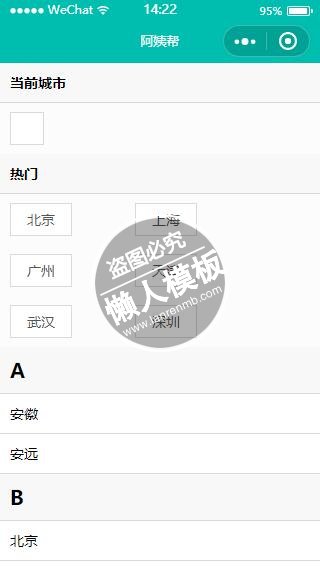
<view class="container">
 <view class="wrap">
  <view class="currentCity flex">
    <text class="now">{{now}}</text>
    <view class="border">
      <text class="current" data-text="{{city}}" bindtap="bindViewTap">{{city}}</text>
    </view>
  </view>
  <view class="hotcity flex">
    <text class="hot">{{hot}}</text>
    <view class="page">
    <block  wx:for="{{hotcitys}}" wx:key="{{item}}">
      <view class="border " >
        <text class="current" data-text="{{item.name}}"bindtap="bindViewTap">{{item.name}}
        </text>
      </view>
    </block>
    </view>
  </view>
  <view class="catagory flex">
    <block wx:for="{{catagory}}" wx:key="{{item}}">
     <text class="id">{{item.id}}</text>
      <block wx:for="{{item.city}}" wx:key="{{item}}">
        <view class="borderbottom">
          <text class="title" data-text="{{item.name}}"bindtap="bindViewTap">{{item.name}}</text>
        </view>
      </block>
    </block>
  </view>
 </view>
</view>
|
.container{
  background-color: #fcfcfc;
  font-size: 14px;
}
.wrap{
  width: 100%;
  height: 100%;
}
.currentcity,.hot,.catagory{
  width: 100%;
}
.flex{
  display: -webkit-flex;
  display: flex;
  flex-direction: column;
}
.now,.hot,.id{
  color: #000;
  font-weight: 700;
  padding:10px 10px;
  border-bottom: 1px solid #dadada;
  background-color: #f8f8f8;
  box-sizing: border-box;
}
.border{
  font-size: 14px;
  color: #555;
  padding: 16px 10px;
  display: inline-block;
  margin-right: 60px;
}
.current{
  background-color: #fff;
  border: 1px solid #dadada;
  padding: 6px 16px;
}
.page{
  width: 100%;
}
.id{
  font-size: 20px;
}
.borderbottom{
  background-color: #fff;
  border-bottom: 1px solid #dadada;
  padding: 10px 10px;
}
|
var app=getApp()
let pageConfig={
  data:{
    city:'',
    now:'',
    hot:'',
    hotcitys:[],
    catagory:[]
  },
  onLoad:function(options){
    this.loadInfo();
  },
  bindViewTap:function(e){
    // console.log(e.target.dataset.text);
    var city=e.target.dataset.text;
    // setStorage API设置本地存储
    wx.setStorage({
      key:"city",
      data:city
    });
    wx.switchTab({
      url: '../home/index'
    })
  },
  loadInfo:function(){
    var page=this;
    wx.request({
      url:'http://www.easy-mock.com/mock/5906811e7a878d73716e32c9/viplist/citylist',
      method:'GET',
      data:{},
      header:{
        'Accept':'application/json'
      },
      success:(res) => {
        console.log(res);
        this.setData({
          now:res.data.now,
          hot:res.data.hot,
          hotcitys:res.data.hotcitys,
          catagory:res.data.catagory
        })
      }
    });

    wx.getLocation({
      type: 'wgs84', // 默认为 wgs84 返回 gps 坐标,gcj02 返回可用于 wx.openLocation 的坐标
      success: function(res){
        // success
        var longitude=res.longitude;
        var latitude=res.latitude;
        page.loadCity(longitude,latitude);
    },
    fail: function() {
      // fail
    },
    complete: function() {
      // complete
    }
   })
  },
  // 微信的getLocation API只获得经纬度,要想得到城市、国家等具体
  // 信息要用到百度、腾讯地图的逆地址解析,这里用的是百度
  loadCity:function(longitude,latitude){
    var page =this;
    wx.request({
      url: 'http://api.map.baidu.com/geocoder/v2/?ak=btsVVWf0TM1zUBEbzFz6QqWF&callback=renderReverse&location='+latitude+','+longitude+'&output=json&pois=1',
      data: {},
      header:{
        'Content-Type':'application/json'
      },
      success: function(res){
        // success
        console.log(res);
        var str1=res.data;
        var str2=str1.replace("renderReverse&&renderReverse(","");
        var str3=str2.substring(0,str2.length-1);
        var cityresult=JSON.parse(str3);
        console.log(typeof(cityresult));
        var city1=cityresult.result.addressComponent.city;
        var city=city1.replace("市","");
        page.setData({
          city:city
        });
      },
      fail: function() {
        // fail
      },
      complete: function() {
        // complete
      }
    })
  }
};
Page(pageConfig);
|
模板简介:该模板名称为【微信小程序首字母顺序排列城市选择样式设计制作开发教程】,大小是,文档格式为.,推荐使用打开,作品中的图片,文字等数据均可修改,图片请在作品中选中图片替换即可,文字修改直接点击文字修改即可,您也可以新增或修改作品中的内容,该模板来自用户分享,如有侵权行为请联系网站客服处理。欢迎来懒人模板【小程序教程】栏目查找您需要的精美模板。
.jpg)
.jpg)