
<!--pages/order/downline.wxml-->
<view class="w100">
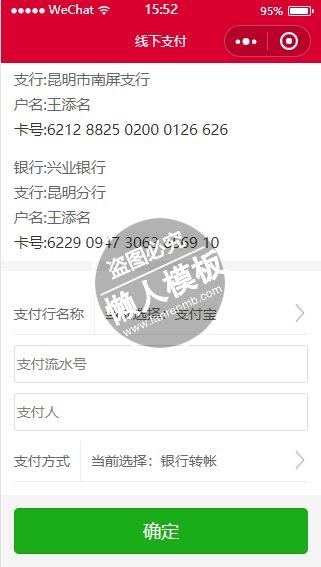
    <view class="p_all">您使用的是线下支付,订单会直接生成,全部金额需通过线下转账转至以下任意账号,转款完成,请到个人中心待付款订单点击确认付款,把您你交易流水号发给我们,以便平台快速确认。平台未确认收到款时,此件商品其他用户仍然可以购买,请您尽快转帐支付。</view>
    <view class="p_all">
        <text>支付宝</text>
        <text>姓名:王添名</text>
        <text class="c3">支付宝:6211666@qq.com</text>
        <!-- <text>复制帐号</text> -->
    </view>
    <view class="p_all">
        <text>银行:中国农业银行</text>
        <text>支行:昆明春城支行营业室</text>
        <text>户名:王添名</text>
        <text class="c3">卡号:6228 4808 6819 4970 273</text>
        <!-- <text>复制卡号</text> -->
    </view>
    <view class="p_all">
        <text>银行:中国建设银行</text>
        <text>支行:昆明西园南路支行</text>
        <text>户名:王添名</text>
        <text class="c3">卡号:6217 0038 6001 3184 799</text>
        <!-- <text>复制卡号</text> -->
    </view>
    <view class="p_all">
        <text>银行:中国银行</text>
        <text>支行:昆明市东风支行</text>
        <text>户名:王添名</text>
        <text class="c3">卡号:6217 8527 0000 6705 006</text>
        <!-- <text>复制卡号</text> -->
    </view>
    <view class="p_all">
        <text>银行:中国工商银行</text>
        <text>支行:昆明市南屏支行</text>
        <text>户名:王添名</text>
        <text class="c3">卡号:6212 8825 0200 0126 626</text>
        <!-- <text>复制卡号</text> -->
    </view>
    <view class="p_all">
        <text>银行:兴业银行</text>
        <text>支行:昆明分行</text>
        <text>户名:王添名</text>
        <text class="c3">卡号:6229 0947 3063 8569 10</text>
        <!-- <text>复制卡号</text> -->
    </view>

		<view class="p_all01 mt10 bg">
			<view class=" mt10">
              <view class="df zhuc">
                <view class="mr10">支付行名称</view>
                <view class="df_1 ble pl10">
                <picker bindchange="bindPickerPayBankNameChange" value="{{index1}}" range="{{payBankNameList}}">
                    <view class="picker">
                    当前选择:{{payBankName}}
                    </view>
                </picker>
                </view>
                <image  class="x_right mt10" src="/images/x_right.png"></image>
            </view>

			</view>
			<view class=" mt10">
            <!-- <view class="c3">支付流水号</view> -->
			<input class="inputStyle" name="input"  bindinput="bindKeyInputPayNo" placeholder="支付流水号" value="{{mobileValue}}"/>
			</view>
			<view class=" mt10">
            <!-- <view class="c3">支付人</view>    -->
			<input class="inputStyle" name="input"  bindinput="bindKeyInputPayUser" placeholder="支付人" value="{{addressValue}}"/>
			</view>
            <view class=" mt10">
                <view class="df zhuc">
                <view class="mr10">支付方式</view>
                <view class="df_1 ble pl10">
                <picker bindchange="bindPickerPayMethodChange" value="{{index2}}" range="{{payMethodList}}">
                    <view class="picker">
                    当前选择:{{payMethod}}
                    </view>
                </picker>
                </view>
                <image  class="x_right mt10" src="/images/x_right.png"></image>
                </view>
			</view>
		</view>

	<view class="p_all01 mtt0">
		<view class="btnGreen">
		<button type="primary" id="btnPay" formType="submit" bindtap="submitPayInfo">确定</button>
	</view>
	</view>

</view>
|
/* pages/order/downline.wxss */

.w100{ width: 100%}
.p_all{
    background: #fff;
    width: 92%;
    padding:2% 4%;
    color: #666;
    font-size: 14px;
    display: block;
    line-height: 25px;
}
.p_all01{
    width: 92%;
    padding:4%;
    color: #666;
    font-size: 14px;
    display: block;
    line-height: 25px;
}
.p_all text{
    width: 100%;
    display: block;
}
.iconWarn{
   vertical-align:top;padding-right:2px;
}

.iconClear{
  float:right;
  padding-top: 5px;
  padding-left: 10px;
  padding-right:10px;
  margin-top:-36px;
  height: 28px;
}

.inputStyle{
  height: 36px;
  line-height: 36px;
  padding-left: 2px;
  border:1px solid #ddd;
  border-radius: 3px;
}

.tips{
  margin-bottom:10px;
}
.x_right{
    width:16px;
    height: 18px;
    display:inline-block;
    vertical-align: middle;
    float: right;
}
.zhifu{
    background: #fff;
    margin-bottom: 1px;
    padding: 4%;
    width: 92%;
    font-size: 14px;
    color: #666;
}

.page{
    width: 92%;
    padding: 4%;
    font-size: 14px;
}
.zhuc{
    line-height: 40px;
    border-bottom: 1px solid #eee;
}
.mr10{
    margin-right: 10px;
}
.pl10{
   padding-left: 10px;
}
|
var app = getApp();
// pages/order/downline.js
Page({
  data:{
    orderId:0,
    payBankName:'支付宝',
    payAccountName:'',
    payMethod:'银行转帐',
    payNo:'',
    payRemark:'',
    payBankNameList: ['支付宝', '中国农业银行', '中国建设银行', '中国银行', '中国工商银行', '兴业银行'],
    payMethodList: ['银行转帐', '支付宝'],
  },
  onLoad:function(options){
    // 页面初始化 options为页面跳转所带来的参数
    this.setData({
      orderId: options.orderId,
    })
  },
  submitPayInfo:function(){
    var that = this;
    if(!this.data.payNo){
      wx.showToast({
        title: '请输入支付流水号',
        icon: 'success',
        duration: 2000
      });
      return;
    }
    if(!this.data.payAccountName){
      wx.showToast({
        title: '请输入支付人',
        icon: 'success',
        duration: 2000
      });
      return;
    }
    //post data

    wx.request({
      url: app.d.hostUrl + '/ztb/orderZBT/AddpaymentInfo',
      method:'post',
      data: {
         orderId: that.data.orderId,
        payBankName: that.data.payBankName,
        payAccountName: that.data.payAccountName,
        payMethod:that.data.payMethod,
        payNo:that.data.payNo,
        payRemark:that.data.payRemark,
      },
      header: {
        'Content-Type':  'application/x-www-form-urlencoded'
      },
      success: function (res) {
        console.log(res)
        //--init data
        var data = res.data;
        console.log(data);
        //创建订单成功
        wx.showToast({
          title: data.message,
          icon: 'success',
          duration: 2000
        });
        if(data.result == 'ok'){
          wx.navigateTo({
            url: '/pages/user/dingdan?currentTab=2',
          });
        }//endok
        //endInitData
      },
    });

  },
  bindPickerPayBankNameChange: function(e) {
    console.log('picker发送选择改变,携带值为', e.detail.value)
    this.setData({
      payBankName: this.data.payBankNameList[parseInt(e.detail.value)]
    });
  },
  bindPickerPayMethodChange: function(e) {
    console.log('picker发送选择改变,携带值为', e.detail.value)
    this.setData({
      payMethod: this.data.payMethodList[parseInt(e.detail.value)]
    });
  },
  bindKeyInputPayNo:function(e){
    this.setData({
      payNo: e.detail.value
    });
  },
  bindKeyInputPayUser:function(e){
    this.setData({
      payAccountName: e.detail.value
    });
  },

});
|
模板简介:该模板名称为【微信小程序线下支付方式详情页面样式设计制作开发教程】,大小是,文档格式为.,推荐使用打开,作品中的图片,文字等数据均可修改,图片请在作品中选中图片替换即可,文字修改直接点击文字修改即可,您也可以新增或修改作品中的内容,该模板来自用户分享,如有侵权行为请联系网站客服处理。欢迎来懒人模板【小程序教程】栏目查找您需要的精美模板。
.jpg)
.jpg)




