
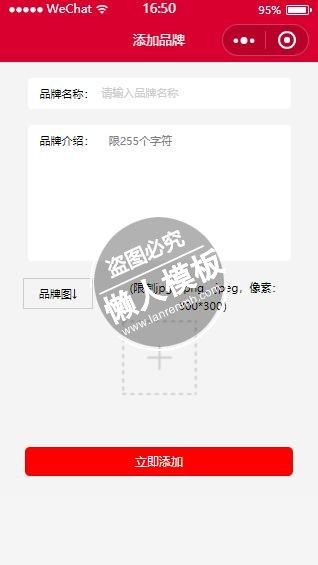
<view class="container">

  <view class="classname">


  <form bindsubmit="addbrand">
        <view class="xing">品牌名称:
          <input placeholder-class='placeholder' placeholder='请输入品牌名称' class="in" name="name"/>
         </view>
         <view class="xing" style="height:300rpx">品牌介绍:
                  <textarea class="i" name='digest' placeholder="限255个字符"/>
         </view>
<!--缩略图-->
<view class="t">品牌图↓</view>
<view class="ii">(限制jpg、png、jpeg,像素:300*300)</view>
<view class="page-body-info">

    <view class="kk">

      <block wx:if="{{imagemin}}">
          <image src="{{imagemin}}" style="width:200rpx;height:200rpx" mode="aspectFit" bindtap="del"></image>
      </block>

      <block wx:else>
        <view class="image-plus image-plus-nb" bindtap="uploadbrand">
          <image src="../../images/s.png" style="width:200rpx;height:200rpx"></image>
        </view>
      </block>

    </view>

</view>
<!--end-->

    <button type="" form-type="submit" hover-class='button-hover' class='su'>立即添加</button>
   </form>
   </view>

</view>
|
.tit {
  height: 300rpx;
  width: 100%;
}

.container {
  padding: 0px;
  height: 100%;
  display: flex;
  flex-direction: column;
  align-items: center;
  justify-content: space-between;
  box-sizing: border-box;
  font-family: '微软雅黑';
}

.classname {
  background: #f4f4f4;
  width: 100%;
  text-align: center;
  padding-bottom: 150rpx;
}

.jj {
  font-size: 24rpx;
  padding-top: 20rpx;
  font-family: "微软雅黑", "黑体";
  margin: 0 auto;
  color: #ccc;
  padding-bottom: 20rpx;
}

.xing {
  font-family: "微软雅黑", "黑体";
  height: 54rpx;
  width: 579rpx;
  border-radius: 10rpx;
  background: #fff;
  margin: 0 auto;
  text-align: left;
  line-height: 54rpx;
  font-size: 28rpx;
  padding: 10rpx;
  margin-top: 38rpx;
  padding-left: 30rpx;
}

.xi {
  font-family: "微软雅黑", "黑体";
  height: 200rpx;
  width: 579rpx;
  border-radius: 10rpx;
  background: #fff;
  margin: 0 auto;
  text-align: left;
  line-height: 54rpx;
  font-size: 28rpx;
  padding: 10rpx;
  margin-top: 38rpx;
  padding-left: 30rpx;
}

.placeholder {
  color: #ccc;
  font-size: 26rpx;
}

.in {
  float: right;
  width: 75%;
  padding-top: 0rpx;
  font-size: 28rpx;
  color: #000;
}

.i {
  float: right;
  width: 72%;
  height: 100%;
  padding-top: 12rpx;
  font-size: 28rpx;
  color: #000;
}

textarea {
  height: 100px;
}

.t {
  font-family: "微软雅黑", "黑体";
  width: 20%;
  height: 60rpx;
  /*background: #fff;*/
  margin-left: 57rpx;
  padding: 5rpx;
  line-height: 60rpx;
  margin-top: 40rpx;
  font-size: 28rpx;
  display: inline-block;
  border: 1px solid #ccc;
  float: left;
}

.su {
  width: 84%;
  color: #fff;
  height: 69rpx;
  line-height: 69rpx;
  font-size: 30rpx;
  font-family: "微软雅黑", "黑体";
  top: 103rpx;
  background: red;
}

button[type="primary"] {
  color: #000;
  background-color: #fff;
}
.shuoming{
  height: 50rpx;
font-size: 30rpx;
}
.label-1, .label-2{
    margin-bottom: 15px;
}
.label-1__text, .label-2__text {
    display: inline-block;
    vertical-align: middle;
}

.label-1__icon {
    position: relative;
    margin-right: 10px;
    display: inline-block;
    vertical-align: middle;
    width: 18px;
    height: 18px;
    background: #fcfff4;
    border: 1px solid #ccc
}

.label-1__icon-checked {
    position: absolute;
    top: 3px;
    left: 3px;
    width: 12px;
    height: 12px;
    background: #d9002f;
}
/*添加图片*/
.t{
  font-family: "微软雅黑", "黑体";
  width: 20%;
  height: 60rpx;
  margin-left: 57rpx;
  padding: 5rpx;
  line-height: 60rpx;
  margin-top: 40rpx;
  font-size: 28rpx;
  display: inline-block;
  border: 1px solid #ccc;
  float: left;
}
.ii{
margin-top:40rpx;
font-size:28rpx;
line-height:44rpx;
width:57%;
display:inline-block;
}
|
var app = getApp();
var common = require("../../utils/common.js");
const uploadFileUrl = require('../../config').uploadFileUrl;
Page({
  data: {
    photo:[]
  },
// 表单
  addbrand: function (e) {
    console.log(e.detail.value);
    var that=this;
    var formdata=e.detail.value;
    wx.request({
      url: app.d.ceshiUrl + '/Api/Shangchang/addbrand',
      method: 'post',
      data: {
        uid:app.globalData.userInfo.id,
        name: formdata.name,
        photo: that.data.brandimg,
        digest:formdata.digest
      },
      header: {
        'Content-Type': 'application/x-www-form-urlencoded'
      },
      success: function (res) {
        //--init data
        var status = res.data.status;
        if (status == 1) {
          wx.showToast({
            title: '提交成功!',
          })
          var pages = getCurrentPages();//获得当前页面
          var prevPage = pages[pages.length - 2];  //获得上一个页面
          prevPage.reloadbrand();
          setTimeout(function(){
            wx.navigateBack();
          },2000)
        } else {
          wx.showToast({
            title: res.data.err,
          })
        }
      },
      fail: function () {
        // fail
        wx.showToast({
          title: '网络异常!',
          duration: 30000
        });
      }
    })

  },
  /**
   * 生命周期函数--监听页面加载
   */
  onLoad: function (options) {

  },
  uploadbrand: function () {
    var self = this;
    wx.chooseImage({
      count: 1,
      sizeType: ['original'],
      sourceType: ['album'],
      success: function (res) {
        console.log('chooseImage success, temp path is', res.tempFilePaths[0])
        var imageSrc = res.tempFilePaths[0]
        wx.showLoading({
          title: '上传中!',
        })
        wx.uploadFile({
          url: app.d.ceshiUrl + '/Api/Shangchang/uploadbrand',
          filePath: imageSrc,
          name: 'data',
          header: {
            'content-type': 'multipart/form-data',
          },
          success: function (res) {
            console.log(res);
            self.setData({
              brandimg: res.data,
            })
            wx.hideLoading()
            wx.showToast({
              title: '上传成功',
              icon: 'success',
              duration: 1000
            })
            self.setData({
              imagemin: imageSrc,
            })
          },
          fail: function ({errMsg}) {
            console.log('uploadImage fail, errMsg is', errMsg)
          }
        })

      },
      fail: function ({errMsg}) {
        console.log('chooseImage fail, err is', errMsg)
      }
    })
  },
  del:function (e){
    var that=this;
    that.setData({
      imagemin:""
    })
  },
  /**
   * 生命周期函数--监听页面初次渲染完成
   */
  onReady: function () {

  },

  /**
   * 生命周期函数--监听页面显示
   */
  onShow: function () {

  },

  /**
   * 生命周期函数--监听页面隐藏
   */
  onHide: function () {

  },

  /**
   * 生命周期函数--监听页面卸载
   */
  onUnload: function () {

  },

  /**
   * 页面相关事件处理函数--监听用户下拉动作
   */
  onPullDownRefresh: function () {

  },

  /**
   * 页面上拉触底事件的处理函数
   */
  onReachBottom: function () {

  },

  /**
   * 用户点击右上角分享
   */
  onShareAppMessage: function () {

  },

  /**
   * 页面上拉触底事件的处理函数
   */
  onReachBottom: function () {

  },

  /**
   * 页面相关事件处理函数--监听用户下拉动作
   */
  onPullDownRefresh: function () {

  }
})
|
模板简介:该模板名称为【微信小程序红色风格添加品牌样式设计制作开发教程】,大小是,文档格式为.,推荐使用打开,作品中的图片,文字等数据均可修改,图片请在作品中选中图片替换即可,文字修改直接点击文字修改即可,您也可以新增或修改作品中的内容,该模板来自用户分享,如有侵权行为请联系网站客服处理。欢迎来懒人模板【小程序教程】栏目查找您需要的精美模板。
.jpg)
.jpg)




