
<!--pages/user/user.wxml-->
<view class="page">
    <view class="userinfo">
			<image class="userinfo-avatar fl_l" src="{{userInfo.avatarUrl}}" background-size="cover"></image>
			<text class="fl_l">{{userInfo.nickName}}</text></view>
    <!--<view class="sc mt10 df">
        <view class="df_1 tc">
        <navigator url="../user/shoucang" hover-class="none">
          <view><image src="/images/use_sc.png"></image></view>
          <text>我的收藏</text>
          </navigator>
        </view>
        <view class="df_1 tc">
        <navigator url="../qyry/qyry" hover-class="none">
          <view><image src="/images/guan.png"></image></view>
          <text>关于我们</text>
          </navigator>
        </view>
    </view> -->
    <!--订单详情-->
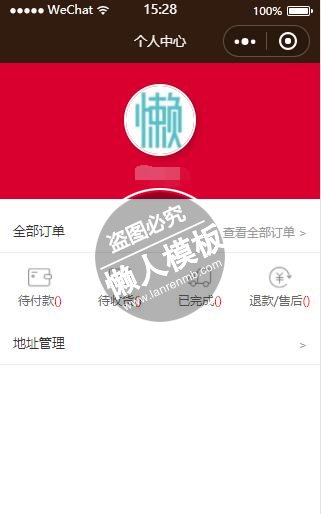
    <view class="qbdd mt10">
    <span class="font_14 c3">全部订单</span>
    <navigator class="fl_r c9 font_12 l_h20" url="../user/dingdan?currentTab=0" hover-class="none" >查看全部订单 ></navigator>
    </view>
    <view class="sc df tc bte ">
    <navigator class="df_1" url="../user/dingdan?currentTab=0" hover-class="none" >
        <view>
        <image src="/images/dfk.png"></image>
       </view>
        <text class="font_12">待付款<text style="color:red">({{orderInfo.PendingSum}})</text></text>
      </navigator>
      <navigator class="df_1" url="../user/dingdan?currentTab=2" hover-class="none" >
          <view><image src="/images/dpl.png"></image></view>
          <text class="font_12">待收货<text style="color:red">({{orderInfo.ReceiptSum}})</text></text>
      </navigator>

    <navigator class="df_1" url="../user/dingdan?currentTab=3" hover-class="none" >
          <view><image src="/images/dsh.png"></image></view>
          <text  class="font_12">已完成<text style="color:red">({{orderInfo.HasSum}})</text></text>
      </navigator>


    <navigator class="df_1" url="../user/dingdan?currentTab=4" hover-class="none" >
          <view><image src="/images/tksh.png"></image></view>
          <text class="font_12">退款/售后<text style="color:red">({{orderInfo.ReturnSum}})</text></text>
       </navigator>

    </view>

<view class="qbdd mt110">
 <navigator url="../address/user-address/user-address" >
    <span class="font_14 c3">地址管理</span>
    <span class="fl_r c9 font_12 l_h20" hover-class="none"> ></span>
    </navigator>
    </view>

</view>
|
/* pages/user/user.wxss */
.me{
  height: 100%;
}
.userinfo{
  position: relative;
  width: 750rpx;
  height: 320rpx;
  background: #d9002f;
  color: #fff;
  display: flex;
  flex-direction: column;
  align-items: center;
}
.userinfo-avatar {
  display: block;
  width: 160rpx;
  height: 160rpx;
  margin: 20rpx;
  margin-top: 50rpx;
  border-radius: 50%;
  border:2px solid #fff;
  box-shadow: 3px 3px 10px rgba(0,0,0,0.2);
}

.userinfo-nickname {
  color: #fff;
  font-size: 14px;
}

.sc{
  background: #fff;
  width: 100%;
  font-size: 12px;
  line-height: 16px;
  color: #666;
  padding: 4% 0;
}
.sc image{
  width: 24px;
  height: 24px;
  display: inline-block;
}
.bte{
  border-top: 1px solid #eee;
}
.qbdd{
  background: #fff;
  width: 92%;
  font-size: 12px;
  color: #666;
  padding: 4%;

}
.mt110{
  /*border-top: 1px solid #eee;*/
   border-bottom: 1px solid #eee
}
.page{
  /*background: #eee;*/
}
|
// pages/user/user.js
var app = getApp()
Page( {
  data: {
    userInfo: {},
    orderInfo:{},
    projectSource: 'https://github.com/liuxuanqiang/wechat-weapp-mall',
    userListInfo: [ {
        icon: '../../images/iconfont-dingdan.png',
        text: '我的订单',
        isunread: true,
        unreadNum: 2
      }, {
        icon: '../../images/iconfont-card.png',
        text: '我的代金券',
        isunread: false,
        unreadNum: 2
      }, {
        icon: '../../images/iconfont-icontuan.png',
        text: '我的拼团',
        isunread: true,
        unreadNum: 1
      }, {
        icon: '../../images/iconfont-shouhuodizhi.png',
        text: '收货地址管理'
      }, {
        icon: '../../images/iconfont-kefu.png',
        text: '联系客服'
      }, {
        icon: '../../images/iconfont-help.png',
        text: '常见问题'
      }],
       loadingText: '加载中...',
       loadingHidden: false,
  },onLoad: function () {
      var that = this
      //调用应用实例的方法获取全局数据
      app.getUserInfo(function(userInfo){
        //更新数据
        that.setData({
          userInfo:userInfo,
          loadingHidden: true
        })
      });

      this.loadOrderStatus();
  },
  onShow:function(){
    this.loadOrderStatus();
  },
  loadOrderStatus:function(){
    //用户的订单状态
    var that = this;
    console.log(this.data);
    wx.request({
      url: app.d.hostUrl + '/ztb/orderZBT/GetOrderSumZBT',
      method:'post',
      data: {
        userId:app.d.userId,
      },
      header: {
        'Content-Type':  'application/x-www-form-urlencoded'
      },
      success: function (res) {
        //--init data
        var data = res.data.data;
        console.log(data);
        that.setData({
          orderInfo:data[0],
        });

        //endInitData
      },
    });
  },

})
|
模板简介:该模板名称为【微信小程序企业版大红色用户个人中心设计制作开发教程】,大小是,文档格式为.,推荐使用打开,作品中的图片,文字等数据均可修改,图片请在作品中选中图片替换即可,文字修改直接点击文字修改即可,您也可以新增或修改作品中的内容,该模板来自用户分享,如有侵权行为请联系网站客服处理。欢迎来懒人模板【小程序教程】栏目查找您需要的精美模板。
.jpg)
.jpg)




