
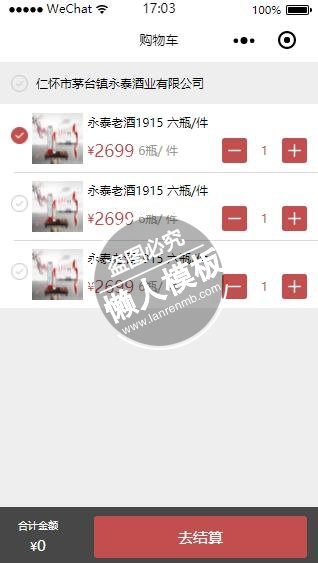
<!--pages/wineProcess/shopCart.wxml-->
<view class="container">
  <view calss="goodsGroup" wx:for="{{foodsgroup}}" wx:for-item="group"  wx:for-index="idx"  >
    <view class="goodsGroup_hd">
      <image class="image-icon" src="/assets/images/buy_cert_choose_off@2x.png"></image>
      <text class="">{{group.foctory_name}}</text>
    </view>
    <view class="goodsGroup_bd">
      <!--<checkbox-group bindchange="checkboxChange" style="width:100%;  overflow: hidden;">
        <label class="foodlist line-before-bottom" wx:for="{{group.foodlist}}" wx:key="{{index}}">
          <checkbox class="weui-check" value="{{index}}" checked="{{item.checked}}" />
          <view class="foodlist-hd">
            <image class="image-icon" src="/assets/images/buy_cert_choose_off@2x.png" wx:if="{{!item.checked}}"></image>
            <image class="image-icon" src="/assets/images/buy_cert_choose_on@2x.png" wx:if="{{item.checked}}"></image>
          </view>
          <view class="foodlist-bd">
            <image class="food-image" src="/assets/testimages/timg.jpg"></image>
            <view class="food-text">
              <text>{{item.food_name}}</text>
              <view class="text font-color-c24e4e"><view >¥<text class="font-size-20" style="margin-right:10rpx;">{{item.food_price}}</text><text class="font-color-999">{{item.food_norm}}</text></view><view class="font-color-c24e4e"><image class="image-icon1" src="/assets/images/Reduceinput@2x.png" style="margin-right:34rpx;"></image>{{item.food_num}}<image  class="image-icon1" src="/assets/images/Addinput@2x.png" style="margin-left:34rpx;"></image></view></view>
                        </view>
             </view>
         </label>
            </checkbox-group>-->
            <checkbox-group bindchange="checkboxChange" style="width:100%;  overflow: hidden;"  data-id="{{idx}}">
                <label class="foodlist weui-cell weui-check__label" wx:for="{{group.foodlist}}" wx:key="{{index}}">
                    <checkbox class="weui-check" value="{{index}}" checked="{{item.checked}}"/>

                    <view class="weui-cell__hd weui-check__hd_in-checkbox">
                         <image class="image-icon" src="/assets/images/buy_cert_choose_off@2x.png" wx:if="{{!item.checked}}"></image>
                         <image class="image-icon" src="/assets/images/buy_cert_choose_on@2x.png" wx:if="{{item.checked}}"></image>
                    </view>
                    <view class="foodlist-bd">
                       <image class="food-image" src="/assets/testimages/timg.jpg"></image>
            <view class="food-text">
              <text>{{item.food_name}}</text>
              <view class="text font-color-c24e4e"><view >¥<text class="font-size-20" style="margin-right:10rpx;">{{item.food_price}}</text><text class="font-color-999">{{item.food_norm}}</text></view><view class="font-color-c24e4e"><image class="image-icon1" src="/assets/images/Reduceinput@2x.png" style="margin-right:34rpx;"></image>{{item.food_num}}<image  class="image-icon1" src="/assets/images/Addinput@2x.png" style="margin-left:34rpx;"></image></view></view>
                        </view>
                    </view>
                </label>
            </checkbox-group>

       </view>
   </view>

</view>
<view class="fixed-ft but-group font-color-white">
   <view class="total"><text class="font-size-12">合计金额</text><text>¥<text class="font-size-18">0</text></text></view>
   <view class="but-box font-size-18" bindtap="addCart" style="margin-left:40rpx;" bindtap="goConOrder" >去结算</view>

</view>
|
/* pages/wineProcess/shopCart.wxss */
.goodsGroup_bd{
    background-color: #fff;
}
.goodsGroup_hd{
    padding: 0 30rpx;
    display: flex;
    align-items: center;
    flex-direction: row;
    height: 100rpx;
}
.goodsGroup_hd image{
    margin-right: 20rpx;
}
.image-icon{
     width: 40rpx;
    height: 40rpx;

}
.image-icon1{
    width: 60rpx;
    height: 60rpx;
}

.food-image{
    width: 120rpx;
    height: 120rpx;
}
.goodsGroup_bd{
    display: flex;
    flex-direction: row;
    width: 100%;
}
.foodlist{
    display: flex;
    flex-direction: row;
    align-items: center;
    height: 160rpx;
    padding:0 30rpx;
}
.foodlist .foodlist-hd{
    margin-right: 30rpx;
}
.foodlist .foodlist-bd{
    display: flex;
    flex: 1;
}
.food-image{
    margin-right: 10rpx;
}
.foodlist .food-text{
    display: flex;
    flex-direction:column;
    justify-content: space-between;
    flex: 1;
}
.foodlist .food-text .text{
     display: flex;
     flex-direction: row;
     justify-content: space-between;
}
.foodlist .food-text .text view{
     display: flex;
     align-items: center;
}
/*购物车*/
.but-group{
  background-color: rgba(0, 0, 0, 0.7);
  height: 140rpx;
  display: flex;
  flex-direction: row;
  align-items: center;
  padding: 0 30rpx 0 45rpx;
  justify-content: space-between;
}
.but-group .total{
  display: flex;
  flex-direction: column;
  justify-content: space-between;
  align-items: center;

}
.but-group .but-box{
  background-color: #c24e4e;
  width: 500rpx;
  height: 100rpx;
  display: flex;
  align-items:center;
  justify-content: center;
  border-radius: 8rpx;
}
|
// pages/wineProcess/shopCart.js
Page({
  data:{


  },
  onLoad:function(options){
    // 页面初始化 options为页面跳转所带来的参数
    this.setData({
      foodsgroup:[{
        foctory_id:1,
        foctory_name:'仁怀市茅台镇永泰酒业有限公司',
        foodlist:[{
           id:1,
           food_name:'永泰老酒1915 六瓶/件',
           food_price:2699,
           food_norm:'6瓶/ 件',
           food_num:1,
           checked: true
        },
        {
           id:2,
           food_name:'永泰老酒1915 六瓶/件',
           food_price:2699,
           food_norm:'6瓶/ 件',
           food_num:1
        },
        {
           id:3,
           food_name:'永泰老酒1915 六瓶/件',
           food_price:2699,
           food_norm:'6瓶/ 件',
           food_num:1
        }]

      },


      ]
    })
  },
  onReady:function(){
    // 页面渲染完成
  },
  onShow:function(){
    // 页面显示
  },
  onHide:function(){
    // 页面隐藏
  },
  onUnload:function(){
    // 页面关闭
  },
  checkboxChange: function (e) {
        console.log('checkbox发生change事件,携带value值为:', e.detail.value,e.currentTarget.dataset.id);
        let checkboxItems=this.data.foodsgroup, values = e.detail.value, idx=e.currentTarget.dataset.id;
        for (let i = 0, lenI = checkboxItems[idx].foodlist.length; i < lenI; ++i) {
            checkboxItems[idx].foodlist[i].checked = false;
            for (let j = 0, lenJ = values.length; j < lenJ; ++j) {
                if(i == values[j]){
                     checkboxItems[idx].foodlist[i].checked = true;
                    break;
                }
            }
        }

        this.setData({
            foodsgroup: checkboxItems
        });

    },
   goConOrder(){
     wx.navigateTo({
       url: 'confirmOrder'
     })
   }
})
|
模板简介:该模板名称为【微信小程序永泰酒业购物车结算页面设计制作开发教程】,大小是,文档格式为.,推荐使用打开,作品中的图片,文字等数据均可修改,图片请在作品中选中图片替换即可,文字修改直接点击文字修改即可,您也可以新增或修改作品中的内容,该模板来自用户分享,如有侵权行为请联系网站客服处理。欢迎来懒人模板【小程序教程】栏目查找您需要的精美模板。
.jpg)
.jpg)




