
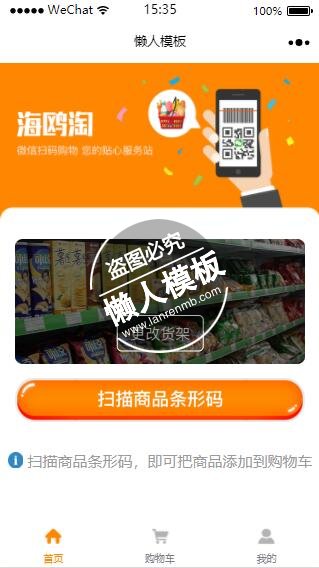
<!--index.wxml-->
<view class="container">

<!--mask-->
<view class="toast_mask" animation="{{count}}" wx:if="{{isShowToast}}"></view>
<!--以下为toast显示的内容-->
<view class="toast_content_box" wx:if="{{isShowToast}}">
  <view class="toast_content">
    <view class="toast_content_text">
      {{toastText}}
    </view>
  </view>
</view>
<image  class="indexbanner"  src="../../image/index.png"></image>
<image  wx:if="{{saoyisao}}"  class="huojia" bindtap="scanCode2" src="../../image/huojia.png"></image>
<image wx:else class="indexsao" bindtap="scanCode2" src="../../image/indexsao.png"></image>
<view class="Iname" wx:if="{{saoyisao}}">
{{name}}
</view>
<view wx:else  class="I">
   <image  class="" src="../../image/I.png"></image>
   先扫描货架二维码,才可以扫描商品条形码
</view>

<image wx:if="{{saoyisao}}"  class="indexsao" bindtap="scanCode3" src="../../image/saoyisao.png"></image>
  <image wx:else  class="indexsao" src="../../image/huisaoyisao.png"></image>
  <view class="I btn-area">
   <image  class=""  src="../../image/I.png"></image>
   扫描商品条形码,即可把商品添加到购物车
  </view>
</view>
|
/**index.wxss**/
.userinfo {
  display: flex;
  flex-direction: column;
  align-items: center;
}
.indexbanner{
float: left;
   width: 100vw;
   height: 48.66666vw;

}
.indexsao{
 margin-top:50px;
 width: 290.5px;
 height: 44.5px;
}
.I{ font-size: 36rpx;margin-top:20px; color: #9A9A9A; line-height: }
.I image{
  margin-top:10px;
  width: 15.5px;
  height: 15.5px;
}
.userinfo-avatar {
  width: 128rpx;
  height: 128rpx;
  margin: 20rpx;
  border-radius: 50%;
}

.userinfo-nickname {
  color: #aaa;
}

.usermotto {
  margin-top: 200px;
}

/*mask*/
.toast_mask {
  opacity: 0;
  width: 100%;
  height: 100%;
  overflow: hidden;
  position: fixed;
  top: 0;
  left: 0;
  z-index: 888;
}
/*toast*/
.toast_content_box {
  display: flex;
  width: 100%;
  height: 100%;
  justify-content: center;
  align-items: center;
  position: fixed;
  z-index: 999;
}
.toast_content {
  width: 50%;
  padding: 20rpx;
  background: rgba(0, 0, 0, 0.5);
  border-radius: 20rpx;
}
.toast_content_text {
  height: 100%;
  width: 100%;
  color: #fff;
  font-size: 28rpx;
  text-align: center;
}
.sys{
  justify-content: space-around;
}
.Iname{
  margin-top: -100px;
  margin-bottom: 64px;
  font-size: 48rpx;
  color: #fff;
}
.huojia{
width: 290.5px;
 height: 125px;
 margin-top:20px;
}
|
//index.js
//获取应用实例
const app = getApp()

Page({
  data: {
    motto: getApp().data.openId,
    toastText: '',
    userInfo: {},
    saoyisao: false,//控制显示
    name: '',//网点名字
    company: '',     //网点企业
    wd:'',
    hasUserInfo: false,
    isShowToast: false,
    canIUse: wx.canIUse('button.open-type.getUserInfo')
  },

  onShow() {
    // 登录
    wx.login({
      success: res => {
        var that = this
        var appid = 'wx6d0679b11da9a628'; //填写微信小程序appid
        var secret = '9fe4d75c618996538852cd0500c6ebe9'; //填写微信小程序secret
        //调用request请求api转换登录凭证
        wx.request({
          url: "https://erp.mod-softs.com/wxapi.php",
          header: {
            "Content-Type": "application/x-www-form-urlencoded"
          },
          method: "POST",
          data: { fun: "Openid", code: res.code },
          complete: function (res) {
            getApp().data.openId = res.data
          }
        })
        // 发送 res.code 到后台换取 openId, sessionKey, unionId
      }
    })
    var that = this
    if (that.data.wd!=''){
      //保存网点编码,全局变量

      wx.request({
        url: "https://erp.mod-softs.com/wxapi.php",
        header: {
          "Content-Type": "application/x-www-form-urlencoded"
        },
        method: "POST",
        data: { fun: "findCustomerByNo", customerNo: that.data.wd },
        complete: function (res) {
          if (res == null || res.data == null) {
            console.error('网络请求失败');
            that.setData({
              count: 1500,
              toastText: '网络请求失败',
              isShowToast: true
            });
            that.showToast();
            return;
          }
          if (res.data.success == 0) {
            return;
          }
          if (getApp().data.customerNo != res.data.customerNo) {
            getApp().data.carts = []
            getApp().data.hasList = false
          }
          getApp().data.customerNo = res.data.customerNo,
            getApp().data.cartsao = true;
          that.setData({
            name: res.data.name,
            company: res.data.company,
            saoyisao: true
          });
        }
      })
    }


  },
  showToast: function () {
    var _this = this;
    // toast时间
    _this.data.count = parseInt(_this.data.count) ? parseInt(_this.data.count) : 3000;
    // 显示toast
    _this.setData({
      isShowToast: true,
    });
    // 定时器关闭
    setTimeout(function () {
      _this.setData({
        isShowToast: false
      });
    }, _this.data.count);
  },
  scanCode2: function () {
    var that = this
    wx.showModal({
      title: '',
      content: '请扫描货架上方二维码',
      success: function (res) {
        if (res.confirm) {
          console.log('用户点击确定')
          wx.scanCode({
            success: function (res) {

              //保存网点编码,全局变量

              wx.request({
                url:"https://erp.mod-softs.com/wxapi.php",
                header: {
                  "Content-Type": "application/x-www-form-urlencoded"
                },
                method: "POST",
                data: { fun: "findCustomerByNo", customerNo: res.result },
                complete: function (res) {

                  if (res == null || res.data == null) {
                    console.error('网络请求失败');
                    that.setData({
                      count: 1500,
                      toastText: '网络请求失败',
                      isShowToast: true
                    });
                    that.showToast();
                    return;
                  }
                  if (res.data.success==0){
                    that.setData({
                      count: 1500,
                      toastText: '没有找到该网点',
                      isShowToast: true
                    });
                    that.showToast();
                    return;
                  }
                  if (getApp().data.customerNo != res.data.customerNo){
                    getApp().data.carts = []
                    getApp().data.hasList=false
                  }
                  getApp().data.customerNo = res.data.customerNo,
                  getApp().data.cartsao = true;
                  that.setData({
                    name: res.data.name,
                    company: res.data.company,
                    saoyisao: true
                  });
                }
              })
            },
            fail: function (res) {
            }
          })
        }
      }
    })
  },
  scanCode3: function () {
    var that = this
    wx.scanCode({
      success: function (res) {


        wx.request({
          url: "https://erp.mod-softs.com/wxapi.php",
          header: {
            "Content-Type": "application/x-www-form-urlencoded"
          },
          method: "POST",
          data: { fun: "findGoodsByNo", customerNo: getApp().data.customerNo, goodsNo: res.result },
          complete: function (res) {

            if (res == null || res.data == null) {
              console.error('网络请求失败');
              that.setData({
                count: 1500,
                toastText: '网络请求失败',
                isShowToast: true
              });
              that.showToast();
              return;
            }
            if (res.data.success == 0) {
              that.setData({
                count: 1500,
                toastText: '没有找到该商品',
                isShowToast: true
              });
              that.showToast();
              return;
            }
            getApp().data.goodsNo = res.data.goodsNo

            for (var i = 0; i < getApp().data.carts.length; i++) {
              if (getApp().data.carts[i].id == res.data.goodsNo){
                getApp().data.carts[i].num = getApp().data.carts[i].num+1;
                wx.showToast({
                  title: '已添加购物车',
                  icon: 'success',
                  duration: 2000
                })
                return;
              }
            }

            //保存商品编码,全局变量
            var newarray = [
              {
                id: res.data.goodsNo, title: res.data.name, image: res.data.img, num: 1, price: res.data.price, selected: true, customerNo: res.data.customerNo, goodsNo: res.data.goodsNo
              }
            ]
            getApp().data.carts = getApp().data.carts.concat(newarray);
            getApp().data.hasList = true
            wx.showToast({
              title: '已添加购物车',
              icon: 'success',
              duration: 2000
            })


          }
        })


      },
      fail: function (res) {
      }
    })


  },
    scanCode: function () {
    var that = this
    wx.showModal({
      title: '',
      content: '请扫描货架上方二维码',
      success: function (res) {
        if (res.confirm) {
          console.log('用户点击确定')
          wx.scanCode({
            success: function (res) {
              that.addCart();
              wx.showToast({
                title: '已添加购物车',
                icon: 'success',
                duration: 2000
              })
            },
            fail: function (res) {
            }
          })
        }
      }
    })


  },
  //事件处理函数
  bindViewTap: function() {
    wx.navigateTo({
      url: '../logs/logs'
    })
  },
  onLoad: function () {
    if (app.globalData.userInfo) {
      this.setData({
        userInfo: app.globalData.userInfo,
        hasUserInfo: true
      })
    } else if (this.data.canIUse){
      // 由于 getUserInfo 是网络请求,可能会在 Page.onLoad 之后才返回
      // 所以此处加入 callback 以防止这种情况
      app.userInfoReadyCallback = res => {
        this.setData({
          userInfo: res.userInfo,
          hasUserInfo: true
        })
      }
    } else {
      // 在没有 open-type=getUserInfo 版本的兼容处理
      wx.getUserInfo({
        success: res => {
          app.globalData.userInfo = res.userInfo
          this.setData({
            userInfo: res.userInfo,
            hasUserInfo: true
          })
        }
      })
    }
  },
  onLoad: function (options) {
    var that = this
    var wd = options['wd'];
    that.setData({
      wd: wd
    })

  },
  getUserInfo: function(e) {
    console.log(e)
    app.globalData.userInfo = e.detail.userInfo
    this.setData({
      userInfo: e.detail.userInfo,
      hasUserInfo: true
    })
  }
})
|
模板简介:该模板名称为【微信小程序海鸥淘商品扫码首页设计制作开发教程】,大小是,文档格式为.,推荐使用打开,作品中的图片,文字等数据均可修改,图片请在作品中选中图片替换即可,文字修改直接点击文字修改即可,您也可以新增或修改作品中的内容,该模板来自用户分享,如有侵权行为请联系网站客服处理。欢迎来懒人模板【小程序教程】栏目查找您需要的精美模板。
.jpg)
.jpg)




