
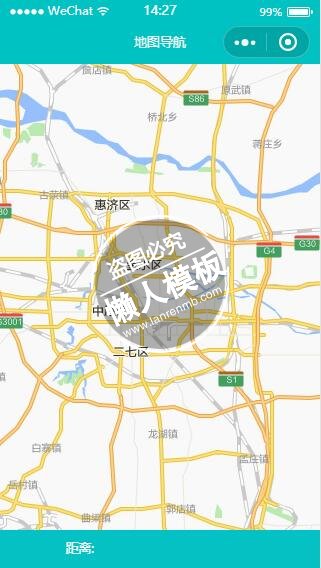
<view class="map_box">
    <map id="navi_map" longitude="113.681965" latitude="34.764026" scale="12" markers="{{markers}}" polyline="{{polyline}}"></map>
</view>

<view class="text_box">
    <view class="text">距离: {{distance}}</view>
    <view class="text">{{cost && ('花费: '+cost)}}</view>
</view>
|
.flex-style{
    display: -webkit-box;
    display: -webkit-flex;
    display: flex;
}
.flex-item{
    height: 35px;
    line-height: 35px;
    text-align: center;
    -webkit-box-flex: 1;
    -webkit-flex: 1;
    flex: 1
}
.flex-item.active{
    color:#0091ff;
}
.map_box{
    position:absolute;
    top: 0;
    bottom: 90rpx;
    left: 0px;
    right: 0px;
}
#navi_map{
    width: 100%;
    height: 100%;
}
.text_box{
    position:absolute;
    height: 90rpx;
    bottom: 0px;
    left: 0px;
    right: 0px;
    display: flex;
    background-color: #04C1C3;
    flex-direction: row;
    color: #fff;
}
.text_box .text{
    margin: 20rpx;text-align: center;
    flex: 1;
}
|
//获取应用实例
//logs.js
import amapFile from "../../vendor/assets/plugins/amap-wx.js";
import config from "../../etc/config";
var app = getApp();
Page({
    data: {
        markers: [{
            iconPath: "../../vendor/assets/images/pos.png",
            id: 0,
            latitude: null,
            longitude: null,
            width: 23,
            height: 23
        },{
            iconPath: "../../vendor/assets/images/pos_m.png",
            id: 0,
            latitude: null,
            longitude: null,
            width: 24,
            height: 24
        }],
        distance: '',
        cost: '',
        polyline: []
    },
    onLoad: function(opt) {
        console.log("pos",opt.pos)
        var that = this;
        let pos=opt.pos.split(",");
        let latitude=pos[0],longitude=pos[1];
        let olatitude=opt.mylat,olongitude=opt.mylong;
        if(latitude && olatitude && longitude && olongitude){
            that.setData({
                "markers[0].latitude": Number(olatitude),
                "markers[0].longitude": Number(olongitude),
                "markers[1].latitude": Number(latitude),
                "markers[1].longitude": Number(longitude)
            });
        }
        var myAmapFun = new amapFile.AMapWX({key: config.service.gdKey});
        myAmapFun.getDrivingRoute({
            origin: olongitude+","+olatitude,
            destination: longitude+","+latitude,
            success: function(data){
                var points = [];
                if(data.paths && data.paths[0] && data.paths[0].steps){
                    var steps = data.paths[0].steps;
                    for(var i = 0; i < steps.length; i++){
                        var poLen = steps[i].polyline.split(';');
                        for(var j = 0;j < poLen.length; j++){
                            points.push({
                                longitude: parseFloat(poLen[j].split(',')[0]),
                                latitude: parseFloat(poLen[j].split(',')[1])
                            })
                        }
                    }
                }
                that.setData({
                    polyline: [{
                        points: points,
                        color: "#0091ff",
                        width: 6
                    }]
                });
                if(data.paths[0] && data.paths[0].distance){
                    that.setData({
                        distance: data.paths[0].distance + '米'
                    });
                }
                if(data.taxi_cost){
                    that.setData({
                        cost: '打车约' + parseInt(data.taxi_cost) + '元'
                    });
                }

            },
            fail: function(info){

            }
        })
    },

})
|
模板简介:该模板名称为【微信小程序绿色风格汽车详细地图导航设计制作开发教程】,大小是,文档格式为.,推荐使用打开,作品中的图片,文字等数据均可修改,图片请在作品中选中图片替换即可,文字修改直接点击文字修改即可,您也可以新增或修改作品中的内容,该模板来自用户分享,如有侵权行为请联系网站客服处理。欢迎来懒人模板【小程序教程】栏目查找您需要的精美模板。
.jpg)
.jpg)




