
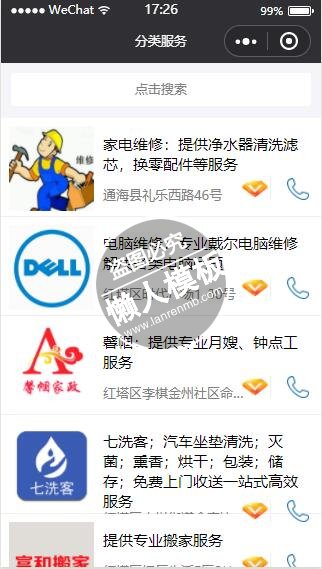
<!--pages/shenghuo/AllServiceclassify/ServiceCategoryList/ServiceCategoryList.wxml-->
<!--<text>pages/shenghuo/AllServiceclassify/ServiceCategoryList/ServiceCategoryList.wxml</text>-->

<import src="ServiceCategoryListCell/ServiceCategoryListCell.wxml" />

<view class="serviceCategoryList-container">
  <view class="search-bg1"></view>
  <view class="search-box">
    <view class="search-icon">
      <input class="input" placeholder="点击搜索" />
    </view>
  </view>

  <block wx:for="{{list}}" wx:for-item="item" wx:for-index="index" wx:key="key">
    <template is="ServiceCategoryListCell" data="{{...item,index}}"></template>
  </block>

</view>
|
/* pages/shenghuo/AllServiceclassify/ServiceCategoryList/ServiceCategoryList.wxss */

@import "ServiceCategoryListCell/ServiceCategoryListCell.wxss";

.serviceCategoryList-container {
  display: flex;
  flex-direction: column;
  height: 100%;
  width: 100%;
}

.search-bg1 {
  height: 55px;
  position: relative;
  top: 0px;
  z-index: 1;
  background-color: #f5f5f9;
}

.search-box {
  height: 33px;
  position: absolute;
  width: 94%;
  z-index: 2;
  top: 10px;
  margin: 0 3% 0 3%;
  background-color: white;
  display: -webkit-flex;
  display: flex;
  font-size: 13px;
  border-radius: 3px;
}

.search-icon {
  display: flex;
  width: 100%;
  flex: 1;
  align-items: center;
  justify-content: center;
}

.input {
  width: 100%;
  text-align: center;
}
|
// pages/shenghuo/AllServiceclassify/ServiceCategoryList/ServiceCategoryList.js

const config = require('../../../../config')
var util = require('../../../../utils/util.js')

Page({

  /**
   * 页面的初始数据
   */
  data: {
    list: []
  },
  /** 点击cell拨打电话 */
  tapServiceCategoryListCellCall: function(e) {
    var phoneNum = e.currentTarget.dataset.phoneNum;
    wx.makePhoneCall({
      phoneNumber: phoneNum,
    })

  },
  /**点击cell*/
  tapServiceCategoryListCell: function(e){

    var that = this;
    var id = e.currentTarget.dataset.id;

    let url = '../ServiceDetailInfo/ServiceDetailInfo?id=' + id;
    wx.navigateTo({
      url: url,
    })


  },
  /**
   * 生命周期函数--监听页面加载
   */
  onLoad: function (options) {

    var CategoryId = options.CategoryId;

    //网络请求
    var that = this

    console.log(options.index)

    let url = config.ServiceSearchListUrl
    let para = {
      "pageNum": 1,
      "pageSize": 20,
      "position": {},
      "serviceSecondCategoryId": CategoryId,
      "serviceAreaName": "云南省 玉溪市"
    }

    util.RequestManager(url, para, function (res, fail) {
      console.log(res)
      that.setData({ list: res.data.dataList })
    })
  },


  /**
   * 生命周期函数--监听页面初次渲染完成
   */
  onReady: function () {

  },

  /**
   * 生命周期函数--监听页面显示
   */
  onShow: function () {

  },

  /**
   * 生命周期函数--监听页面隐藏
   */
  onHide: function () {

  },

  /**
   * 生命周期函数--监听页面卸载
   */
  onUnload: function () {

  },

  /**
   * 页面相关事件处理函数--监听用户下拉动作
   */
  onPullDownRefresh: function () {

  },

  /**
   * 页面上拉触底事件的处理函数
   */
  onReachBottom: function () {

  },

  /**
   * 用户点击右上角分享
   */
  onShareAppMessage: function () {

  }
})
|
模板简介:该模板名称为【微信小程序带搜索功能的分类服务图文列表页设计制作开发教程】,大小是,文档格式为.,推荐使用打开,作品中的图片,文字等数据均可修改,图片请在作品中选中图片替换即可,文字修改直接点击文字修改即可,您也可以新增或修改作品中的内容,该模板来自用户分享,如有侵权行为请联系网站客服处理。欢迎来懒人模板【小程序教程】栏目查找您需要的精美模板。
.jpg)
.jpg)




