
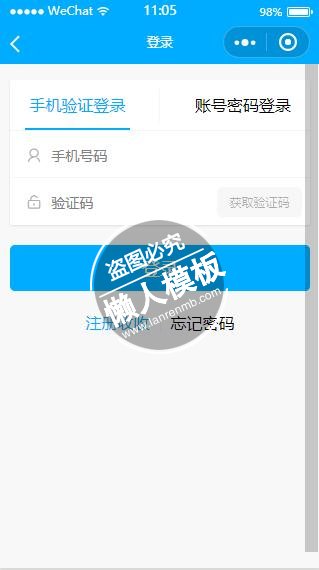
<!--pages/account/login.wxml-->
<view class="tool-tip " wx:if="{{popMsg}}">
    <text class="{{popType}}">{{popMsg}}</text>
</view>
<form bindsubmit="loginSubmit">
    <view class="list card margin-top">

        <view class="header row row-horizontal-around row-no-padding">
            <view class="col-35 header-tab {{currentTab==0 ? 'on' : ''}}" data-current="0" bindtap="swichNav">
                手机验证登录
            </view>

            <text class="border-r"></text>
            <view class="col-35 header-tab {{currentTab==1 ? 'on' : ''}}" data-current="1" bindtap="swichNav">
                账号密码登录
            </view>
        </view>
        <!-- 手机验证登录 -->
        <view wx:if="{{currentTab==0}}">
            <view class="item item-input">
                <text class=" iconfont icon-my placeholder-icon"></text>
                <input type="number" bindinput="bindChange" id="user" name="user" maxlength="11" placeholder="手机号码"
                       />
            </view>

            <view class="item item-input">
                <text class=" iconfont  icon-unlock placeholder-icon"></text>
                <input type="number" bindinput="bindChange" id="verifycode" name="verifycode" placeholder="验证码"/>
                <button bindtap="getVerifyCode" disabled="{{vcdisabled}}"
                        class="positive-bg light verify-code col-30 button-small" hover-class="button-hover">
                    {{paracont}}
                </button>
            </view>
        </view>

        <!-- 账号密码登录 -->
        <view wx:if="{{currentTab==1}}">
            <view class="item item-input">
                <text class=" iconfont icon-my placeholder-icon"></text>
                <input type="number" bindinput="bindChange" id="account" maxlength="11" name="account"
                       placeholder="手机号码"
                       />
            </view>

            <view class="item item-input">
                <text class=" iconfont  icon-lock placeholder-icon"></text>
                <input type="text" bindinput="bindChange" password="true" id="password" maxlength="18" name="password"
                       placeholder="密码"/>
            </view>
        </view>


    </view>

    <view class="padding-horizontal">
        <button formType="submit" hover-class="button-hover" class="positive-bg light ">登录</button>
    </view>
    <view class="row row-horizontal-center  margin-top">
        <navigator url="register" open-type="navigate" hover-class="none"
                   class="col-30 positive text-right padding-right  border-r">注册收收
        </navigator>
        <navigator url="findpassword" open-type="navigate" hover-class="none" class="col-30 padding-left">忘记密码
        </navigator>
    </view>
</form>
|
/* pages/account/login.wxss */
.header {
    border-bottom: 2px solid rgba(221, 221, 221, 0.3)
}

.header-tab {
    font-size: 1rem;
    text-align: center;
    background-color: #fff;
    padding: 0.8rem 0.2rem;
}

.header .border-r {
    margin: 0.5rem 0;
}
|
// pages/account/login.js
//获取应用实例
var app = getApp();
var util = require('../../utils/util.js');
import WxValidate from '../../utils/validate';

var inputContent = {};//输入内容
Page({

    /**
     * 页面的初始数据
     */
    data: {
        currentTab: 0,   // tab切换
        paracont: "获取验证码",//验证码文字
        vcdisabled: true,//验证码按钮状态
        verifycode: ""//返回的验证码
    },

    /**
     * 生命周期函数--监听页面加载
     */
    onLoad: function (options) {
        // 页面初始化 options为页面跳转所带来的参数

        //删除记住用户信息
        wx.removeStorageSync("userid");
        wx.removeStorageSync("usersecret");
        wx.removeStorageSync("user");
        wx.removeStorageSync("token");
        wx.removeStorageSync("expires_in");
        //接口API授权 type 1.是公共授权  2.登录授权
        util.authorization(1, function () {
            //微信授权登录
            util.wxLogin();
        })

    },

    /**
     * 生命周期函数--监听页面初次渲染完成
     */
    onReady: function () {

    },

    /**
     * 生命周期函数--监听页面显示
     */
    onShow: function () {

    },

    /**
     * 生命周期函数--监听页面隐藏
     */
    onHide: function () {

    },

    /**
     * 生命周期函数--监听页面卸载
     */
    onUnload: function () {

    },

    /**
     * 页面相关事件处理函数--监听用户下拉动作
     */
    onPullDownRefresh: function () {

    },

    /**
     * 页面上拉触底事件的处理函数
     */
    onReachBottom: function () {

    },

    /**
     * 用户点击右上角分享
     */
    onShareAppMessage: function () {

    },
    /**
     * 获取用户输入
     */
    bindChange: function (e) {
        inputContent[e.currentTarget.id] = e.detail.value;
        util.verifyCodeBtn(e, this);
    },
    /**
     * 获取验证码
     */
    getVerifyCode: function (e) {
        var that = this;
        util.getVerifyCode(inputContent['user'], this, function (data) {
            that.setData({
                verifycode: data.data
            })
        })

    },
    /**
     * 登录提交
     */
    loginSubmit: function (e) {
        var that = this;
        if (that.data.currentTab == 0) {
            //验证表单
            that.WxValidate = new WxValidate({
                    user: {  //验证规则 input name值
                        required: true,
                        tel: true
                    }
                },
                {
                    user: { //提示信息
                        required: "请填写真实手机号码",
                    }
                })

        } else if (that.data.currentTab == 1) {
            //验证表单
            that.WxValidate = new WxValidate({
                    account: {  //验证规则 input name值
                        required: true,
                        tel: true
                    },
                    password: {
                        required: true,
                        minlength: 6
                    },
                },
                {
                    account: { //提示信息
                        required: "请填写真实手机号码",
                    },
                    password: { //提示信息
                        required: "请填写密码",
                        minlength: "密码至少输入6个字符"
                    }
                })

        }

        util.wxValidate(e, that, function () {
            /*     console.log(wx.getSystemInfoSync().platform);*/
            //用户手机登录
            if (that.data.currentTab == 0) {
                if (that.data.verifycode != inputContent.verifycode) {
                    util.toolTip(that,"验证码输入不正确")
                    return;
                }
                util.https(app.globalData.api + "/api/user/login_mobile", "POST", {
                        mobile: inputContent.user,
                        code: inputContent.verifycode,
                        client: 0,
                        openID: wx.getStorageSync("openid"),
                        invitecode: ""
                    },
                    function (data) {
                        if(data.code==1001){
                            that.loginSucess(data);
                        }else {
                            util.toolTip(that,data.message)
                        }


                    }
                )
            } else if (that.data.currentTab == 1) { //用户名密码登录
                util.https(app.globalData.api + "/api/user/login", "POST", {
                        account: inputContent.account,
                        password: inputContent.password,
                        client: 0,
                        openID: wx.getStorageSync("openid"),
                        invitecode: ""
                    },
                    function (data) {
                        if(data.code==1001){
                            that.loginSucess(data);
                        }else {
                            util.toolTip(that,data.message)
                        }

                    }
                )
            }

        });

    },
    /**
     * 登录成功后
     */
    loginSucess: function (data) {
        wx.setStorageSync("userid", data.data.userid);
        wx.setStorageSync("usersecret", data.data.usersecret);
        //接口API授权 type 1.是公共授权  2.登录授权
        util.authorization(2, function () {
            //根据会员ID获取会员账号基本信息
            util.getUserInfo(function (data) {
                //返回上一页
        /*        wx.navigateBack({
                    delta: 1
                })*/
                wx.reLaunch({
                    url: '../index/index'
                })

            })
        },true);


    },
    /**
     * 点击tab切换
     */
    swichNav: function (e) {
        util.swichNav(e, this)
    }
})
|
模板简介:该模板名称为【微信小程序蓝色两种方法登陆页面设计制作开发教程】,大小是,文档格式为.,推荐使用打开,作品中的图片,文字等数据均可修改,图片请在作品中选中图片替换即可,文字修改直接点击文字修改即可,您也可以新增或修改作品中的内容,该模板来自用户分享,如有侵权行为请联系网站客服处理。欢迎来懒人模板【小程序教程】栏目查找您需要的精美模板。
.jpg)
.jpg)




