
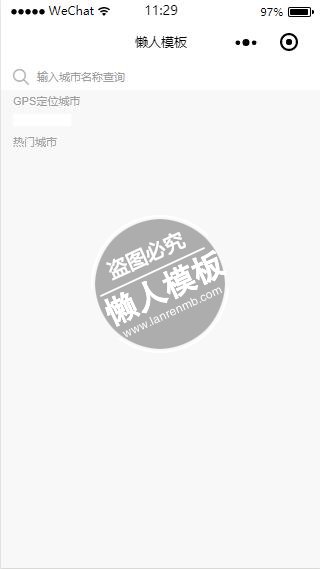
<!--pages/location/select-city/select-city.wxml-->
<view class="container">
  <view class="page-session page-session-spacing">
    <view class="search-session">
      <icon type="search" size="16"></icon>
      <block wx:if="{{!searching}}">
        <text class="search-holder" bindtap="bindSearch">输入城市名称查询</text>
      </block>
      <block wx:elif="{{searching}}">
        <input class="search-input" placeholder-class="search-placeholder" value="" placeholder="输入城市名称查询" focus="true" bindinput="handleInput" bindconfirm="handleConfirm" bindblur="handleBlur" />
        <text class="cancel" bindtap="handleCancel">取消</text>
      </block>
    </view>
  </view>
  <block wx:if="{{searching}}">
    <view class="select-city-body {{searching ? 'select-city-body-cover' :'select-city-body-hidden'}}" catchtap="handleCancel">
    </view>
    <block wx:if="{{searchLetterList.length > 0}}">
      <view class="city-list-wrapper">
        <view class="city-list ">
          <block wx:for="{{searchLetterList}}" wx:for-item="letter">
            <text class="list-title">{{letter}}</text>
            <view class="list-content">
              <block wx:for="{{searchCityList[letter]}}" wx:for-item="city">
                <text class="city-block" data-id="{{city.id}}" data-name="{{city.name}}" data-uid="{{city.uid}}" bindtap="bindCityTap">{{city.name}}</text>
              </block>
            </view>
          </block>
        </view>
      </view>
    </block>
    <block wx:if="{{showSearchNone}}">
      <view class="search-none">这里是空哒~</view>
    </block>
  </block>
  <text class="gps-title">GPS定位城市</text>
  <view class="gps-city-content">
    <text class="gps-loc" data-id="{{gpsCity.id}}" data-name="{{gpsCity.name}}" data-uid="{{gpsCity.uid}}" bindtap="bindCityTap">{{gpsCity.name}}</text>
  </view>
  <text class="hot-city-title">热门城市</text>
  <view class="hot-city">
    <view class="hot-city-content">
      <block wx:for="{{hotCity}}" wx:for-item="city">
        <text class="city-box" data-id="{{city.id}}" data-name="{{city.name}}" data-uid="{{city.uid}}" bindtap="bindCityTap">{{city.name}}</text>
      </block>
    </view>
  </view>
  <view class="city-list">
    <block wx:for="{{letterList}}" wx:for-item="letter">
      <text class="list-title">{{letter}}</text>
      <view class="list-content">
        <block wx:for="{{cityList[letter]}}" wx:for-item="city">
          <text class="city-block" data-id="{{city.id}}" data-name="{{city.name}}" data-uid="{{city.uid}}" bindtap="bindCityTap">{{city.name}}</text>
        </block>
      </view>
    </block>
  </view>
</view>
|
/* pages/location/select-city/select-city.wxss */

.page-session {
  width: 100%;
  white-space: nowrap;
  border-width: 0px 0px 0px 0px;
  border-style: solid;
  border-color: #e6e6e6;
  background: #fff;
}

.page-session-spacing {
  padding-bottom: 0rpx;
  margin-bottom: 0rpx;
}

.search-session {
  display: flex;
  flex-direction: row;
  align-items: center;
  align-self: center;
  padding: 12rpx 30rpx 12rpx 30rpx;
  box-sizing: border-box;
}

.search-session .search-holder {
  flex: 1;
  color: #9e9e9e;
  font-size: 28rpx;
  font-weight: 500;
  margin-left: 20rpx;
}

.search-session .search-input {
  flex: 1;
  color: #4a4a4a;
  font-weight: 500;
  font-size: 28rpx;
  margin-left: 20rpx;
}

.search-session .cancel {
  font-size: 28rpx;
  margin-left: 20rpx;
  padding: 6rpx 8rpx 6rpx 8rpx;
}

.select-city-body {
  width: 100%;
  background: #ccc;
  top: 86rpx;
  position: fixed;
  opacity: 0.3;
  z-index: 1;
}

.select-city-body-hidden {
  height: -2rpx;
}

.select-city-body-cover {
  height: 9999rpx;
}

.city-list-wrapper {
  position: fixed;
  top: 86rpx;
  background: #f8f8f8;
  width: 100%;
  height: 100%;
  opacity: 1;
  flex-grow: 1;
  z-index: 2;
}

.search-none {
  position: fixed;
  color: #4a4a4a;
  padding-top: 20rpx;
  font-size: 28rpx;
  top: 80rpx;
  background: #fff;
  width: 100%;
  height: 100%;
  text-align: center;
  opacity: 1;
  flex-grow: 1;
  z-index: 2;
}

.hot-city-content, .list-content {
  display: flex;
  flex-direction: column;
  padding: 0rpx 30rpx 0rpx 30rpx;
}

.list-content {
  background: #fff;
}

.gps-city-content {
  padding: 0rpx 30rpx 0rpx 30rpx;
}

.gps-title, .hot-city-title, .list-title {
  width: 100%;
  padding-left: 30rpx;
  padding-right: 30rpx;
  color: #9e9e9e;
  font-size: 26rpx;
  height: 56rpx;
  line-height: 56rpx;
}

.gps-loc, .city-box {
  display: inline-block;
  color: #4a4a4a;
  padding: 16rpx 70rpx 16rpx 70rpx;
  font-size: 28rpx;
  background: #fff;
}

.city-box {
  margin-bottom: 30rpx;
}

.hot-city-content {
  display: flex;
  flex-direction: row;
  align-items: center;
  justify-content: space-between;
  flex-wrap: wrap;
  margin-bottom: -30rpx;
}

.list-title {
  color: #9e9e9e;
  font-size: 26rpx;
}

.list-content {
  border-width: 1px 0px 1px 0px;
  border-style: solid;
  border-color: #e6e6e6;
}

.city-block {
  width: 100%;
  padding: 16rpx 0rpx 16rpx 0rpx;
  color: #4a4a4a;
  font-size: 28rpx;
  font-weight: 500;
  border-bottom: 1px solid #e6e6e6;
}

.city-block:last-child {
  border: 0px solid #e6e6e6;
}
|
// pages/location/select-city/select-city.js
var app = getApp();
Page({
  data: {
    searching: false,
    showSearchNone: false,
    gpsCity: {},
    locs: [],
    searchLocs: undefined,
    city: undefined,
    hotCityUid: ["beijing", "shanghai", "guangzhou", "shenzhen", "chengdu", "nanjing", "wuhan", "hangzhou", "chongqing"],
    hotCity: [],
    letterList: [],
    cityList: {}
  },
  onLoad: function (options) {
    // 页面初始化 options为页面跳转所带来的参数
    var id = options.id;
    var uid = options.uid;
    var name = options.name;
    var gpsCity = {
      "id": id,
      "uid": uid,
      "name": name
    }
    var city = app.globalData.city;
    var locs = app.globalData.locs;
    this.setData({
      locs: locs, gpsCity: gpsCity
    });
    this.processCityListData(locs);
  },
  onReady: function () {
    // 页面渲染完成
  },
  onShow: function () {
    // 页面显示
  },
  onHide: function () {
    // 页面隐藏
  },
  onUnload: function () {
    // 页面关闭
  },
  /** 搜索城市 */
  bindSearch: function (event) {
    this.setData({ "searching": true });
  },
  /** 处理城市信息 */
  processCityListData: function (locs) {
    if (locs && typeof locs == "object") {
      // 提取热门城市
      var hotCity = this.data.hotCityUid.map(function (item, index, input) {
        return locs[item];
      });

      // 按字母顺序排序
      var keys = Object.keys(locs);
      keys.sort();
      // 提取所有城市并按首字母归类
      var cityList = {};
      var letterList = [];
      for (let idx in keys) {
        var key = keys[idx];
        var letter = key.substring(0, 1);
        var city = locs[key];
        if (!cityList[letter]) {
          cityList[letter] = [];
          letterList.push(letter);
        }
        cityList[letter].push(city);
      }
      console.log("cityList: " + cityList);
      this.setData({
        "hotCity": hotCity, "letterList": letterList, "cityList": cityList
      });
    }
  },
  /** 选择城市 */
  bindCityTap: function (event) {
    var locId = event.currentTarget.dataset.id;
    var city = event.currentTarget.dataset.name;
    var cityUid = event.currentTarget.dataset.uid;
    var currentLoc = {
      "id": locId, "name": city, "uid": cityUid
    };
    wx.navigateBack({
      delta: 1, // 回退前 delta(默认为1) 页面
      success: function (res) {
        app.globalData.reflesh = true;
        app.globalData.locId = locId;
        app.globalData.city = city;
        app.globalData.cityUid = cityUid;
        app.globalData.currentLoc = currentLoc;
      }
    });
  },
  /** 点击完成按钮是触发 */
  handleConfirm: function (event) {
    console.log("handleConfirm");
  },
  /** 搜索框失去焦点是触发 */
  handleBlur: function (event) {
    console.log("bindblur");
  },
  /** 取消搜索 */
  handleCancel: function (event) {
    this.setData({
      "searching": false
    });
  },
  handleInput: function (event) {
    var value = event.detail.value;
    console.log("value: " + value);
    var searchLocs = {};
    var searchCityList = {};
    var searchLetterList = [];
    var readyData = { "searchLocs": searchLocs, "searchCityList": searchCityList, "searchLetterList": searchLetterList, "showSearchNone": false };
    if (value == "") {
      this.setData(readyData);
      return;
    }

    var locKeys = Object.keys(this.data.locs);
    for (let idx in locKeys) {
      var key = locKeys[idx];
      if (key.indexOf(value) != -1) {
        searchLocs[key] = this.data.locs[key];
      } else if (this.data.locs[key].name.indexOf(value) != -1) {
        (searchLocs[key] = this.data.locs[key])
      }
    }

    // 按字母顺序排序
    var keys = Object.keys(searchLocs);

    var keyLength = keys.length;

    if (keyLength == 0) {
      readyData["showSearchNone"] = true;
      this.setData(readyData);
      return;
    }

    keys.sort();
    // 提取所有城市并按首字母归类
    for (let idx in keys) {
      var key = keys[idx];
      var letter = key.substring(0, 1);
      var city = searchLocs[key];
      if (!searchCityList[letter]) {
        searchCityList[letter] = [];
        searchLetterList.push(letter);
      }
      searchCityList[letter].push(city);
    }

    readyData["searchLocs"] = searchLocs;
    readyData["searchCityList"] = searchCityList;
    readyData["searchLetterList"] = searchLetterList;
    this.setData(readyData);
  }
})
|
模板简介:该模板名称为【微信小程序输入城市名称gps定位查询页设计制作开发教程】,大小是,文档格式为.,推荐使用打开,作品中的图片,文字等数据均可修改,图片请在作品中选中图片替换即可,文字修改直接点击文字修改即可,您也可以新增或修改作品中的内容,该模板来自用户分享,如有侵权行为请联系网站客服处理。欢迎来懒人模板【小程序教程】栏目查找您需要的精美模板。
.jpg)
.jpg)




