
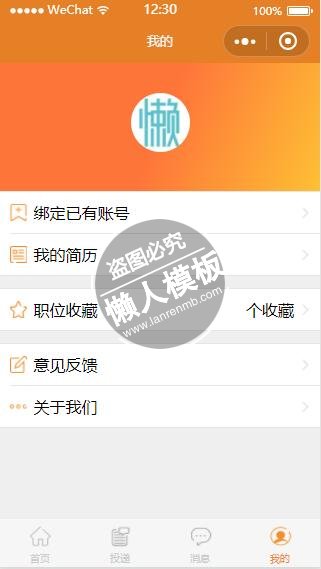
<!--pages/mycenter/mycenter.wxml-->
<view class="wrap">
    <!--用户登录-->
    <view class="user_logon">
        <view  bindtap="bindViewTap" class="userinfo">
            <image bindtap="change_avatarUrl_" class="userinfo-avatar" src="{{userInfo.avatarUrl || avatar}}" background-size="cover"></image>
            <text class="userinfo-nickname">{{user_name}}</text>
        </view>
    </view>
    <view class="list_box">
        <view class="top">
            <!--绑定现有最佳东方账号-->
                <navigator wx:if="{{showBading}}" url="../logs/logs">
                    <view  class="first">
                        <view class="my_resume left">
                            <image src="image/dingyue_03.png"></image>
                            绑定已有账号
                        </view>
                        <view class="right">
                            <image src="image/jiantou_tou.png"></image>
                        </view>
                    </view>
                </navigator>
            <!--我的简历-->
            <navigator url="../myresume/myresume">
                <view class="first" style="border-bottom:none">
                    <view class="my_resume left">
                        <image src="image/jianli_01.png"></image>
                        我的简历
                    </view>
                    <view class="right">
                        <image src="image/jiantou_tou.png"></image>
                    </view>
                </view>
            </navigator>
            <!--刷新简历-->
            <!--<view class="second">
                <image class="image1" src="image/shuaxin_02.png"></image>
                刷新简历
            </view>-->
        </view>
        <view class="middle">
            <!--职位订阅-->
            <!--<view class="dingyue">
                <view class="left">
                    <image class="image1" src="image/dingyue_03.png"></image>
                    职位订阅
                </view>
                <view class="right">
                    <image class="image2" src="image/jiantou_tou.png"></image>
                </view>
            </view>-->
            <!--职位收藏-->
            <navigator url="../collect/collect">
                <view bindtap="collect" class="dingyue" style="border-bottom:none">
                    <view class="left">
                        <image class="image1" src="image/shouchang_04.png"></image>
                        职位收藏
                    </view>
                    <view class="right">{{favorited_num}}个收藏
                        <image class="image2" src="image/jiantou_tou.png"></image>
                    </view>
                </view>
            </navigator>
            <!--我的关注-->
            <!--<view class="dingyue">
                <view class="left">
                    <image class="image1" src="image/guanzhu_05.png"></image>
                    我的关注
                </view>
                <view class="right">
                    <image class="image2" src="image/jiantou_tou.png"></image>
                </view>
            </view>-->
            <!--屏蔽的企业-->
            <!--<view class="dingyue">
                <view class="left" style="color:red;">
                    <image class="image1" src="image/pingbi_06.png"></image>
                    屏蔽的企业
                </view>
                <view class="right">
                    <image class="image2" src="image/jiantou_tou.png"></image>
                </view>
            </view>-->
            <!--个人增值服务-->
            <!--<view class="dingyue none_bottom" style="border-bottom:none;">
                <view class="left">
                    <image class="image1" src="image/zenzhi_07.png"></image>
                    个人增值服务
                </view>
                <view class="right">
                    <image class="image2" src="image/jiantou_tou.png"></image>
                </view>
            </view>-->
        </view>

        <view class="middle bottom">
            <!--设置-->
            <!--<navigator url="../seeting/seeting">
                <view class="dingyue none_bottom">
                    <view class="left">
                        <image class="image1" src="image/shezhi_08.png"></image>
                        设置
                    </view>
                    <view class="right">
                        <image class="image2" src="image/jiantou_tou.png"></image>
                    </view>
                </view>
            </navigator>-->
             <!--意见反馈-->
             <navigator url="../opinion/opinion">
                <view class="dingyue none_bottom" >
                    <view class="left">
                        <image class="image1" src="image/yijina_09.png"></image>
                        意见反馈
                    </view>
                    <view class="right">
                        <image class="image2" src="image/jiantou_tou.png"></image>
                    </view>
                </view>
             </navigator>
             <!--关于我们-->
            <navigator url="../aboutous/aboutous">
                <view class="dingyue none_bottom" style="border-bottom:none">
                    <view class="left">
                        <image class="image1" src="image/more_10.png"></image>
                        关于我们
                    </view>
                    <view class="right">
                        <image class="image2" src="image/jiantou_tou.png"></image>
                    </view>
                </view>
            </navigator>
            <!--更多-->
            <!--<view bindtap="more" class="dingyue none_bottom"  style="border-bottom:none;">
                <view class="left">
                    <image class="image1" src="image/more_10.png"></image>
                    更多
                </view>
                <view class="right">
                    <image class="image2" src="image/jiantou_tou.png"></image>
                </view>
            </view>-->
        </view>
    </view>
</view>
|
/* pages/mycenter/mycenter.wxss */
page{
    background-color: #efefef;
}
.image2{
    width: 30rpx;
    height: 30rpx;
}
.image1{
    width: 40rpx;
    height: 40rpx;
    padding-right: 18rpx;
}

.userinfo-avatar {
    width: 140rpx;
    height: 140rpx;
    border-radius: 50%;
}
.userinfo{
    width: 100%;
    text-align: center;
}
.userinfo-nickname{
    display: block;
    color: #fff;
    padding-top: 15rpx;
}

.user_logon{
    background: -webkit-linear-gradient(left top,#fe753a 50% ,#fec034 );
    height: 300rpx;
    display: flex;
    align-items: center;
    text-align: center;
}
.user_logon navigator{
    margin:  auto;
}
.user_logon button{
    width: 340rpx;
    color: #f28f2d;
    background: -webkit-linear-gradient(left top,#fee0c3 50% ,#fdebc0 );
}
.list_box .top{
    border-bottom: 1px solid #e5e5e5;
    border-top: 1px solid #e5e5e5;
    padding: 0 0 0 3%;
    background-color: #fff;
}
.list_box .top .first{
    display: flex;
    justify-content: space-between;
    align-items: center;
    height: 98rpx;
    padding-right: 3%;
    border-bottom: 1px solid #e5e5e5;
}
.list_box .top .left {
    display: flex;
    align-items: center;
}
.list_box .top .left image{
    width: 40rpx;
    height: 40rpx;
    padding-right: 18rpx;
}
.list_box .top .right image{
    width: 30rpx;
    height: 30rpx;
}
.list_box .top .second{
    height: 98rpx;
    display: flex;
    align-items: center;
}
.list_box .middle{
    background-color: #fff;
    margin-top: 30rpx;
    border-bottom: 1px solid #e5e5e5;
    border-top: 1px solid #e5e5e5;
    padding: 0 0 0 3%;
}
.list_box .middle .dingyue{
    display: flex;
    justify-content: space-between;
    align-items: center;
    height: 98rpx;
    padding-right: 3%;
    border-bottom: 1px solid #e5e5e5;
}
.list_box .middle .dingyue .left{
    display: flex;
    align-items: center;
}
.list_box .bottom{
    margin-bottom: 60rpx;
}
|
// pages/mycenter/mycenter.js
let app = getApp();
let myrequire = require('../../utils/wxrequire');
const url = require('../../utils/requireurl.js').url;
Page({
  data:{
    userInfo: {},
    favorited_num:'',
    avatar:'',
    user_name:'',
    showBading:true
  },
  onLoad:function(options){
    // 页面初始化 options为页面跳转所带来的参数
    wx.showToast({
      title: '加载中...',
      icon: 'loading',
      duration: 2000000
    })
    let _that = this
    let user_ticket = wx.getStorageSync('user_ticket');
    let user_name = wx.getStorageSync('user_name');
    this.setData({
      userInfo:wx.getStorageSync('userInfo')
    })
    myrequire.requireMassage( '/user/status', user_ticket,function(res){
        // console.log( res )
        let status = res.data.status;
        let data = res.data.data || [];
        if(status == 1){

          let favorited_num = data.favorited_num //收藏的职位;
          let avatar = data.avatar//用户头像头像;
          let true_name = data.true_name //用户的姓名;
          let resume_status = data.resume_status //是否公开
            _that.setData({
                favorited_num:favorited_num,
                avatar:avatar,
                user_name:user_name
            })

            wx.hideToast()
        }else{
          wx.hideToast();
          let err = res.data.errMsg;
          wx.showModal({
            title: '失败',
            showCancel:false,
            content: err,
            success: function(res) {
            }
          })
        }
    },function(){
      console.log( '接口调用失败' )
    })
  },
  onReady:function(){
    // 页面渲染完成
  },
  onShow:function(){
    // 页面显示
    let is_binding = wx.getStorageSync('is_binding');
    let user_name = wx.getStorageSync('user_name');
    this.setData({
      user_name:user_name
    })
    if ( is_binding == 0 ){ //==用户没有绑定 显示绑定控件
        this.setData({
          showBading:true
        })
    }else{  //==用户已经绑定,隐藏控件
        this.setData({
          showBading:false
        })
    }
  },
  onHide:function(){
    // 页面隐藏
  },
  onUnload:function(){
    // 页面关闭
  },
  change_avatarUrl:function(){  //==============================修改用户头像
      let _that = this;
      wx.chooseImage({
        count: 1,
        sizeType: ['compressed'], // 可以指定是原图还是压缩图,默认二者都有
        sourceType: ['album', 'camera'], // 可以指定来源是相册还是相机,默认二者都有
        success: function (res) {
          var tempFilePaths = res.tempFilePaths

          let user_ticket = wx.getStorageSync('user_ticket');
          wx.uploadFile({
            url: url+'/resume/upload_avatar',
            filePath:tempFilePaths[0],
            name:'avatar',
             header: {
                'content-type' : 'multipart/form-data'
             },
             formData: {
               'user_ticket':user_ticket
             },
            success: function(res){
              console.log( res )
              // _that.setData({
              //   'userInfo.avatarUrl':tempFilePaths[0]
              // })
            },
            fail: function(res) {
              console.log( res )
            }
          })
        }
      })
  },
   onPullDownRefresh:function(){  //上拉刷新 在josn中开启;
      let _that = this
      let user_ticket = wx.getStorageSync('user_ticket');
      myrequire.requireMassage( '/user/status', user_ticket,function(res){
        // console.log( res )
        let status = res.data.status;
        let data = res.data.data || [];
        if(status == 1){
          wx.stopPullDownRefresh()
          let favorited_num = data.favorited_num //收藏的职位;
          // console.log( favorited_num )
            _that.setData({
                favorited_num:favorited_num,
            })
        }else{
          let err = res.data.errMsg;
          wx.showModal({
            title: '失败',
            showCancel:false,
            content: err,
            success: function(res) {
            }
          })
        }
    },function(){
      console.log( '接口调用失败' )
    })
  }
})
|
模板简介:该模板名称为【微信小程序开发橙色招聘类账号个人中心页面制作与设计教程】,大小是,文档格式为.,推荐使用打开,作品中的图片,文字等数据均可修改,图片请在作品中选中图片替换即可,文字修改直接点击文字修改即可,您也可以新增或修改作品中的内容,该模板来自用户分享,如有侵权行为请联系网站客服处理。欢迎来懒人模板【小程序教程】栏目查找您需要的精美模板。
.jpg)
.jpg)




