
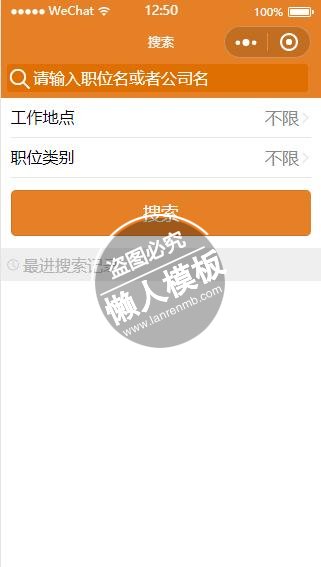
<view class="search_wrap">
    <view class="s_input">
        <view class="inputbox">
            <icon color="#fff" type="search" size="20"/>
            <input auto-focus="true"  bindinput="user_import" placeholder-class="placeholder" placeholder="请输入职位名或者公司名" />
        </view>
    </view>
    <view class="s_s_list">
        <navigator url="../workplace/workplace">
            <view class="title">
                <view class="s_til">工作地点</view>
                <view class="s_cont">
                    <text class="has_select">{{action}}</text>
                    <image class="image_jiantou" src="image/jiantou_tou.png"></image>
                </view>
            </view>
        </navigator>
        <navigator url="../worktype/worktype">
            <view class="title">
                <view class="s_til">职位类别</view>
                <view class="s_cont">
                    <text class="has_select">{{position_type}}</text>
                    <image class="image_jiantou" src="image/jiantou_tou.png"></image>
                </view>
            </view>
        </navigator>
        <button bindtap="search" class="s_search">搜索</button>
    </view>


    <view class="s_his"><image class="iamge_search" src="image/_03.png"></image>最进搜索记录</view>
    <view wx:if="{{search_history.length==0?false:true}}" class="s_his_box">
        <block wx:for="{{search_history}}">
            <view class="title" bindtap="history_search" data-search_id="{{item.search_id}}">
                <view class="s_til">
                {{item.position_name}}
                </view>
                <view class="s_cont">
                    <text class="has_select">约{{item.company_num}}个职位</text>
                    <image class="image_jiantou" src="image/jiantou_tou.png"></image>
                </view>
            </view>
        </block>
    </view>
    <view wx:if="{{search_history.length==0?false:true}}" bindtap="clear_his" class="clear_his">清空搜索记录</view>
</view>
|
.s_input{
    background-color: #e58026;
    padding:0 0 15rpx 15rpx;
}
.inputbox{
  display: flex;
  background-color: #df6f00;
  border-radius:8rpx;
  padding: 8rpx;
  width:94%;
  /*display: table;*/
}
.inputbox icon{
    /*display: table-cell;*/
    /*vertical-align: middle;*/
    padding-right: 8rpx;
    margin-top: 6rpx;
}
.inputbox input{
  color:  #fff;
}
.placeholder{
  color: #fff;
  font-size: 12pt;
}
.image_jiantou{
  width: 30rpx;
  height: 30rpx;
}
.iamge_search{
  width: 30rpx;
  height: 30rpx;
  padding-right: 10rpx;
}
.s_s_list{
  width: 94%;
  margin: 0 auto;
}
.s_s_list .title{
  border-bottom: 1px solid #e5e5e5;
  padding: 20rpx 0;
  display: flex;
  justify-content: space-between;
}
.s_s_list .title .s_til{
  width: 25%;
}
.s_cont{
  width: 70%;
  display: flex;
  align-items: center;
  justify-content: flex-end;
}
.has_select{
  font-size: 13pt;
  color: #888888;
  max-width: 92%;
  overflow: hidden;
  text-overflow:ellipsis;
  white-space: nowrap;
}
.s_search{
  background-color: #e58026;
  color: #fff;
  margin-top: 30rpx;
}
.s_his{
  margin-top: 30rpx;
  background-color: #efefef;
  font-size: 12pt;
  color: #b2b2b2;
  padding: 16rpx;
  display: flex;
  align-items: center;
}
.s_his_box{
  /*border: 1px solid red;*/
  width: 94%;
  margin: 0 auto;
  font-size: 12pt;
}
.s_his_box .title{
  padding: 10rpx 0;
  color: #b2b2b2;
  display: flex;
  justify-content: space-between;
  align-items: center;
}

.clear_his{
  font-size: 12pt;
  text-align: center;
  color: #888888;
  margin: 15rpx auto;
}
|
const method = require('../../utils/methond.js');
var app = getApp()
Page({
  data:{
    action:'',
    position_type:'',
    search_history:[]
  },
  onLoad:function(options){
    // 页面初始化 options为页面跳转所带来的参数

  },
  onReady:function(){
    // 页面渲染完成

  },
  onShow:function(){
    // 页面显示
    let _search_history;
    let has_select_temp = wx.getStorageSync('has_select') || [];     //选择的工作地点
    let has_post_tep = wx.getStorageSync('has_post') || [];          //选择的职位
    let search_history = wx.getStorageSync('search_history') || [];  //搜索的历史记录

    _search_history = search_history.map(function(item){
      let city = item.city_arr.map(function(it){
          return it.city
      }).join()
      let post = item.post_arr.map(function(it){
          return it.post
      }).join()
      return {
        search_id:item.search_id,
        company_num:item.num,
        position_name:[item.user_import, city, post].join('+')
      }
    })

      this.setData({
        action:method.has_(has_select_temp,'city'),
        position_type:method.has_(has_post_tep,'post'),
        search_history:_search_history
      })
      wx.setStorage({
          key:"user_import",
          data:''
        })
  },
  onHide:function(){
    // 页面隐藏

  },
  onUnload:function(){
    // 页面关闭

  },
  user_import:(e)=>{
    let value = e.detail.value;
    wx.setStorage({
      key:"user_import",
      data:value
    })
  },
  search:(e)=>{
    let id = app.data.searchId;  // 全局数据
    try {
      let city_arr = wx.getStorageSync('has_select') || []; //用户选择的城市
      let post_arr = wx.getStorageSync('has_post') || [];   //用户选择的职位
      let user_import = wx.getStorageSync('user_import');   //用户输入的内容
      let city_id,post_id;
      if (city_arr =='' && post_arr == '' && user_import == '' ) {
          wx.showModal({
            showCancel:false,
            content: '请选择地点或职位名'
        })
      }else{

        city_id = city_arr.map(function(item){  //对应的职位id
            return item.id
        });

        post_id = post_arr.map(function(item){ //选择的城市id
            return item.id
        }); //用户选择的职位id
        wx.navigateTo({
          url:"../searchend/searchend?user_import="+user_import+"&city_id="+city_id+"&post_id="+post_id,
        })
      }
    } catch (e) {
      console.log(e);
    }
  },
  clear_his: function(){  //清空历史记录
      this.setData({
        search_history:''
      })
      wx.removeStorage({
        key: 'search_history',
        fail: function(res) {
          console.log('清除历史记录失败')
        }
      })
  },
  history_search:function(e){
    let search_id = e.currentTarget.dataset.search_id;
    try {
        let  search_history = wx.getStorageSync('search_history')
        if (search_history) {

            let now_his=[];
            search_history.map(function(item){
                if( item.search_id == search_id ){
                  now_his.push(item)
                }
            })
            let city_arr = now_his[0].city_arr;
            let user_import = now_his[0].user_import;
            let post_arr = now_his[0].post_arr;
            let city_id,post_id;
            city_id = city_arr.map(function(item){
                return item.id
            }).join()
            post_id = post_arr.map(function(item){
                return item.id
            }).join()
            // console.log( user_import,city_id,post_id )
            wx.navigateTo({
                url:"../searchend/searchend?user_import="+user_import+"&city_id="+city_id+"&post_id="+post_id,
            })

        }
      } catch (e) {

    }
  }
})
|
模板简介:该模板名称为【微信小程序橙色工作地点职位类别搜索页面制作设计模板下载】,大小是,文档格式为.,推荐使用打开,作品中的图片,文字等数据均可修改,图片请在作品中选中图片替换即可,文字修改直接点击文字修改即可,您也可以新增或修改作品中的内容,该模板来自用户分享,如有侵权行为请联系网站客服处理。欢迎来懒人模板【小程序教程】栏目查找您需要的精美模板。
.jpg)
.jpg)




