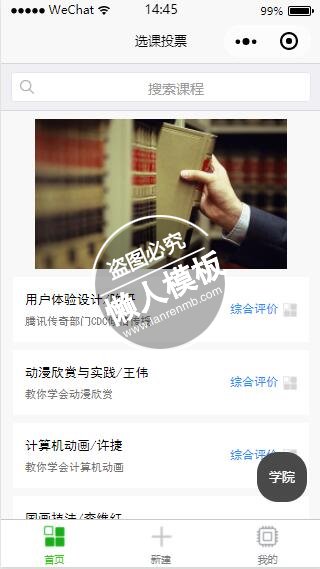
<view class="page">

    <!-- search bar -->
    <view class="page__bd">
        <view class="weui-search-bar">
            <view class="weui-search-bar__form">
                <view class="weui-search-bar__box">
                    <icon class="weui-icon-search_in-box" type="search" size="14"></icon>
                    <input type="text" class="weui-search-bar__input" placeholder="搜索课程" value="{{inputVal}}" focus="{{inputShowed}}" bindinput="inputTyping" />
                    <view class="weui-icon-clear" wx:if="{{inputVal.length > 0}}" bindtap="clearInput">
                        <icon type="clear" size="14"></icon>
                    </view>
                </view>
                <label class="weui-search-bar__label" hidden="{{inputShowed}}" bindtap="showInput">
                    <icon class="weui-icon-search" type="search" size="14"></icon>
                    <view class="weui-search-bar__text">搜索课程</view>
                </label>
            </view>
            <view class="weui-search-bar__cancel-btn" hidden="{{!inputShowed}}" bindtap="hideInput">取消</view>
        </view>
        <view class="weui-cells searchbar-result" wx:if="{{inputVal.length > 0}}">
            <navigator url="" class="weui-cell" hover-class="weui-cell_active">
                <view class="weui-cell__bd">
                    <view>大数据与云计算</view>
                </view>
            </navigator>
            <navigator url="" class="weui-cell" hover-class="weui-cell_active">
                <view class="weui-cell__bd">
                    <view>数据库设计与实现</view>
                </view>
            </navigator>
        </view>
    </view>


    <view wx:if="{{inputVal.length == 0}}">

    <!-- class swiper -->
    <view class="container" style="width:100%;">
        <view class="page-body" style="width:100%;">
            <view class="page-section page-section-spacing swiper" style="width:100%;">
            <swiper indicator-dots="{{indicatorDots}}"
                autoplay="{{autoplay}}" interval="{{interval}}" duration="{{duration}}">
                <block wx:for="{{activities}}" wx:key="*this">
                <swiper-item>
                    <image src="{{item}}" class="swiper-item" mode="aspectFill"/>
                </swiper-item>
                </block>
            </swiper>
            </view>
        </view>
    </view>

    <!-- class list -->
    <view class="index-bd">
        <view class="kind-list">
        <block wx:for-items="{{courseInfos}}" wx:key="{{item.courseNo}}">
            <view class="kind-list-item">
            <view id="{{item.courseNo}}" class="kind-list-item-hd {{item.open ? 'kind-list-item-hd-show' : ''}}" bindtap="noteGraph" data-evaluation="{{item.evaluation}}">
                <view class="kind-list-text">
                    <text class="class-list-item-title">{{item.courseName}}</text>
                    <text class="class-list-item-content">n{{item.courseDesc}}</text>
                </view>
                <view class="evaluation-text">综合评价</view>
                <image class="kind-list-img" src="../resources/kind/logo.png"></image>
            </view>
            </view>
        </block>
        </view>
    </view>

    <!-- button -->
    <view class="college-btn" bindtap="powerDrawer" data-statu="open">学院</view>

    <!-- 模态窗口 -->
    <!--mask-->
    <view class="drawer_screen" bindtap="powerDrawer" data-statu="close" wx:if="{{showModalStatus}}"></view>
    <!--content-->
    <!--使用animation属性指定需要执行的动画-->
    <view animation="{{animationData}}" class="drawer_box" wx:if="{{showModalStatus}}">
        <!--drawer content-->
        <view class="drawer_title">学院/专业选择</view>
        <view class="drawer_content">
            <view class="weui-cells weui-cells_after-title">
                <view class="weui-cell weui-cell_input">
                    <view class="weui-cell__hd">
                        <view class="weui-label">学院</view>
                    </view>
                    <view class="weui-cell__bd">
                        <picker bindchange="bindCollegePickerChange" value="{{collegeIndex}}" range="{{colleges}}">
                            <view class="weui-input">{{colleges[collegeIndex]}}</view>
                        </picker>
                    </view>
                </view>
            </view>

            <view class="weui-cells weui-cells_after-title">
                <view class="weui-cell weui-cell_input">
                    <view class="weui-cell__hd">
                        <view class="weui-label">专业</view>
                    </view>
                    <view class="weui-cell__bd">
                        <picker bindchange="bindMajorPickerChange" value="{{majorIndex}}" range="{{majors}}">
                            <view class="weui-input">{{majors[majorIndex]}}</view>
                        </picker>
                    </view>
                </view>
            </view>

            <view class="weui-cells weui-cells_after-title">
                <view class="weui-cell weui-cell_input">
                    <view class="weui-cell__hd">
                        <view class="weui-label">学号</view>
                    </view>
                    <view class="weui-cell__bd">
                        <view class="weui-input">
                            <input bindinput="bindNoInputChange" class="no-input" type="text" value="" />
                        </view>
                    </view>
                </view>
            </view>
        </view>
        <view class="btn_ok" bindtap="powerDrawer" data-click="true" data-statu="close">确定</view>
    </view>

    </view>
</view>
|
@import "../common/index.wxss";
@import "../common/lib/weui.wxss";

/* search bar */
.searchbar-result{
    margin-top: 0;
    font-size: 14px;
}
.searchbar-result:before{
    display: none;
}
.weui-cell{
    padding: 12px 15px 12px 35px;
}
.weui-icon-search {
  /* modify add float:left; margin-top: 2px; margin-left:8px;*/
  float: left;
  margin-top: 2px;
  margin-left: 8px;
}

/* class swiper */
.container {
  margin-top: 8px;
  margin-bottom: 8px;
}
.swiper-item{
  display: block;
  width: 100%;
  height: 150px;
}

/* class list */
.class-list-item-title {
  font-family: SimHei;
  font-size: 32rpx;
}
.class-list-item-content {
  font-family: SimHei;
  font-size: 28rpx;
  color: #757373;
}
.evaluation-text {
  font-family: SimHei;
  font-size: 28rpx;
  color: dodgerblue;
}

.evaluation-text {
  font-size: 12px;
}
.kind-list-img {
  margin-left: 5px;
  width: 14px;
  height: 14px;
}


.college-btn {
  position: fixed;
  bottom: 0rpx;
  width: 50px;
  height: 50px;
  padding: 0rpx 0;
  border-radius: 50rpx 50rpx;
  text-align: center;
  line-height:50px;
  margin: 40rpx 80%;
  background: #494949;
  color: #fff;
}

button{
  margin-bottom: 30rpx;
}
button:last-child{
  margin-bottom: 0;
}
.page-section-title{
  padding: 0;
}

.page-section-title{
  margin-top: 60rpx;
  position: relative;
}
.info{
  position: absolute;
  right: 0;
  color: #353535;
  font-size: 30rpx;
}
.page-foot{
  margin-top: 50rpx;
}

/* 模态 */

/*mask*/
.drawer_screen {
  width: 100%;
  height: 100%;
  position: fixed;
  top: 0;
  left: 0;
  z-index: 1000;
  background: #000;
  opacity: 0.5;
  overflow: hidden;
}

/*content*/
.drawer_box {
  width: 650rpx;
  overflow: hidden;
  position: fixed;
  top: 50%;
  left: 0;
  z-index: 1001;
  background: #FAFAFA;
  margin: -150px 50rpx 0 50rpx;
  border-radius: 3px;
}

.drawer_title{
  padding:15px;
  font: 20px "microsoft yahei";
  text-align: center;
}
.drawer_content {
  height: 210px;
  overflow-y: scroll; /*超出父盒子高度可滚动*/
}

.btn_ok{
  padding: 10px;
  font: 20px "microsoft yahei";
  text-align: center;
  border-top: 1px solid #E8E8EA;
  color: #3CC51F;
}

.top{
	padding-top:8px;
}
.bottom {
	padding-bottom:8px;
}
.title {
	height: 30px;
	line-height: 30px;
	width: 160rpx;
	text-align: center;
	display: inline-block;
	font: 300 28rpx/30px "microsoft yahei";
}

.input_base {
	border: 2rpx solid #ccc;
	padding-left: 10rpx;
	margin-right: 50rpx;
}
.input_h30{
	height: 30px;
	line-height: 30px;
}
.input_h60{
	height: 60px;
}
.input_view{
	font: 12px "microsoft yahei";
	background: #fff;
	color:#000;
	line-height: 30px;
}

input {
	font: 12px "microsoft yahei";
	background: #fff;
	color:#000 ;
}
radio{
	margin-right: 20px;
}
.grid { display: -webkit-box; display: box; }
.col-0 {-webkit-box-flex:0;box-flex:0;}
.col-1 {-webkit-box-flex:1;box-flex:1;}
.fl { float: left;}
.fr { float: right;}


/* no input */
.no-input {
  height: 100rpx;
}
|
var app = getApp()


Page({
  // data
  data: {
    // courses
    courseInfos: null,
    // userInfo
    userInfo: null,
    // swiper
    activities:['../resources/activities/activity-1.jpg', '../resources/activities/activity-2.jpg', '../resources/activities/activity-3.jpg', '../resources/activities/activity-4.jpg'],
    indicatorDots: true,
    vertical: false,
    autoplay: true,
    interval: 2000,
    duration: 500,

    // 模态
    collegeIndex: 0,
    majorIndex: 0,
    noInput: "未设置",
    colleges: ['软件与微电子学院', '数学科学学院','物理学院', '化学与分子工程学院', '生命科学学院', '城市与环境学院', '地球与空间科学学院',
     ,'心理与认知科学学院', '建筑与景观设计学院', '信息科学技术学院', '工学院', '环境科学与工程学院', '计算机科学技术研究所',],
    majors: ['大数据与云计算', '软件工程技术', '机器学习', '人工智能', '系统软件', '应用软件开发'],
    inputShowed: false,
    inputVal: "",
    selectClick: false,
  },

  onShow: function () {
    // 获取课程信息
    app.getCourseInfos(this.updateCourseInfos)

    // 请求课程数据
    wx.request({
      url: '127.0.0.1',
      data: {

      },
      header: {
          'content-type': 'application/json'
      },
      success: function(res) {
        console.log(res.data)
      },
      fail: function(res) {

      }
    })
  },

  // 更新课程信息
  updateCourseInfos: function(courseInfos) {
    this.setData({
      courseInfos: courseInfos
    })
  },


  // pull refresh
  onPullDownRefresh: function () {
    wx.showToast({
      title: 'loading...',
      icon: 'loading'
    })
    console.log('onPullDownRefresh', new Date())
  },
  stopPullDownRefresh: function () {
    wx.stopPullDownRefresh({
      complete: function (res) {
        wx.hideToast()
        console.log(res, new Date())
      }
    })
  },

  // swiper
  changeIndicatorDots: function (e) {
    this.setData({
      indicatorDots: !this.data.indicatorDots
    })
  },
  changeAutoplay: function (e) {
    this.setData({
      autoplay: !this.data.autoplay
    })
  },
  intervalChange: function (e) {
    this.setData({
      interval: e.detail.value
    })
  },
  durationChange: function (e) {
    this.setData({
      duration: e.detail.value
    })
  },

  // search
  showInput: function () {
      this.setData({
        inputShowed: true
      });
  },
  hideInput: function () {
      this.setData({
          inputVal: "",
          inputShowed: false
      });
  },
  clearInput: function () {
    this.setData({
          inputVal: ""
      });
  },
  inputTyping: function (e) {
      this.setData({
          inputVal: e.detail.value
      });
  },

  // 模态
  powerDrawer: function (e) {
    var currentStatu = e.currentTarget.dataset.statu;
    this.data.selectClick = new Boolean(e.currentTarget.dataset.click);
    this.util(currentStatu);
  },
  util: function(currentStatu){
    /* 动画部分 */
    // 第1步:创建动画实例
    var animation = wx.createAnimation({
      duration: 200,  //动画时长
      timingFunction: "linear", //线性
      delay: 0  //0则不延迟
    });

    // 第2步:这个动画实例赋给当前的动画实例
    this.animation = animation;

    // 第3步:执行第一组动画
    animation.opacity(0).rotateX(-100).step();

    // 第4步:导出动画对象赋给数据对象储存
    this.setData({
      animationData: animation.export()
    })

    // 第5步:设置定时器到指定时候后,执行第二组动画
    setTimeout(function () {
      // 执行第二组动画
      animation.opacity(1).rotateX(0).step();
      // 给数据对象储存的第一组动画,更替为执行完第二组动画的动画对象
      this.setData({
        animationData: animation
      })

      //关闭
      if (currentStatu == "close") {
        this.setData(
          {
            showModalStatus: false
          }
        );
        if(this.data.selectClick == true) {
          // 跳转到选课主页
          wx.navigateTo({
            url: '../index-class-select-main/index-class-select-main'
          });
          this.setData({
            selectClick: false
          })
        }

        app.getUserInfo(this.updateUserInfo)
      }
    }.bind(this), 200)

    // 显示
    if (currentStatu == "open") {
      this.setData(
        {
          showModalStatus: true
        }
      );
    }
  },
  // 更新用户信息
  updateUserInfo: function(userInfo) {

    var newUserInfo = userInfo


    newUserInfo["userCollege"] = this.data.colleges[this.data.collegeIndex]
    newUserInfo["userProfession"] = this.data.majors[this.data.majorIndex]
    newUserInfo["userStudentId"] = this.data.noInput
    console.log(newUserInfo["userStudentId"])
    this.setData({
      userInfo: newUserInfo
    })

    wx.setStorage({
      key: 'userInfo',
      data: newUserInfo,
      success: function(res){
        console.log("用户信息更新成功")
      },
      fail: function() {
        console.log("用户信息更新失败")
      },
      complete: function() {
        // complete
      }
    })

  },

  // picker
  bindCollegePickerChange: function(e) {
    console.log('picker发送选择改变,携带值为', e.detail.value)
    this.setData({
      collegeIndex: e.detail.value
    })
  },
  bindMajorPickerChange: function(e) {
    console.log('picker发送选择改变,携带值为', e.detail.value)
    this.setData({
      majorIndex: e.detail.value
    })
  },
  bindNoInputChange: function(e) {
    console.log('picker发送选择改变,input携带值为', e.detail.value)
    this.setData({
      noInput: e.detail.value
    })
  },

  kindToggle: function (e) {
    var id = e.currentTarget.id, list = this.data.list;
    for (var i = 0, len = list.length; i < len; ++i) {
      if (list[i].id == id) {
        list[i].open = !list[i].open
      } else {
        list[i].open = false
      }
    }
    this.setData({
      list: list
    });
  },

  // 模态
  modalTap: function(e) {
    wx.showModal({
      title: "弹窗标题",
      content: "",
      showCancel: false,
      confirmText: "确定"
    })
  },
  noTitlemodalTap: function(e) {
    wx.showModal({
      content: "弹窗内容,告知当前状态、信息和解决方法,描述文字尽量控制在三行内",
      confirmText: "确定",
      cancelText: "取消"
    })
  },

  // noteGraph
  noteGraph: function(e) {
    var evaluation = e.currentTarget.dataset.evaluation;

    wx.navigateTo({
      url: '../vote-graph/vote-graph?evaluation=' + JSON.stringify(evaluation)
    });
  }
});
|
模板简介:该模板名称为【微信小程序选课投票带幻灯切换搜索课程样式模板制作设计下载】,大小是,文档格式为.,推荐使用打开,作品中的图片,文字等数据均可修改,图片请在作品中选中图片替换即可,文字修改直接点击文字修改即可,您也可以新增或修改作品中的内容,该模板来自用户分享,如有侵权行为请联系网站客服处理。欢迎来懒人模板【小程序教程】栏目查找您需要的精美模板。
.jpg)
.jpg)