
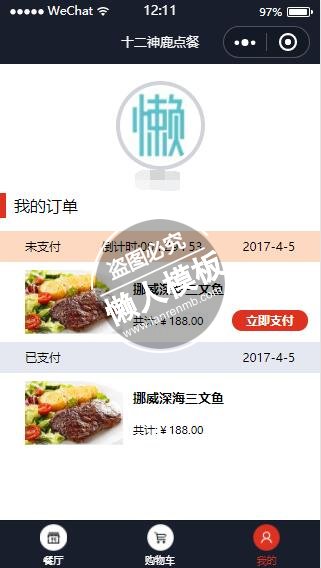
<view class="user_head">
  <view class="user_img">
    <image src="{{userInfo.avatarUrl}}"></image>
    <view class="user_name">{{userInfo.nickName}}</view>
  </view>
</view>
<view class="order_title">
  <text>我的订单</text>
</view>
<view class="order_section">
  <view class="order_box">
    <view>
      <view class="sub_order_header no_pay">
        <text class="z fs32 fw">未支付</text>
        <text>倒计时:</text>
        <text id="textCounter">{{timeCounter}}</text>
        <text class="y">2017-4-5</text>
      </view>
      <view class="sub_order_content">
        <view class="sub_order_img z">
          <image src="/images/food.jpg"></image>
        </view>
        <view class="sub_order_img_detail z">
          <text class="order_img_name">挪威深海三文鱼</text>
          <view>
            <text class="m30">共计:¥188.00</text>
            <view class="pay_btn" bindtap="payBtn">立即支付</view>
          </view>
        </view>
      </view>
    </view>
    <view>
      <view class="sub_order_header payed">
        <text class="z fs32 fw">已支付</text>
        <text class="y">2017-4-5</text>
      </view>
      <view class="sub_order_content">
        <view class="sub_order_img z">
          <image src="/images/food.jpg"></image>
        </view>
        <view class="sub_order_img_detail z">
          <text class="order_img_name">挪威深海三文鱼</text>
          <text class="m30">共计:¥188.00</text>
        </view>
      </view>
    </view>
  </view>
</view>
|
.user_img {
  width: 190rpx;
  height: 190rpx;
  border-radius: 50%;
  -webkit-border-radius: 50%;
  border: 10rpx solid #d1d3da;
  margin: 38rpx auto 0 auto;
  text-align: center;
}

.user_img image {
  display: block;
  width: 180rpx;
  height: 180rpx;
  border: none;
  border-radius: 50%;
  -webkit-border-radius: 50%;
  margin: 5rpx auto 0 auto;
}

.z {
  float: left;
}

.y {
  float: right;
}

.user_head {
  padding-top: 1px;
  height: 300rpx;
}

.user_name {
  margin: 20rpx;
  font-size: 30rpx;
  font-weight: bold;
  color: #7c7f88;
}

.order_title {
  border-left: 6px solid #de3120;
  height: 60rpx;
  line-height: 60rpx;
  padding-left: 20rpx;
}

.order_section {
  margin-top: 32rpx;
  padding-bottom: 135rpx;
}

.order_box ul li {
  height: 260rpx;
  position: relative;
}

.sub_order_header {
  height: 74rpx;
  line-height: 74rpx;
  padding: 0 60rpx;
  text-align: center;
  font-size: 30rpx;
}

.no_pay {
  background-color: #fed9c2;
}

.payed {
  background-color: #e5e8f1;
}

.sub_order_content {
  padding: 20rpx 60rpx;
  height: 150rpx;
  display: flex;
  position:relative;
}

.sub_order_img image {
  width: 230rpx;
  height: 150rpx;
}

.pay_box {
  position: absolute;
  right: 44rpx;
  bottom: 28rpx;
}

.pay_btn {
  display: inline-block;
  width: 180rpx;
  height: 50rpx;
  background-color: #de3120;
  border-radius: 40rpx;
  line-height: 50rpx;
  text-align: center;
  color: #fff;
  font-size: 30rpx;
  font-weight: bold;
  vertical-align: middle;
  position:absolute;
  right: 30rpx;
  bottom:26rpx;
}

.sub_order_img_detail {
  margin-left: 24rpx;
  font-size: 26rpx;
  font-weight: bold;
}

.order_img_name {
  margin: 10rpx 0;
  font-size: 32rpx;
}

.m30 {
  margin: 10rpx 0;
  font-weight: normal;
}

.sub_order_img_detail{
  display: flex;
  flex-direction: column;
  justify-content:space-around;
}
|
// pages/user/user.js
//获取应用实例
var app = getApp();
Page({
  data: {
    userInfo: {},
    timeCounter: null
  },
  onLoad: function (options) {
    // 页面初始化 options为页面跳转所带来的参数
    var that = this
    //调用应用实例的方法获取全局数据
    that.countDown(1800);
    that.setData({
      userInfo: app.globalData.userInfo
    })
  },
  formateTime: function (total) {
    var s = (total % 60) < 10 ? ('0' + total % 60) : total % 60;
    var h = total / 3600 < 10 ? ('0' + parseInt(total / 3600)) : parseInt(total / 3600);
    var m = (total - h * 3600) / 60 < 10 ? ('0' + parseInt((total - h * 3600) / 60)) : parseInt((total - h * 3600) / 60);
    return h + ' : ' + m + ' : ' + s;
  },
  countDown: function (total) {
    var that = this;
    that.setData({
      timeCounter: that.formateTime(total)
    });
    if (total <= 0) {
      that.setData({
        timeCounter: "已经截止"
      });
      return;
    }
    setTimeout(function () {
      total--;
      that.countDown(total);
    }, 1000)
  },
  payBtn:function(){
    wx.navigateTo({
      url: '/pages/nopay/nopay'
    })
  }
})
|
模板简介:该模板名称为【微信小程序订餐类我的订单页面样式模板制作设计下载】,大小是,文档格式为.,推荐使用打开,作品中的图片,文字等数据均可修改,图片请在作品中选中图片替换即可,文字修改直接点击文字修改即可,您也可以新增或修改作品中的内容,该模板来自用户分享,如有侵权行为请联系网站客服处理。欢迎来懒人模板【小程序教程】栏目查找您需要的精美模板。
.jpg)
.jpg)




