
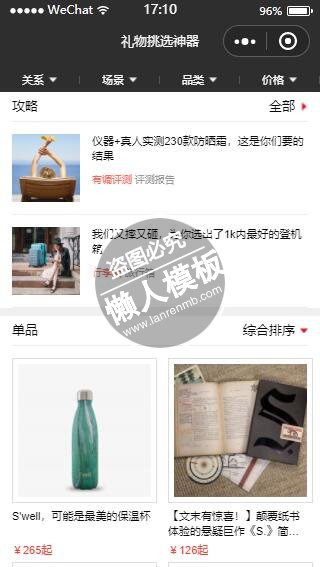
<!--index.wxml-->
<!-- <loading hidden="{{loadingHidden}}">玩命搜索数据</loading> -->

<!-- <view class="category-container" bindtap="actionSheetChange" animation="{{animationData}}"> -->
<!-- <view class="category-container {{actionSheetHidden ? 'hide' : 'show'}}" bindtap="actionSheetChange">
  <block wx:for="{{category.items}}" wx:key="items">
    <view bindtap="bindItemTap" data-group="{{category.name}}" data-item="{{item}}" class="{{category.selectedIndex === index ?'selected':''}}">{{item}}</view>
  </block>
  <view-cancel bindtap="hideActiveSheet">取消</view-cancel>
</view> -->
<view class="{{load ? 'load': ''}}">
  <view class="loading-placeholder">
    <image src="./icon/placeholder.png"></image>
  </view>
</view>

<scroll-view
  class="container {{load ? 'container-show': ''}}"
  scroll-y="true"
  bindscrolltolower="scrolltolower"
  lower-threshold="300"
  style="height:100%;">
    <!-- <view class="search-box">
     <input class="search-input" placeholder="搜索你想要的礼物" placeholder-class="placeholder-style" bindchange="bindChange" value="{{query}}"/>
     <view class="search-btn"><icon type="search" bindtap="search" size="18"/></view>
    </view> -->

    <!-- <view class="category-tabs">
      <view class="tab" wx:for="{{categorys}}" wx:key="name" wx:for-item="category">
        <view class="tab-title {{currentIndex === index ? 'active':''}}">
          <text wx:if="{{category.selectedIndex === 0}}" bindtap="switchSelectCond" data-group="{{category.name}}">{{category.title}}</text>
          <text wx:else bindtap="switchSelectCond" data-group="{{category.name}}">{{category.items[category.selectedIndex]}}</text>
          <i class="arrow">▴</i>
          <view class="line"></view>
        </view>
      </view>
    </view> -->
    <!-- 相比上面,少了选中红色状态  -->
    <view class="category-tabs">
      <view class="tab" wx:for="{{categorys}}" wx:key="name" wx:for-item="category">
        <view class="tab-title {{currentIndex === index ? 'active':''}}"  bindtap="switchSelectCond" data-group="{{category.name}}">
          <text wx:if="{{category.selectedIndex <= 0}}">{{category.title}}</text>
          <text wx:else>{{category.items[category.selectedIndex]}}</text>
          <image class="arrow" src="./icon/arrow.png"></image>
        </view>
        <view class="line"></view>
      </view>
    </view>

    <view class="result-area">

      <view class="section-sep first-section-sep clearfix" wx:if="{{raiders.length > 0}}">
        <view class="section-sep-container">
          <text class="pull-left">攻略</text>
          <view class="pull-right" bindtap="viewAll">
            <text>全部</text>
            <image src="./icon/arrow-red.png" class="arrow-red"></image>
          </view>
        </view>
      </view>

      <view class="up-list" wx:if="{{raiders.length > 0}}">
        <block wx:for="{{raiders}}" wx:for-item="raider" wx:key="aid">
          <view class="up-list-item">
            <navigator url="../article/article?id={{raider.aid}}">
             <view class="item-desc-container">
                <image class="item-img" src="{{raider.thumb_image_url}}"></image>
                <view class="info-view">
                  <text class="title">{{raider.title}}</text>
                  <view class="target-word">
                    <block wx:for="{{raider.rendered_keywords}}" wx:key="index">
                      <text wx:if="{{index === 0}}" class="keyword">{{ item }}  </text>
                      <text wx:else>  {{ item }}</text>
                    </block>
                  </view>
                </view>
             </view>
           </navigator>
         </view>
        </block>
     </view>

    <view class="section-sep clearfix" wx:if="{{ goods_copy.length > 0 }}">
      <view class="section-sep-container">
        <text class="pull-left">单品</text>
        <view class="pull-right" bindtap="orderBy">
          <text>{{orderByActionSheetItems[currentPX]}}</text>
          <image src="./icon/arrow-red.png" class="arrow-red arrow-red-down {{order?'selected':''}}"></image>
        </view>
      </view>
    </view>

    <view class="down-list" wx:if="{{ goods_copy.length > 0 }}">
      <block wx:for="{{goods}}" wx:for-item="good" wx:key="aid">
        <view class="down-list-item">
          <navigator url="{{good.ctype ? '../article/article?id='+good.aid : '../sku/sku?sid=' + good.aid }}">
            <view class="image-container">
              <image src="{{good.thumb_image_url}}"></image>
            </view>
            <view class="info-container">
              <text class="info">{{good.title}}</text>
              <text class="price">{{ ( !good.price || good.price === "N/A" ) ? "无":good.price }}</text>
            </view>
          </navigator>
        </view>
      </block>
      <!-- import写在顶部会出问题。不知道原因。。 -->
      <import src="../../common/loading.wxml"/>
      <template is="loading" data="{{done, text:'只有这些啦~'}}"/>
    </view>
  </view>
  <view  wx:if="{{ goods_copy.length === 0 }}" class="error-cry-container">
    <image class="error-cry" src="../../common/icon/cry.png"></image>
    <text class="error-msg">
      当前条件下,找不到商品
      换个条件试试
    </text>
  </view>
</scroll-view>
<!-- <action-sheet hidden="{{actionSheetHidden}}" bindchange="actionSheetChange">
  <block wx:for="{{category.items}}">
    <action-sheet-item bindtap="bindItemTap" data-group="{{category.name}}" data-item="{{item}}" class="{{category.selectedIndex === index ?'selected':''}}">{{item}}</action-sheet-item>
  </block>
  <action-sheet-cancel bindtap="hideActiveSheet">取消</action-sheet-cancel>
</action-sheet> -->

<!-- <action-sheet hidden="{{orderByActionSheetHidden}}" bindchange="orderByActionSheetChange">
  <block wx:for="{{orderByActionSheetItems}}" wx:key="items">
    <action-sheet-item bindtap="orderByBindItemTap" data-item="{{item}}">{{item}}</action-sheet-item>
  </block>
  <action-sheet-cancel bindtap="orderByHideActiveSheet">取消</action-sheet-cancel>
</action-sheet> -->
|
/**load之前的占位图样式**/
.container{
  z-index: -1;
  opacity: 0;
  background-color: transparent;
  transition: all .2s ease-in;
}

.loading-placeholder {
  width: 100%;
  height: 100%;
  position: fixed;
}

.loading-placeholder image{
  width: 100%;
  height: 100%;
}

.container-show {
  z-index: 1;
  opacity: 1;
  /*background-color: rgb(240,240,240);*/
}

.load{
  width: 0;
  height: 0;
  z-index: -2;
}

.load .loading-placeholder{
  width: 0;
  height: 0;
}
/**load之前的占位图样式 end**/

/*
 1. 不认ID
 2. 不认属性选择符
 3. 不认相邻兄弟选择符
*/
.search-box{
  padding-top: 38.647rpx;
}
/* 顶部tab */
.category-tabs {
  padding-top: 10rpx;
  display: -webkit-flex;
  display: flex;

  background-color: rgb(46,46,47);
  color: #fff;
  height: 60rpx;
}

.tab{
  -webkit-flex:1;
          flex:1;
  display: -webkit-flex;
  display: flex;
  -webkit-justify-content: center;
          justify-content: center;
  position: relative;
  overflow: hidden;
  font-size: 26rpx;
  -webkit-align-items: center;
          align-items: center;
}

.tab-title{
  -webkit-flex: 1;
          flex: 1;
  -webkit-display: flex;
  display: flex;
  -webkit-align-items: center;
          align-items: center;
  -webkit-justify-content: center;
          justify-content: center;
}

.line{
  width: 1px;
  background-color: rgb(81,81,81);
  height: 20rpx;
}

.arrow{
  /*原始大小 14 * 8 */
  transition: all .2s ease-in-out;
  width: 21rpx;
  height: 12rpx;
  margin-left: 14rpx;
}

.active .arrow{
  -webkit-transform: rotate(180deg);
          transform: rotate(180deg);
}

.no-border {
  border:none;
}

.arrow-red {
  width: 21rpx;
  height: 12rpx;
  -webkit-transform: rotate(90deg);
          transform: rotate(90deg);
  margin-left: 14rpx;
  vertical-align: 6rpx;
  transition: all .2s ease-in-out;
}
.arrow-red-down{
  -webkit-transform: rotate(180deg);
          transform: rotate(180deg);
  margin-left: 14rpx;
}
.selected{
  -webkit-transform: rotate(0);
          transform: rotate(0);
}
.section-sep{
  padding:20rpx 30rpx 0 30rpx;
  background-color: #fff;
  margin-top: 20rpx;
  font-size: 32rpx;
  line-height: 1;
  display: -webkit-flex;
  display: flex;
  -webkit-flex-direction: column;
          flex-direction: column;
}

.section-sep-container{
  -webkit-flex: 1;
          flex: 1;
  padding-bottom: 20rpx;
  border-bottom:1px #eaeaea solid;
}

.first-section-sep{
  margin-top: 0;
  /*padding-top: 20px;*/
}

/* 上部横条结构卡片 */
.up-list{
  -webkit-display: flex;
  display: flex;
  -webkit-flex-direction: column;
          flex-direction: column;
  background-color: #fff;
}

.up-list-item navigator{
  padding: 30rpx 30rpx 0 30rpx;
}

.item-desc-container{
  -webkit-flex: 1;
          flex: 1;
  display: -webkit-flex;
  display: flex;
  border-bottom: 1px rgb(237,237,237) solid;
  padding-bottom: 30rpx;
}

.item-img{
  width: 160rpx;
  height: 160rpx;
}

.info-view{
  -webkit-flex: 1;
          flex: 1;
  margin-left:30rpx;
  font-size: 24rpx;
  color:#999;
}

.title{
  font-size:28rpx;
  line-height: 1.45;
  max-height: 82rpx;
  color:#080808;
  margin-bottom: 20rpx;
  word-break: break-all;
  overflow: hidden;
  display: -webkit-box;
  -webkit-box-orient: vertical;
  -webkit-box-pack: start;
  -webkit-line-clamp: 2;
}

.title, .price, .footer-desc {
    -webkit-flex:1;
            flex:1;
    display: -webkit-flex;
    display: flex;
}

.target-word{
  margin-top: 20rpx;
}
.keyword{
  color: #ff685c;
}
.other-word{
  margin-left: 12rpx;
  color:#999;
}
.source-from{
    -webkit-justify-content: flex-end;
            justify-content: flex-end;
    -webkit-flex:1;
            flex:1;
    -webkit-display: flex;
    display: flex;
    -webkit-align-items: flex-end;
            align-items: flex-end;
}
.source{
    display: -webkit-flex;
    display: flex;
    -webkit-align-items: flex-end;
            align-items: flex-end;
}
.datetime{
    margin-left:24rpx;
}

/* 下方左右结构文章卡片 */
.down-list{
  display: -webkit-flex;
  display: flex;
  -webkit-flex-flow: row wrap;
          flex-flow: row wrap;
  -webkit-justify-content: -webkit-space-between;
          justify-content: -webkit-space-between;
          justify-content: space-between;
  background-color: #fff;
  padding: 30rpx 30rpx 0 30rpx;
}

.down-list-item{
  display: -webkit-flex;
  display: flex;
  -webkit-flex-direction: -webkit-column;
          flex-direction: -webkit-column;
          flex-direction: column;
  width: 330rpx;
}

.image-container{
  /*box-sizing: border-box;*/
  background-color: #eee;
  border:1px rgb(221,221,221) solid;
  width: 312rpx;
  height: 312rpx;
  /*设计图给的边距很奇怪,一点儿也不协调,也不好看,没有强迫症的人看到都受不了*/
  /*padding: 32rpx 4rpx 36rpx 14rpx;*/
  padding: 14rpx;
  background-color: #fff;
}

.image-container image{
  /* 注意这个。终于解决了在小程序中图片尺寸的问题了*/
  width: 312rpx;
  height: 312rpx;
}

.info-container{
  padding:0 0 16rpx 0;
  color:#080808;
  background-color: #fff;
  font-size: 28rpx;
  overflow: hidden;
}

.info-container .price{
  color:#f14538;
  margin-top: 14rpx;
  line-height: 1;
}

.info-container .info{
  margin-top: 14rpx;
  /*line-height: 1;*/
  height: 76rpx;
  word-break: break-all;
  overflow: hidden;
  display: -webkit-box;
  -webkit-box-orient: vertical;
  -webkit-box-pack: start;
  -webkit-line-clamp: 2;
}

.error-cry-container{
  width: 100%;
  text-align: center;
  margin-top: 240rpx;
}

.error-cry{
  width: 160rpx;
  height: 160rpx;
  margin:40rpx 0;
}
.error-msg{
  color:#999;
}


/*.selected {
  color:#ef4438;
  position: relative;
}
.selected:after{
  font-size: 28rpx;
  position: absolute;
  right: 18rpx;
  content:'√';
}*/
|
import common from '../../common/app'
import { handleTitle, extractPriceFromPriceString, objectToQueryString, convert, type, fetch } from '../../utils/utils'
import API from '../../common/API'
import category, { defaultItem, ORDER_BY } from '../../common/category'
const keys = Object.keys(category)
const categorys = keys.map(item => category[item])
console.log("category:", category);
console.log("keys:", Object.keys(category));
console.log("categorys:", categorys);

const loadingLength = 20
const loadingStart = 0

let pageLength = loadingLength
let start = loadingStart
const ACTION_SHEET_LENGTH = 6

const page = {
  data: {
    categorys,
    // orderBy排序字段
    orderByActionSheetItems: [
      ORDER_BY.zonghe, // 综合排序
      ORDER_BY.latest, // 最新
      ORDER_BY.price_up_to_down, // 价格从高到低
      ORDER_BY.price_down_to_up // 价格从低到高
    ],
    // 当前默认是综合排序
    currentPX: 0
  }
  ,handleMoreTap(itemList, group){
    // this.setData({currentIndex:index})
    wx.showActionSheet({
      itemList: itemList,
      success: res => {
        if (!res.cancel) {
          category[group].selectedIndex = ACTION_SHEET_LENGTH - 1 + res.tapIndex
          this.setData({ categorys })
          this.renderByDataFromServer(this.packageQueryParam())
        }
        this.setData({currentIndex:-1})
      }
    })
  }
  // 顶部tap操作 --start
  ,switchSelectCond(e) {
    if(this.data.loading) return;
    console.log('switchSelectCond exec...');
    const group = e.currentTarget.dataset.group
    const cat = category[group]
    const index = keys.indexOf(group)
    this.setData({currentIndex:index})
    /**
     * 数据处理,由于小程序action-sheet组件只允许最多有6个item,
     * 但现在我们的筛选条件基本上都超过6个,所以,需要对数据进行处理
     */
    const len = ACTION_SHEET_LENGTH - 1
    const items = cat.items
    const categoryObject = convert(items)
    const itemList = items.slice(0, len)
    if(cat.name !== 'price'){
      itemList.push('更多')
    }
    wx.showActionSheet({
      itemList: itemList,
      success: res => {
        const tapIndex = res.tapIndex
        if(tapIndex === len){
          // 点击了跟多
          this.handleMoreTap(items.slice(len), group)
        }else{
          if (!res.cancel) {
            cat.selectedIndex = tapIndex
            this.setData({ categorys })
            this.renderByDataFromServer(this.packageQueryParam())
          }
          this.setData({currentIndex:-1})
        }
      }
    })
  }
    // 顶部tap操作 --end
  ,onLoad(options) {
    console.log('gift-result onload...');
    wx.showToast({ title: '玩命搜索中',icon: 'loading',duration: 10000 })
    this.setData({load: false})
    pageLength = loadingLength
    start = loadingStart
    this.renderByDataFromServer(this.packageQueryParam(options.queryParameter))
  }
   // 滚动到底部事件监听 -start
   ,scrolltolower(){
     this.loadNewPage()
   }
   ,loadNewPage(goods = this.goods, isOrderBy = false){
     if(!goods || goods.length === 0 ) return;
     const alreadyDisplay = this.data.goods || []
     //  如果是在 orderBy* 方法中调用的
     //  需要重置所有的条件
     if(isOrderBy){
       alreadyDisplay.length = 0 // 清空已渲染数据,从新build数据并渲染
       this.setData({ goods: [] })
       pageLength = loadingLength
       start = loadingStart
     }
     const metas = alreadyDisplay.concat(goods.slice(start, start + pageLength))
     if(metas.length === goods.length){
      //  当数据已经ready,但是页面还没有渲染出来
      //  就会马上出现“已经到底啦~”,为了防止这种情况,需要异步地设置 done 为 true
       setTimeout(() => {
         this.setData({ done: true })
       }, 120)
     }else{
       this.setData({ done: false })
     }
     this.setData({ goods: metas })
     this.goods = goods
     start += pageLength
   }
  // 滚动到底部事件监听 -end
  // ,search(){
  //   this.renderByDataFromServer(this.packageQueryParam())
  // }

  ,renderByDataFromServer(queryObject){
    const url = `${API.giftq.url}/${objectToQueryString(queryObject)}`
    this.setData({loading: true})
    fetch( {url,complete:() => {
        this.setData({loading: false})
        this.setData({load: true})
      }}).then(result => {
      console.log(`${url}返回的数据:`, result);
      // console.log(result);
      result = result.data
      const aids = result.aids
      // raiders 攻略
      let raiders = []
      // goods 单品
      let goods = []
      const reg = /http://|https:///i
      const prefix = 'http://a.diaox2.com/cms/sites/default/files'

      for(let each of aids){
        const [ aid, type ] = each
        const meta_info = result[`meta_infos_${type}`][aid]
        if(!meta_info) {
          console.log('存在空的meta_info:')
          continue
        }
        const {ctype, thumb_image_url} = meta_info

        if( thumb_image_url && !reg.test(thumb_image_url) ){
          meta_info.thumb_image_url = `${prefix}/${thumb_image_url}`
        }

        meta_info.aid = aid
        meta_info.title = handleTitle(meta_info.title || meta_info.format_title)

        if( ctype == void 0 ){
          // console.log('SKU数据:', meta_info);
          meta_info.price_num = extractPriceFromPriceString(meta_info.price)
          const [ pic ] = meta_info.pics
          meta_info.thumb_image_url = pic.url
          goods.push(meta_info)
        }else if( ctype === 2 ){
          meta_info.price_num = extractPriceFromPriceString(meta_info.price)
          goods.push(meta_info)
        }
         else if(ctype !== 2 && ctype !== 3) // 过滤掉专刊数据(ctype === 3)
        {
          const rendered_keywords = meta_info.rendered_keywords
          if(rendered_keywords){
            meta_info.rendered_keywords  = rendered_keywords.map(keywords => keywords[0])
          }
          raiders.push(meta_info)
        }

      }

      // 在本地记录下所有攻略,以供查看“全部”
      wx.setStorage({key: "allRaiders",data: [...raiders]})
      // 攻略最多只有2篇
      if( raiders.length > 2){
        raiders = raiders.slice(0, 2)
      }
      // console.log('攻略数据:', raiders);
      /**
       * 1. ctype不准  不是不准,是文章的ctype应该是2
       * 2. remove_aids数据不全
       * 3. 单品无price过滤掉
       *    price: 'N/A'
       */
      // 单品至少有2篇
      // 不足2篇,remove_aids来补
      if( goods.length < 2 ){
        // 做一下非空判定
        // 鹏哲说如果全部命中,则remove_aids这个字段就没有值
        const aids = result.remove_aids || []
        // console.log(aids);
        for(let each of aids){
          const [ aid, type ] = each
          const meta_info = result[`meta_infos_${type}`][aid]
          // let meta_info = meta_infos[aid]
          // if(!meta_info) continue
          if(meta_info.ctype === 2){
            meta_info.price_num = extractPriceFromPriceString(meta_info.price)
            goods.push(meta_info)
          }else{
            console.log('done else');
          }
        }
      }
      this.loadNewPage( goods , true)
      // console.log('单品数据:', goods);
      this.setData({raiders, goods_copy: goods, currentPX: 0})
      wx.hideToast()
      // console.log(goods);
    }).catch(result => {
      console.log(`${API.giftq.url}接口错误:`,result)
      wx.hideToast()
    })
  }
  /**
   * 组装查询参数,共有3个地方调用
   *   1. 从首页 or 筛选页跳转到结果页         --onLoad中调用
   *   2. 切换category item的值              --bindItemTap中调用
   *   3. 在筛选页搜索框中输入内容,并触发搜索  --search中调用
   * 该函数做3件事情
   *   1. 组装参数
   *   2. 调用“切换顶部的tab显示内容”的函数
   *   3. 根据参数发送请求,并调用 renderByDataFromServer 函数
   */
  ,packageQueryParam(queryParameter){
    // console.log(queryParameter);
    // 取出上游页面传递过来的数据
    // 从首页传过来的数据
    // or 从礼物筛选页传过来的数据
    // queryParameterString = '{"relation": "妈妈", "scene": "新年", "category": "生活日用", "price": [500, 800]}'
    wx.showToast({ title: '玩命搜索中', icon: 'loading',duration: 10000 })
    //  组装参数
    let queryObject = {}
    if(queryParameter){ // 从index和filter过来的请求走第一个
      if(type(queryParameter) === 'string'){
        queryObject = JSON.parse(queryParameter)
      }else if(type(queryParameter) === 'object'){
        queryObject = queryParameter
      }
    }
     else // bindItemTap 和 search走这个
    {
      this.data.categorys.forEach((category) => {
        const selectedItem = category.items[category.selectedIndex]
        if( selectedItem !== defaultItem ){
          queryObject[category.name] = selectedItem
        }
      })
    }
    const query = queryObject.query || this.data.query
    if (query) {
      queryObject.query = query
      this.setData({query})
    }else{
      this.setData({query:''})
    }
    // 无需判断是否是空对象
    // if(isNullObject(queryObject)) return;
    return queryObject
  }
  // 查看全部 start
  ,viewAll(){
    wx.navigateTo({url:'../all/all'})
  }
  // 查看全部 end

  // 排序相关 start
  ,orderBy(){
    const itemList = this.data.orderByActionSheetItems
    this.setData({order:true})
    wx.showActionSheet({
        itemList: itemList,
        success: res => {
          if (!res.cancel) {
            this.orderByBindItemTap(itemList[res.tapIndex])
          }
          this.setData({order:false})
        }
    })
  }

  ,orderByBindItemTap(item){
    // 取出当前的排序规则
    let currentPX = this.data.currentPX
    // 根据选取的item确定下次的排序规则
    let nextPX = this.data.orderByActionSheetItems.indexOf(item)
    // 如果本次排序规则和下次排序规则一致,则关掉ActiveSheet,直接返回即可
    if( currentPX === nextPX ) return this.orderByHideActiveSheet();
    switch(item){
      case ORDER_BY.zonghe:
        this.orderByZonghe()
      break
      case ORDER_BY.latest:
        this.orderByLatest()
      break
      case ORDER_BY.price_up_to_down:
        this.orderByPrice()
      break;
      case ORDER_BY.price_down_to_up:
        this.orderByPrice('down_to_up')
      break;
    }
    this.setData({currentPX: nextPX})
  }

  ,orderByZonghe(){
    // 把最初的综合排序记住,直接恢复即可
    this.loadNewPage(this.data.goods_copy, true)
  }

  ,orderByLatest(){
    const goods = [...this.data.goods_copy]
    this.loadNewPage(goods.sort((prev, next) => next.latest_version - prev.latest_version), true)
  }

  ,orderByPrice(seq = 'up_to_down'){
    const goods = [...this.data.goods_copy]
    seq === 'up_to_down'?
     this.loadNewPage( goods.sort((prev, next) => next.price_num - prev.price_num), true):
     this.loadNewPage( goods.sort((prev, next) => prev.price_num - next.price_num), true)
  }

  // ,onHide(){
  //   this.setData({load: false})
  // }
  //
  // ,onUnload() {
  //   this.setData({load: false})
  // }
  // ,onShareAppMessage: function () {
  //   return {
  //     title: '礼物挑选神器 -- 筛选结果',
  //     desc: '找到最好的礼物'
  //   }
  // }
}
// 排序相关 end
Object.assign(page, common)
Page(page)
|
模板简介:该模板名称为【微信小程序单品带综合排序列表样式模板制作设计下载】,大小是,文档格式为.,推荐使用打开,作品中的图片,文字等数据均可修改,图片请在作品中选中图片替换即可,文字修改直接点击文字修改即可,您也可以新增或修改作品中的内容,该模板来自用户分享,如有侵权行为请联系网站客服处理。欢迎来懒人模板【小程序教程】栏目查找您需要的精美模板。
.jpg)
.jpg)




