
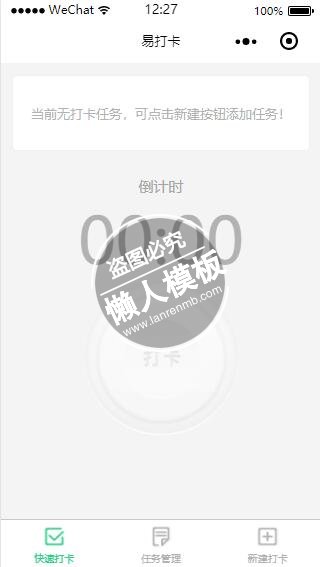
<view class="sign-page">

    <!-- 有打卡任务 -->
    <block wx:if="{{flag}}">

        <swiper indicator-dots="{{indicatorDots}}" autoplay="{{autoplay}}" interval="{{interval}}" duration="{{duration}}" bindchange="changeSwiper">
            <block wx:for="{{tasks}}">
                <swiper-item>

                    <!-- module a -->
                    <view class="module-a">
                        <view class="module-a-l">
                            <view class="item">
                                <text class="key">您的任务</text><text class="task-name">{{item.name}}</text>
                            </view>
                            <view class="item">
                                <view class="key">{{item.distance}}</view>
                                <view class="update-address-btn {{updateAddres ? 'update-address' : 'updateAddres'}}" bindtap="updateDistance">
                                    <image class="update-address-icon" src="../../image/refresh.png"></image>
                                    <text>更新</text>
                                </view>
                            </view>
                        </view>
                        <view class="module-a-r">
                            <!-- leave btn -->
                            <view class="leave-btn" bindtap="showLeavePanel">
                                <text class="txt">请假</text>
                            </view>
                        </view>
                    </view>
                </swiper-item>
            </block>
        </swiper>

        <!-- module b -->
        <view class="module-b">
            <!-- 状态为0:倒计时 -->
            <block wx:if="{{currentState == 0}}">
                <view class="tit">
                    <block wx:if="{{currentTimeFlag == 0}}">
                        <text>倒计时</text>
                    </block>
                    <block wx:if="{{currentTimeFlag == 1}}">
                        <text>已迟到</text>
                    </block>
                </view>
                <view class="num">
                    <text class="hour">{{clock.hour}}</text>
                    <text>:</text>
                    <text class="min">{{clock.min}}</text>
                </view>
                <view class="sign-wrap" bindtap="signTask">
                    <view class="sign-btn"><image src="../../image/sign_btn_{{btn}}.png"></image></view>
                </view>
            </block>

            <!-- 状态为1:已打卡 -->
            <block wx:if="{{currentState == 1}}">
                <view class="tit success">
                    <text>打卡成功!</text>
                </view>
                <view class="num unable">
                    <text class="hour">00</text>
                    <text>:</text>
                    <text class="min">00</text>
                </view>
                <view class="sign-wrap">
                    <view class="sign-btn"><image src="../../image/sign_btn_2.png"></image></view>
                </view>
            </block>

            <!-- 状态为2:请假中 -->
            <block wx:if="{{currentState == 2}}">
                <view class="tit">
                    <text>请假中</text>
                </view>
                <view class="num unable">
                    <text class="hour">00</text>
                    <text>:</text>
                    <text class="min">00</text>
                </view>
                <view class="sign-wrap">
                    <view class="sign-btn"><image src="../../image/sign_btn_unable.png"></image></view>
                </view>
            </block>
        </view>


        <!-- 记录心情 -->
        <view class="humor">
            <!--<text classclass="tips">本月已累计打卡2天,继续努力^_^~</text>-->
            <input type="text" bindinput="bindKeyInput" class="input" placeholder="随手记下今天的感想..."></input>
        </view>

    </block>

    <!-- 无打卡任务 -->
    <block wx:else>
        <view class="module-no">
            <view class="tips">
                <text>当前无打卡任务,可点击新建按钮添加任务!</text>
            </view>
            <view class="system-time">
                <view class="tit">
                    <text>倒计时</text>
                </view>
                <view class="num">
                    <text class="hour">00</text>
                    <text>:</text>
                    <text class="min">00</text>
                </view>
            </view>

            <view class="sign-wrap">
                <view class="sign-btn"><image src="../../image/sign_btn_unable.png"></image></view>
            </view>
        </view>
    </block>

    <!-- 提示信息 -->
    <modal class="modal" hidden="{{modalHidden}}" no-cancel bindconfirm="modalChange" bindcancel="modalChange">
      <view>{{modalText}}</view>
    </modal>

    <!-- 请假提示框 -->
    <view class="overlay" hidden="{{leaveHidden}}">
        <view class="leave-panel">
            <view class="inner">
                <form bindsubmit="leaveSubmit">
                    <!-- 当前任务名 -->
                    <view class="title">
                        <text>{{curTask.name}}</text>
                    </view>

                    <!-- 当前任开始时间 -->
                    <view class="mod-b mt20 time-b">
                        <view class="key">
                            <text>开始时间</text>
                        </view>
                        <view class="value">
                            <picker mode="date" value="{{currentLeaveStart}}" start="{{curTask.startTime}}" end="curTask.endTime" bindchange="startDateChange">
                                <view class="date">{{currentLeaveStart}}<image class="arrow-d" src="../../image/arrow-d-0.png"></image></view>
                            </picker>
                        </view>
                    </view>

                    <!-- 当前任务结束时间 -->
                    <view class="mod-b mt20 time-b">
                        <view class="key">
                            <text>结束时间</text>
                        </view>
                        <view class="value">
                            <picker mode="date" value="{{currentLeaveEnd}}" start="{{curTask.startTime}}" end="{{curTask.endTime}}" bindchange="endDateChange">
                                <view class="date">{{currentLeaveEnd}}<image class="arrow-d" src="../../image/arrow-d-0.png"></image></view>
                            </picker>
                        </view>
                    </view>
                    <!--<view class="mod-b mt20">
                        <text>申请请假</text>
                        <view>
                            <text>{{}}天</text>
                        </view>
                    </view>-->

                    <view class="leave-reason mt20">
                        <textarea bindblur="inputReason" class="textarea" placeholder="填写请假事由..."/>
                    </view>

                    <view class="mt20">
                        <button form-type="submit" class="submit-btn">提交</button>
                    </view>

                    <view class="close-btn" bindtap="HideLeavePanel">
                        <image src="../../image/success-close.png"></image>
                    </view>
                </form>
            </view>
        </view>
    </view>

</view>
|
.sign-page{
  position: relative;
  display: flex;
  flex-direction: column;
  padding: 0 26rpx;
  height: 100%;
  overflow: hidden;
}
.s-arr-btn{
  position: absolute;
  top: 60%;
}
.s-l{left: 80rpx;}
.s-r{right: 80rpx;}

.s-arr-btn .s-arr{
  width: 44rpx;
  height: 65rpx;
}
.unable{
  opacity: 0.4
}


.module-no .tips{
  display: flex;
  flex-direction: row;
  justify-content: center;
  align-items: center;
  border: 1px solid #f0f0f0;
  border-radius: 12rpx;
  overflow: hidden;
  background-color: #fff;
  font-size: 32rpx;
  height: 174rpx;
  margin-top: 30rpx;
  color: #b2b2b2;
}
.module-no .system-time{
  display: flex;
  flex-direction: column;
  justify-content: center;
  align-items: center;
  font-size: 36rpx;
  color: #a5a5a5;
  margin-top: 60rpx;
}
.module-no .system-time .num{
  color: #b2b2b2;
  font-size: 150rpx;
}

swiper{
  height: 260rpx;
}
swiper-item{
  display: block;
  height: 260rpx;
}

.module-a{
  display: flex;
  flex-direction: row;
  justify-content: space-between;
  height: 174rpx;
  border: 1px solid #f0f0f0;
  border-radius: 12rpx;
  overflow: hidden;
  background-color: #fff;
  font-size: 32rpx;
  margin-top: 30rpx;
}

.module-a-l{
  display: flex;
  flex-direction: column;
  justify-content: center;
  padding-left: 40rpx;
}
.module-a-r{
  height: 100%;
}
.module-a-l .item{
  display: flex;
  flex-direction: row;
  align-items: center;
  height: 60rpx;
  line-height: 60rpx;
}
.module-a-l .item .key{
  display: flex;
  flex-direction: row;
  align-items: center;
}
.task-name{
  font-weight: bold;
  border-radius: 5rpx;
  padding: 2rpx 10rpx;
  margin-left: 20rpx;
  height: 60rpx;
  width: 390rpx;
  overflow: hidden;
}
.update-address-btn{
  display: flex;
  flex-direction: row;
  align-items: center;
  margin-left: 10rpx;
  color: #2fcc85;
}

.update-address-icon{
  width: 44rpx;
  height: 44rpx;
  transition: transform 1s;
}
.update-address .update-address-icon{
  transform: rotate(-360deg);
}
.leave-btn{
  display: flex;
  flex-direction: column;
  justify-content: center;
  color: #fff;
  width: 88rpx;
  height: 100%;
  text-align: center;
  background-color: #2fcc85;
}

.distance{
  display: flex;
  flex-direction: row;
  justify-content:space-between;
}

.sign-wrap{
  display: flex;
  flex-direction: row;
  justify-content: center;
}
.sign-btn image{
  display: flex;
  flex-direction: row;
  justify-content: center;
  border: none;
  width: 360rpx;
  height: 363rpx;
  text-align: center;
  background: url('../../image/sign_btn_0.png') no-repeat;
  background-size: 360rpx 363rpx;
}
.sign-btn::after{
  border: none;
}
.module-b{
  display: flex;
  flex-direction: column;
  justify-content: center;
  align-items: center;
  margin-top: 30rpx;
}
.module-b .tit{
  font-size: 36rpx;
  color: #a5a5a5;
}
.module-b .success{
  color:  #2fcc85;
}
.module-b .num{
  font-size: 150rpx;
  color: #2fcc85;
}
.module-b .unable{
  color: #b2b2b2;
}


.humor{
  margin-top: 30rpx;
  font-size: 32rpx;
  color: #676767;
}
.humor .input{
  margin-top: 20rpx;
  background-color: #fff;
  height: 78rpx;
  line-height: 78rpx;
  border: 1px solid #f0f0f0;
  border-radius: 10rpx;
  padding: 0 20rpx;
  font-size: 32rpx;
  font-family: "PingFang SC", "Hiragino Sans GB", "Heiti SC", "Microsoft YaHei", "WenQuanYi Micro Hei", sans-serif;
}
.overlay{
  display: flex;
  flex-direction: row;
  justify-content: center;
  align-items: center;
  position: absolute;
  top: 0;
  left: 0;
  width: 100%;
  height: 100%;
  z-index: 6666;
  background-color: rgba(0, 0, 0, 0.4);
}
.leave-panel{
  width: 600rpx;
  background-color: #fff;
  border-radius: 10rpx;
}
.arrow-d{
  width: 17rpx;
  height: 9rpx;
  margin-left: 10rpx;
}

.leave-panel .inner{
  position: relative;
  display: flex;
  flex-direction: column;
  justify-content: space-between;
  padding: 50rpx 40rpx;
  font-size: 32rpx;
  color: #b2b2b2;
}
.leave-panel .title{
  display: flex;
  flex: row;
  justify-content: center;
  font-size: 36rpx;
  color: #676767;
}
.leave-panel .mod-b{
  display: flex;
  flex-direction: row;
  justify-content: space-between;
  align-items: center;
  height: 80rpx;
}
.time-b .value{
  display: flex;
  align-items: center;
  justify-content: flex-end;
  width: 334rpx;
  height: 58rpx;
  padding-right: 20rpx;
  background-color: #fafafa;
  border: 1px solid #e0e0e0;
  border-radius: 8rpx;
}
.time-b .value .date{
  display: flex;
  align-items: center;
  justify-content: flex-end;
}
.leave-reason{
  height: 218rpx;
  padding: 15rpx 20rpx;
  border-radius: 10rpx;
  border: 1px solid #e0e0e0;
  background-color: #fafafa;
}
.leave-reason .textarea{
  width: 478rpx;
  height: 218rpx;
}
.submit-btn{
  font-size: 36rpx;
  color: #fff;
  background-color: #2fcc85;
}
.button-hover{
  background-color: #2caf6d;
  color: #96d7b6;
}

.close-btn{
  position: absolute;
  bottom: -90rpx;
  left: 50%;
  margin-left: -40rpx;
  width: 80rpx;
  height: 80rpx;
}
.close-btn image{
  width: 80rpx;
  height: 80rpx;
}
|
/**
* Page() 快速打卡页
*
* @author marsliang <marsliang@tencent.com>
* @date 2016-11-14 20:07:04
* @update 2016-11-30
*/
var util = require('../../utils/util.js');
var app = getApp();
Page({
data: {
// 是否有签到任务
flag: false,
indicatorDots: true,
autoplay: false,
interval: 5000,
duration: 400,
current: 0,
tasks: [],
quickTasks: [],
userInfo: {},
openId: '',
currentState: 0,
currentTimeFlag: 0,
currentLeaveStart: '',
currentLeaveEnd: '',
curTask: {},
// 倒计时
clock: {
hour: '00',
min: '00'
},
// 打卡按钮状态 0:未按压 1:按压 2:完成
btn: 0,
btnPress: false,
updateAddres: false,
// 提示框默认隐藏
modalHidden: true,
modalText: '',
leaveHidden: true,
// 默认心情为空
humor: '',
humorAble: false,
// 请假事由
reason: ''
},
// 显示请假面板
showLeavePanel: function () {
this.setData({
leaveHidden: false
})
},
// 关闭请假面板
HideLeavePanel: function () {
this.setData({
leaveHidden: true
})
},
// 当前请假任务开始时间
startDateChange: function (e) {
this.setData({
currentLeaveStart: e.detail.value
})
},
// 当前请假任务结束时间
endDateChange: function (e) {
this.setData({
currentLeaveEnd: e.detail.value
})
},
inputReason: function (e) {
this.setData({
reason: e.detail.value
})
},
// 发送请假请求
leaveSubmit: function () {
var openId = wx.getStorageSync('openId');
var d = this.data;
wx.showToast({
title: '请假中',
icon: 'success',
duration: 2000
})
wx.request({
url: 'https://www.cpcsign.com/api/leave',
data: {
taskID: d.curTask._id,
openId: openId,
startDate: d.currentLeaveStart,
endDate: d.currentLeaveEnd,
reason: d.reason
},
method: 'POST',
success: function(res){
// success
that.HideLeavePanel();
},
fail: function() {
// fail
},
complete: function() {
// complete
}
})
},
// 更新距离
updateDistance: function () {
var openId = wx.getStorageSync('openId');
var that = this;
this.setData({
updateAddres: true
});
setTimeout(function () {
that.setData({
updateAddres: false
});
}, 1000);
this.updateTask(openId);
},
// 获取任务
updateTask: function (openId) {
var that = this;
wx.request({
url: 'https://www.cpcsign.com/api/task',
data: {
'openId': openId
},
method: 'GET',
success: function(res){
// success
var tasks = res.data.data.sort(function (a, b) {
return a.state - b.state
});
var tmpTasks = [];
for (var j = 0, len = tasks.length; j < len; ++j) {
if (tasks[j].state == 0 || tasks[j].state == 1 || tasks[j].state == 2 ) {
tmpTasks.push(tasks[j]);
}
}
wx.getLocation({
type: 'wgs84', // 默认为 wgs84 返回 gps 坐标,gcj02 返回可用于 wx.openLocation 的坐标
success: function(res){
var my = {
latitude: res.latitude,
longitude: res.longitude
}
for (var i = 0, len = tmpTasks.length; i < len; ++i) {
var d = that.getDistance(my.latitude, my.longitude, tmpTasks[i].latitude, tmpTasks[i].longitude);
tmpTasks[i].distance = '距离还有' + d + '公里';
}
that.setData({
flag: true,
tasks: tmpTasks,
currentState: tmpTasks[that.data.current].state,
curTask: tmpTasks[that.data.current],
currentLeaveStart: tmpTasks[that.data.current].startTime,
currentLeaveEnd: tmpTasks[that.data.current].endTime,
humorAble: tmpTasks[that.data.current].state == 0 ? true : false
})
// 时间
var sign;
var now = new Date();
var nowDate = util.getYMD(now);
var time_str = nowDate + ' ' + tmpTasks[that.data.current].signTime + ':00';
sign = new Date(time_str.replace(/-/g, '/'));
if (now.getTime() < sign.getTime()) {
// 倒计时状态
that.setData({
currentTimeFlag: 0
})
} else {
// 已迟到状态
that.setData({
currentTimeFlag: 1
})
}
var disTime = Math.abs(now.getTime() - sign.getTime());
that.setData({
'clock.hour': util.formatNumber(Math.floor(disTime/(3600*1000))),
'clock.min': util.formatNumber(Math.floor(disTime%(3600*1000)/(60*1000)))
})
}
})
}
})
},
// 切换滑块
changeSwiper: function (e) {
var that = this;
var sign;
var now = new Date();
var nowDate = util.getYMD(now);
var time_str = nowDate + ' ' + this.data.tasks[e.detail.current].signTime + ':00';
this.setData({
current: e.detail.current
})
sign = new Date(time_str.replace(/-/g, '/'));
if (now.getTime() < sign.getTime()) {
// 倒计时状态
that.setData({
currentTimeFlag: 0
})
} else {
// 已迟到状态
that.setData({
currentTimeFlag: 1
})
}
var disTime = Math.abs(now.getTime() - sign.getTime());
that.setData({
'clock.hour': util.formatNumber(Math.floor(disTime/(3600*1000))),
'clock.min': util.formatNumber(Math.floor(disTime%(3600*1000)/(60*1000)))
})
this.setData({
currentState: this.data.tasks[e.detail.current].state,
curTask: this.data.tasks[e.detail.current],
currentLeaveStart: this.data.tasks[e.detail.current].startTime,
currentLeaveEnd: this.data.tasks[e.detail.current].endTime
})
},
// 计算距离
getDistance: function (lat1, lng1, lat2, lng2) {
function rad(d) {
return d * Math.PI / 180.0
}
var radLat1 = rad(lat1);
var radLat2 = rad(lat2);
var a = radLat1 - radLat2;
var b = rad(lng1) - rad(lng2);
var s = 2 * Math.asin(Math.sqrt(Math.pow(Math.sin(a/2),2) +
Math.cos(radLat1)*Math.cos(radLat2)*Math.pow(Math.sin(b/2),2)));
s = s * 6378.137 ;// EARTH_RADIUS;
s = (Math.round(s * 10000) / 10000).toFixed(2);
return s;
},
// 签到打卡
signTask: function () {
var that = this;
var d;
if (!this.data.btnPress) {
wx.showToast({
title: '请求中',
icon: 'loading',
duration: 1000
})
this.setData({
'btn': 1,
'btnPress': true
});
setTimeout(function () {
that.setData({
'btn': 0,
'btnPress': false
});
}, 500);
wx.getLocation({
type: 'wgs84',
success: function(res){
var openId = wx.getStorageSync('openId');
var my = {
latitude: res.latitude,
longitude: res.longitude
};
var curTask = that.data.tasks[that.data.current];
var d = that.getDistance(my.latitude, my.longitude, curTask.latitude, curTask.longitude);
if (d < 2) {
if (that.data.currentTimeFlag == 0 && parseInt(that.data.clock.hour) > 2) {
that.setData({
modalText: '您来的太早了',
modalHidden: false
})
} else {
wx.request({
url: 'https://www.cpcsign.com/api/sign?time='+ (new Date()).getTime(),
data: {
openId: openId,
taskID: curTask._id,
longitude: curTask.longitude,
latitude: curTask.latitude,
say: that.data.humor
},
method: 'POST',
success: function(res){
// success
that.updateTask(openId);
wx.showToast({
title: '签到成功',
icon: 'success',
duration: 1000
});
that.setData({
modalHidden: true
})
},
fail: function() {
// fail
},
complete: function() {
// complete
}
})
}
} else {
wx.hideToast()
that.setData({
'modalText': '您还没有到达任务地点附近',
'modalHidden': false
});
}
// success
},
fail: function() {
// fail
},
complete: function() {
// complete
}
})
}
},
// 隐藏弹出框
modalChange: function () {
this.setData({
'modalHidden': true
});
},
// 监听输入框
bindKeyInput: function (e) {
this.setData({
humor: e.detail.value
})
},
onReady: function () {
},
// 监听页面显示
onShow: function () {
var that = this;
var openId, Timer;
Timer = setInterval(function () {
if (wx.getStorageSync('openId')) {
clearInterval(Timer);
openId = wx.getStorageSync('openId');
that.updateTask(openId);
}
}, 30);
},
// 初始化
onLoad: function () {
var that = this, openId;
app.getUserInfo(function(userInfo){
//更新数据
that.setData({
userInfo:userInfo
});
});
}
});
|
模板简介:该模板名称为【微信小程序白色背景快速打卡页面样式模板制作设计下载】,大小是,文档格式为.,推荐使用打开,作品中的图片,文字等数据均可修改,图片请在作品中选中图片替换即可,文字修改直接点击文字修改即可,您也可以新增或修改作品中的内容,该模板来自用户分享,如有侵权行为请联系网站客服处理。欢迎来懒人模板【小程序教程】栏目查找您需要的精美模板。
.jpg)
.jpg)




