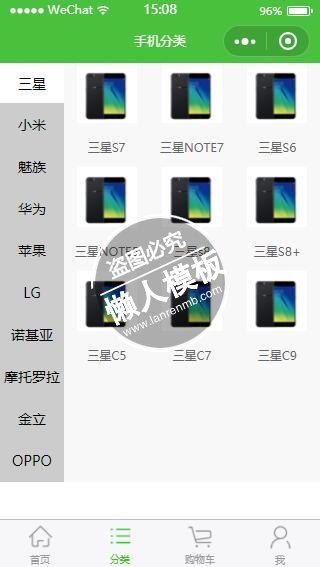
<!--pages/zx/zx.wxml-->
<view class="wrap">
	<!-- 左侧导航 -->
	<view class="navLeft">
		<block wx:for="{{categoryData}}">
			 <text catchtap="onAside" data-index="{{index}}" class="{{currentIndex == index?'active':''}}">{{item.title}}</text>
		</block>
	</view>
	<!-- 右侧内容 -->
	<view class="navRight">
		<block wx:for="{{categoryData}}">
			<view class="navRight-main-item" wx:if="{{currentIndex == index}}">
				<block wx:for="{{item.list}}" wx:for-item="subitem">
					<view class="navRight-main-item-list">
						<block wx:for="{{subitem.subList}}" wx:for-item="descitem" >
							<navigator bindtap="pud" data-img="{{descitem.descUrl}}" data-text="{{descitem.descTitlt}}">
								<!-- <view> -->
									<image src="{{descitem.descUrl}}"></image>
									<text>{{descitem.descTitlt}}</text>
								<!-- </view> -->
							</navigator>
						</block>
					</view>
				</block>
			</view>
		</block>
	</view>
</view>
|
.wrap{
    display: flex;
    background: #f8f8f8;
    width: 100%;
    height: 100%;
}
.navLeft{
    width: 20%;
    /*border-right: 1px solid #ccc; */
    background: #ccc;
    height: 100%;
}
.navLeft text{
    display: block;
    font-size: 14px;
    text-align: center;
    line-height: 98rpx;
    height: 98rpx;
    border-bottom: 1px solid #ccc;
}
.navLeft .active{
    box-sizing: border-box;
    background: #fff;
}
.navRight{
    width:80%;
    height: 100%;
}
.navRight-main-item{
    width: 100%;
    height: 100%;
    display: flex;
}
.navRight-main-item-list{
    width: 100%;
    display: -webkit-flex;
    flex-wrap:wrap;
}

.navRight-main-item-list navigator{
    width: 33.33%;
    text-align: center;
}
.navRight-main-item-list navigator image{
    width:60px;
    height: 60px;
}
.navRight-main-item-list navigator text{
    display: block;
    width: 100%;
    font-size: 12px;
    color: #666;
    margin: 12px 0;
}
|
// pages/zx/zx.js
var categoryData=require("../../data/classiFication.js")
Page({
  data:{
    currentIndex:0
  },
  pud:function(e){
    console.log(e)
    var img=e.currentTarget.dataset.img,
        text=e.currentTarget.dataset.text;
        wx.navigateTo({
          url:'../news/news?img='+img+'&text='+text
        })
  },
  onLoad:function(options){
    //console.log(options)
    // 页面初始化 options为页面跳转所带来的参数
    this.setData({
        categoryData:categoryData.default.data
    })
  },
  onAside:function(options){
    //console.log(options)
    //下标
    var index=options.currentTarget.dataset.index;
    console.log(index)
    this.setData({
        currentIndex:index
    });
  },
  onReady:function(){
    // 页面渲染完成
  },
  onShow:function(){
    // 页面显示
  },
  onHide:function(){
    // 页面隐藏
  },
  onUnload:function(){
    // 页面关闭
  }
})
|
模板简介:该模板名称为【微信小程序各手机品牌分类样式模板制作设计下载】,大小是,文档格式为.,推荐使用打开,作品中的图片,文字等数据均可修改,图片请在作品中选中图片替换即可,文字修改直接点击文字修改即可,您也可以新增或修改作品中的内容,该模板来自用户分享,如有侵权行为请联系网站客服处理。欢迎来懒人模板【小程序教程】栏目查找您需要的精美模板。
.jpg)
.jpg)