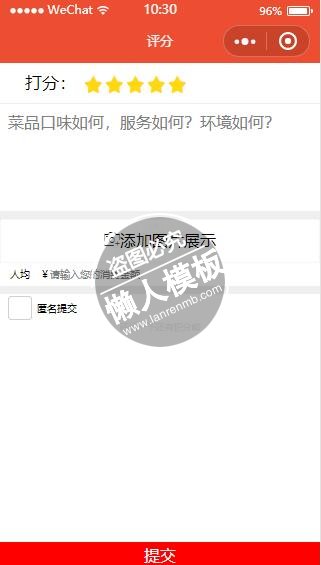
<!-- 可用组件:https://mp.weixin.qq.com/debug/wxadoc/dev/component/ -->
<view class="grade">
  <view class="give-star">
    打分:
    <text bindtap="chooseStar" data-star="{{ index }}" wx:for="12345" class="iconfont icon-star {{ currentStar >= index ? 'active' : '' }}"></text>
  </view>
  <textarea class="text-input" placeholder="{{ text_ph }}" value=""> </textarea>
  <view class="up-photo">
    <view class="photos-wrap" wx:for="{{ upPhotoList }}">
      <image data-imgsrc="{{ item }}" bindtap="showImage" class="photos"  src="{{ item }}"></image>
      <view bindtap="delphoto" data-delsrc="{{ item }}" class="del-photo">删除图片</view>
    </view>
  </view>
  <view bindtap="upPhoto" class="up-photo-icon iconfont icon-touxiangmorenicon">添加图片展示</view>
  <view class="in-money"><view> 人均 ¥</view><input bindblur="setMoney" type="number" placeholder='请输入您的消费金额' /></view>
  <checkbox class="no-name" bindtap="changbox" checked="{{ checkStatus }}">匿名提交</checkbox>
  <view class="grade-text">评论一下还有积分哟</view>
  <view bindtap="gradeBtn" class="grade-btn">提交</view>
</view>
|
.give-star {
  font-size: 40rpx;
  line-height: 90rpx;
  padding-left: 60rpx;
  border-bottom: 2rpx solid #efefef;
}
.give-star text {
  margin-left: 10rpx;
  color: #f4e6bd;
}
.give-star .active {
  color: #ffd80d;
}
.text-input {
  box-sizing: border-box;
  width: 100%;
  padding: 20rpx;
  height: 270rpx;
  border-bottom: 20rpx solid #efefef;
}
.up-photo {
  display: flex;
  flex-wrap: wrap;
}
.up-photo .photos-wrap {
  width: 32%;
  margin-right: 2rpx;
}
.up-photo .photos-wrap .photos {
  width: 100%;
  height: 200rpx;
}
.up-photo .photos-wrap .del-photo {
  text-align: center;
  line-height: 40rpx;
  border: 1rpx solid #efefef;
  border-radius: 10rpx;
  font-size: 20rpx;
}
.up-photo-icon {
  border: 1rpx dotted #eee;
  text-align: center;
  line-height: 100rpx;
}
.in-money {
  font-size: 24rpx;
  display: flex;
  border-bottom: 20rpx solid #efefef;
  line-height: 55rpx;
}
.no-name {
  padding-left: 20rpx;
  font-size: 24rpx;
}
.grade-text {
  font-size: 22rpx;
  text-align: center;
  color: #efefef;
}
.grade-btn {
  color: #fff;
  line-height: 60rpx;
  background-color: #f00;
  position: fixed;
  bottom: 0;
  width: 100%;
  text-align: center;
}
|
'use strict';

// 获取全局应用程序实例对象
// const app = getApp()

// 创建页面实例对象
Page({
  /**
   * 页面的初始数据
   */
  data: {
    title: 'grade',
    text_ph: '菜品口味如何,服务如何?环境如何?',
    upPhotoList: [],
    currentStar: 4,
    checkStatus: false
  },
  /**
   * 星星打分
   * @param e
   */
  chooseStar: function chooseStar(e) {
    this.setData({
      currentStar: e.currentTarget.dataset.star
    });
  },

  /**
   * 用户上传图片
   */
  upPhoto: function upPhoto() {
    var that = this;
    if (that.data.upPhotoList.length >= 6) {
      return wx.showToast({
        title: '最多6张图片',
        icon: 'success',
        duration: 2000
      });
    }
    wx.chooseImage({
      count: 1, // 默认9
      sizeType: ['original', 'compressed'], // 可以指定是原图还是压缩图,默认二者都有
      sourceType: ['album', 'camera'], // 可以指定来源是相册还是相机,默认二者都有
      success: function success(res) {
        // 返回选定照片的本地文件路径列表,tempFilePath可以作为img标签的src属性显示图片
        var tempFilePaths = res.tempFilePaths;
        var temp = tempFilePaths[0];
        that.data.upPhotoList.push(temp);
        that.setData({
          upPhotoList: that.data.upPhotoList
        });
      }
    });
  },

  /**
   * 图片展示
   */
  showImage: function showImage(e) {
    var that = this;
    wx.previewImage({
      current: e.currentTarget.dataset.imgsrc, // 当前显示图片的http链接
      urls: that.data.upPhotoList // 需要预览的图片http链接列表
    });
  },

  /**
   * 删除当前图片
   * @param e
   */
  delphoto: function delphoto(e) {
    var that = this;
    that.data.upPhotoList.splice(that.data.upPhotoList.indexOf(e.currentTarget.dataset.delsrc), 1);
    this.setData({
      upPhotoList: that.data.upPhotoList
    });
  },

  /**
   * 设置消费金额
   * @param e
   */
  setMoney: function setMoney(e) {
    this.setData({
      useMoney: e.detail.value
    });
  },

  /**
   * 提交评论信息
   */
  gradeBtn: function gradeBtn() {
    wx.switchTab({
      url: '../index/index'
    });
  },

  /**
   * checkbox 选项
   * @param e
   */
  changbox: function changbox() {
    this.setData({
      checkStatus: !this.data.checkStatus
    });
  },

  /**
   * 生命周期函数--监听页面加载
   */
  onLoad: function onLoad() {
    // TODO: onLoad
  },


  /**
   * 生命周期函数--监听页面初次渲染完成
   */
  onReady: function onReady() {
    // TODO: onReady
  },


  /**
   * 生命周期函数--监听页面显示
   */
  onShow: function onShow() {
    // TODO: onShow
  },


  /**
   * 生命周期函数--监听页面隐藏
   */
  onHide: function onHide() {
    // TODO: onHide
  },


  /**
   * 生命周期函数--监听页面卸载
   */
  onUnload: function onUnload() {
    // TODO: onUnload
  },


  /**
   * 页面相关事件处理函数--监听用户下拉动作
   */
  onPullDownRefresh: function onPullDownRefresh() {
    // TODO: onPullDownRefresh
  }
});
//# sourceMappingURL=grade.js.map
|
模板简介:该模板名称为【微信小程序餐饮类服务环境打分页面样式模板制作设计下载】,大小是,文档格式为.,推荐使用打开,作品中的图片,文字等数据均可修改,图片请在作品中选中图片替换即可,文字修改直接点击文字修改即可,您也可以新增或修改作品中的内容,该模板来自用户分享,如有侵权行为请联系网站客服处理。欢迎来懒人模板【小程序教程】栏目查找您需要的精美模板。
.jpg)
.jpg)