
<import src="../../components/poi/poi.wxml"/>

<scroll-view scroll-x="true" class="header">
  <view class="nav">
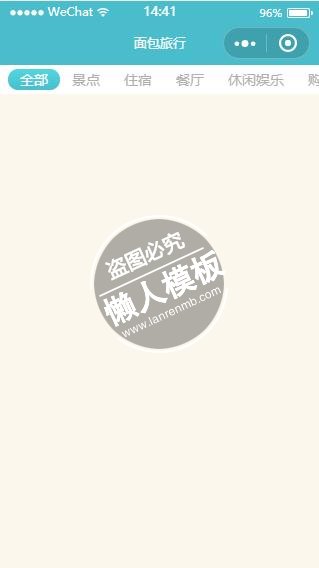
    <view class="{{ poiType === 'all' ? 'selected' : ''}}" data-type="all" bindtap="changePOIType">全部</view>
    <view class="{{ poiType === 'sights' ? 'selected' : ''}}" data-type="sights" bindtap="changePOIType">景点</view>
    <view class="{{ poiType === 'hotel' ? 'selected' : ''}}" data-type="hotel" bindtap="changePOIType">住宿</view>
    <view class="{{ poiType === 'restaurant' ? 'selected' : ''}}" data-type="restaurant" bindtap="changePOIType">餐厅</view>
    <view class="{{ poiType === 'entertainment' ? 'selected' : ''}}" data-type="entertainment" bindtap="changePOIType">休闲娱乐</view>
    <view class="{{ poiType === 'mall' ? 'selected' : ''}}" data-type="mall" bindtap="changePOIType">购物</view>
  </view>
</scroll-view>
<scroll-view class="list" style="height: {{ windowHeight - 70 / pixelRatio }}px; width: {{ windowWidth }}px;" scroll-y="true"  bindscrolltolower="loadMore" lower-threshold="800">
  <block wx:for="{{ pois }}" wx:for-item="poi" wx:key="poi.id">
    <template is="m-poi" data="{{poi: poi}}" />
  </block>
  <view wx:if="{{ hasMore }}" class="loading">
    正在加载...
  </view>
</scroll-view>
|
@import "../../components/poi/poi.wxss";

page{
  background-color: #fbf7ed;
  margin-top: 90rpx;
}
.header{
  position: fixed;
  top: 0;
  left: 0;
  width: 100%;
  height: 70rpx;
  background-color: #fff;
  box-sizing: border-box;
  z-index: 100;
}
.nav{
  display: inline-block;
  margin: 10rpx 20rpx;
  white-space: nowrap;
  overflow: hidden;
}
.nav view{
  color: #b0b0b0;
  display: inline-block;
  height: 50rpx;
  line-height: 50rpx;
  padding: 0 30rpx;
}
.nav .selected{
  color: #fff;
  border-radius: 50rpx;
  background-image: linear-gradient(to top, #4abdcc, #51d7df);
}
.list{
  position: absolute;
  top: 0;
  padding-top: 70rpx;
}
.m-poi{
  margin: 20rpx;
}
.loading{
  color: #999;
  text-align: center;
  margin: 20rpx 0;
}
|
const App = getApp();
const api = require('../../utils/api.js');

Page({
  data: {
    title: '',
    type: null,
    id: null,
    pois: null,
    poiType: 'all',
    start: 0,
    loading: false,
    hasMore: true,
    windowWidth: App.systemInfo.windowWidth,
    windowHeight: App.systemInfo.windowHeight,
    pixelRatio: App.systemInfo.pixelRatio,
  },
  onReady() {
    const self = this;
    wx.setNavigationBarTitle({
      title: self.data.title,
    });
  },
  onLoad(options) {
    const self = this;
    const type = options.type;
    const id = options.id;
    const name = options.name;
    wx.showToast({
      title: '正在加载',
      icon: 'loading',
      duration: 10000,
    });
    this.setData({
      title: name,
      type,
      id,
    });
    wx.setNavigationBarTitle({
      title: name,
    });
    wx.getSystemInfo({
      success(res) {
        self.setData({
          windowHeight: res.windowHeight,
        });
      },
    });
    this.getPOIList(type, id, 'all', true);
  },
  getPOIList(type, id, poiType, needRefresh) {
    const self = this;
    const loading = self.data.loading;
    const hasMore = self.data.hasMore;
    if (loading || (!hasMore && !needRefresh)) {
      return;
    }
    self.setData({
      loading: true,
    });
    if (needRefresh) {
      self.setData({
        pois: [],
        start: 0,
        hasMore: true,
      });
    }
    const data = {
      start: self.data.start,
    };
    api.getPlacePOIByID({
      data,
      query: {
        type,
        id,
        poiType,
      },
      success: (res) => {
        let newList = res.data.items;
        if (needRefresh) {
          console.log('needRefresh');
        } else {
          newList = self.data.pois.concat(newList);
        }
        const nextStart = res.data.next_start;
        if (nextStart) {
          self.setData({
            start: nextStart,
          });
        } else {
          self.setData({
            hasMore: false,
          });
        }
        self.setData({
          pois: newList,
          loading: false,
        });
        wx.hideToast();
      },
    });
  },
  loadMore() {
    const self = this;
    this.getPOIList(self.data.type, self.data.id, self.data.poiType, false);
  },
  changePOIType(e) {
    // TODO: stop previous request
    const self = this;
    const poiType = e.currentTarget.dataset.type;
    self.setData({
      poiType,
    });
    this.getPOIList(self.data.type, self.data.id, poiType, true);
  },
});
|
模板简介:该模板名称为【微信小程序蓝色顶部横排导航栏样式制作设计教程】,大小是,文档格式为.,推荐使用打开,作品中的图片,文字等数据均可修改,图片请在作品中选中图片替换即可,文字修改直接点击文字修改即可,您也可以新增或修改作品中的内容,该模板来自用户分享,如有侵权行为请联系网站客服处理。欢迎来懒人模板【小程序教程】栏目查找您需要的精美模板。
.jpg)
.jpg)




