
<!--index.wxml-->
<import src="../common/head.wxml" />
<import src="../common/foot.wxml" />

<view class="container">

<!--<template is="head" data="{{title: 'main'}}"/>-->

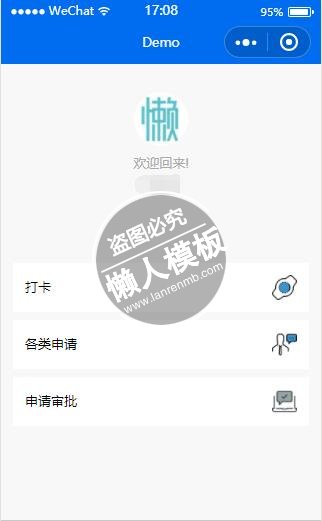
<view class="userinfo">
    <image class="userinfo-avatar" src="{{userInfo.avatarUrl}}" background-size="cover"></image>
    <text class="userinfo-nickname">{{UI[uindex].greeting}}n{{userInfo.nickName}}</text>
</view>

<view class="index">
  <view class="index-bd">
    <view class="kind-list">
      <block wx:for-items="{{list}}" wx:key="{{item.id}}">
        <view class="kind-list-item">
          <view id="{{item.id}}" class="kind-list-item-hd {{item.open ? 'kind-list-item-hd-show' : ''}}" bindtap="kindToggle">
            <view class="kind-list-text">{{item.name[uindex] }}</view>
            <image class="kind-list-img" src="../../image/{{item.id}}.png"></image>
          </view>
          <view class="kind-list-item-bd {{item.open ? 'kind-list-item-bd-show' : ''}}">
            <view class="navigator-box {{item.open ? 'navigator-box-show' : ''}}">
              <!--<block wx:for-items="{{item.pages}}" wx:for-item="page" wx:key="*item">
                <navigator url="pages/{{page}}/{{page}}" class="navigator">
                  <view class="navigator-text">{{page}}</view>
                  <view class="navigator-arrow"></view>
                </navigator>
              </block>-->
              <block wx:for-items="{{item.pages}}" wx:for-item="page" wx:key="*item">
                <navigator url="../{{item.id}}/{{page.path}}/{{page.path}}" class="navigator">
                  <view class="navigator-text">{{page.title[uindex]}}</view>
                  <view class="navigator-arrow"></view>
                </navigator>
              </block>
            </view>
          </view>
        </view>
      </block>
    </view>
  </view>
</view>


  <view class="usermotto">
    <!--<text class="user-motto">{{motto}}</text>-->
  </view>
</view>
|
/**index.wxss**/
@import "../common/index.wxss";

.userinfo {
  display: flex;
  flex-direction: column;
  align-items: center;
  margin-top: 20px;
}

.userinfo-avatar {
  width: 128rpx;
  height: 128rpx;
  margin: 20rpx;
  border-radius: 50%;
}

.userinfo-nickname {
  color: #aaa;
  text-align: center
}
|
//index.js
//获取应用实例
var app = getApp()
Page({
  data: {
    userInfo: {},
    uindex: null,
    UI: [
      {greeting: "欢迎回来!"}, // Chinese UI
      {greeting: "Welcome back!"},  // English UI
      {greeting: "お帰りなさい!"}
    ],
    list: [
      {
        id: 'timecard',
        name: ['打卡', 'Time Card', '打刻'],
        open: false,
        pages: [
          {path: "normal", title: ["正常出勤", "Normal Checkin", '通常出勤']},
          {path: "history", title: ["打卡记录", "Check History", "打刻履歴"]}
          ]
      }, {
        id: 'overwork',
        name: ['各类申请', 'Application', "各種申請"],
        open: false,
        pages: [
          {path: "create", title: ["加班申请", "Apply Overwork", "残業申請"]},
          {path: "list", title: ["休假申请", "Apply vacation", "休暇申請"]}
          ]
      }, {
        id: 'sample',
        name: ['申请审批', 'Improvement', "申請承認"],
        open: false,
        pages: [
          {path: "index", title: ["子菜单", "Sub-menu", "サブメニュー"]}
          ]
      }
    ]
  },
  //事件处理函数
  kindToggle: function (e) {
    var id = e.currentTarget.id, list = this.data.list;
    for (var i = 0, len = list.length; i < len; ++i) {
      if (list[i].id == id) {
        list[i].open = !list[i].open
      } else {
        list[i].open = false
      }
    }
    this.setData({
      list: list
    });
  },
  onLoad: function () {
    console.log('onLoad')


    var that = this
    //调用应用实例的方法获取全局数据
    app.getUserInfo(function(userInfo){
      //更新数据
      that.setData({
        userInfo:userInfo
      })
    })
  },
  onShow:function(){
    // 设置app语言的全局变量
    var selectedLanguage = app.globalData.settings.language;
    console.log('Current Language:' + selectedLanguage + ' (0: ZH-ch 1: ENG)');
    this.setData({
      uindex: selectedLanguage
    })
  }
})
|
模板简介:该模板名称为【签到打卡微信小程序考勤页面设计教程】,大小是,文档格式为.,推荐使用打开,作品中的图片,文字等数据均可修改,图片请在作品中选中图片替换即可,文字修改直接点击文字修改即可,您也可以新增或修改作品中的内容,该模板来自用户分享,如有侵权行为请联系网站客服处理。欢迎来懒人模板【小程序教程】栏目查找您需要的精美模板。
.jpg)
.jpg)




