
<!--pages/order/downline.wxml-->
<view class="w100">
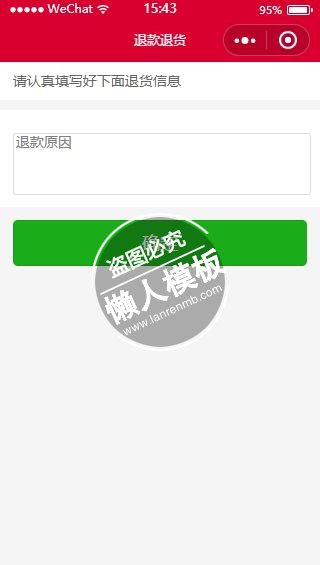
  <view class="p_all">请认真填写好下面退货信息</view>
  <view class="p_all01 mt10 bg">
    <!--<view class=" mt10">
      <input class="inputStyle" name="input" bindinput="reasonInput" placeholder="退货原因" value="{{reason}}" />
    </view>-->
    <view class=" mt10">
      <!-- <view class="c3">退货描述</view> -->
      <textarea class="min_60 inputStyle" auto-height name="remark" placeholder="退款原因" bindinput="remarkInput" value="{{remark}}"/>
    </view>
    <!--<view class=" mt10">
      <view class="c3">图片凭证</view>
      <button bindtap="uploadImgs">上传图片</button>
    </view>-->
  </view>
  <view class="p_all01 mtt0">
    <view class="btnGreen">
      <button type="primary" id="btnPay" formType="submit" bindtap="submitReturnData">确定</button>
    </view>
  </view>
</view>
|
/* pages/order/downline.wxss */

.w100{ width: 100%}
.p_all{
    background: #fff;
    width: 92%;
    padding:2% 4%;
    color: #666;
    font-size: 14px;
    display: block;
    line-height: 25px;
}
.p_all01{
    width: 92%;
    padding:4%;
    color: #666;
    font-size: 14px;
    display: block;
    line-height: 25px;
}
.p_all text{
    width: 100%;
    display: block;
}
.iconWarn{
   vertical-align:top;padding-right:2px;
}

.iconClear{
  float:right;
  padding-top: 5px;
  padding-left: 10px;
  padding-right:10px;
  margin-top:-36px;
  height: 28px;
}

.inputStyle{
  height: 36px;
  line-height: 36px;
  padding-left: 2px;
  border:1px solid #ddd;
  border-radius: 3px;
  width: 100%;
}

.tips{
  margin-bottom:10px;
}
.x_right{
    width:16px;
    height: 18px;
    display:inline-block;
    vertical-align: middle;
    float: right;
}
.zhifu{
    background: #fff;
    margin-bottom: 1px;
    padding: 4%;
    width: 92%;
    font-size: 14px;
    color: #666;
}
.min_60{
    min-height: 60px;
}
|
var app = getApp();
// pages/order/downline.js
Page({
  data:{
    orderId:0,
    reason:'',
    remark:'',
    imgUrl:'',
  },
  onLoad:function(options){
    this.setData({
      orderId: options.orderId,
    });
  },
  submitReturnData:function(){
    //console.log(this.data);
    //数据验证
    if(!this.data.remark){
      wx.showToast({
        title: '请填写退款原因',
        icon: 'success',
        duration: 2000
      });
      return;
    }
    // if(!this.data.remark){
    //   wx.showToast({
    //     title: '请填写退货描述',
    //     icon: 'success',
    //     duration: 2000
    //   });
    //   return;
    // }
    var that = this;
    wx.request({
      url: app.d.ceshiUrl + '/Api/Order/orders_edit',
      method:'post',
      data: {
        id: that.data.orderId,
        type:'refund',
        back_remark:that.data.remark,
        //imgUrl:that.data.imgUrl,
      },
      header: {
        'Content-Type':  'application/x-www-form-urlencoded'
      },
      success: function (res) {
        //--init data
        var status = res.data.status;
        if(status == 1){
          wx.showToast({
            title: '您的申请已提交审核!',
            duration: 2000
          });
          // wx.navigateTo({
          //   url: '/pages/user/dingdan?currentTab=4',
          // });
        }else{
          wx.showToast({
            title: res.data.err,
            duration: 2000
          });
        }
      },
    });

  },
  reasonInput:function(e){
    this.setData({
      reason: e.detail.value,
    });
  },
  remarkInput:function(e){
    this.setData({
      remark: e.detail.value,
    });
  },
  uploadImgs:function(){

    wx.chooseImage({
      success: function(res) {
        console.log(res);
        var tempFilePaths = res.tempFilePaths
        wx.uploadFile({
          url: 'http://example.weixin.qq.com/upload', //仅为示例,非真实的接口地址
          filePath: tempFilePaths[0],
          name: 'file',
          formData:{
            'user': 'test'
          },
          success: function(res){
            var data = res.data
            //do something
          }
        })
      }
    });
  },
})
|
模板简介:该模板名称为【微信小程序退款退货原因信息样式设计制作开发教程】,大小是,文档格式为.,推荐使用打开,作品中的图片,文字等数据均可修改,图片请在作品中选中图片替换即可,文字修改直接点击文字修改即可,您也可以新增或修改作品中的内容,该模板来自用户分享,如有侵权行为请联系网站客服处理。欢迎来懒人模板【小程序教程】栏目查找您需要的精美模板。
.jpg)
.jpg)




