
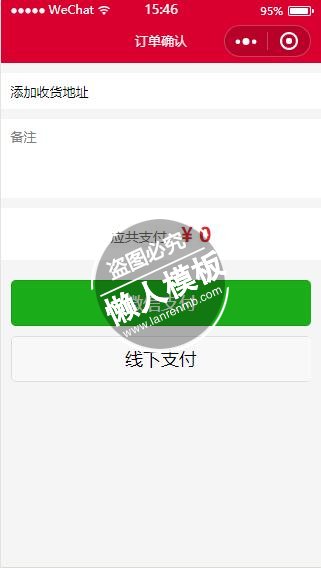
<!--pay.wxml-->
<view class="w100">
		<view class="p_all bg_white df item" wx:for="{{productData}}">
			<view class="cp_photo">
				<image src="{{item.photo_x}}"></image>
			</view>
			<view class="df_1">
				<view class="font_14 mt5 ovh1">
		           {{item.name}}
		        </view>
			<text class="gm_ovh_1h red pt10">¥{{item.price}}</text>
			<text class="gm_ovh_1h pt10">数量:{{item.num}}</text>
			</view>
		</view>

		<view class="p_all bg_white mt10 font_14" wx:if="{{addemt==0}}">
		   <navigator url="../address/user-address/user-address?cartId={{cartId}}" hover-class="none">
			<view class="df">
				<view class="df_1 c6">
				<view class="l_h20">收货人:{{address.name}}<text class="fl_r mr10">{{address.tel}}</text></view>
				<view class="l_h20 mt5">地址:{{address.address_xq}}</view>
				</view>
				<image class="x_right mt15" src="/images/x_right.png"></image>
			</view>
			</navigator>
		</view>
		<view class="p_all bg_white mt10 font_14" wx:else>
		   <navigator url="../address/user-address/user-address?cartId={{cartId}}" hover-class="none">
			<view class="df">
				添加收货地址
			</view>
			</navigator>
		</view>

<view class="xuan" wx:if="{{vou!=''}}" >
	<view class="hui">可使用优惠券:</view>
<!--设置监听器,当点击radio时调用-->
<radio-group bindchange="listenerRadioGroup" class="hui">
<!--label通常与radio和checkbox结合使用-->
  <label style="display: flex" wx:for="{{vou}}" class="xuan" bindtap="getvou" data-id="{{item.vid}}" data-price="{{item.amount}}">
  <radio value="{{item.vid}}" />满{{item.full_money}}立减{{item.amount}}元
 </label>
 <label style="display: flex" class="xuan" bindtap="getvou" data-id="0" data-price="0">
  <radio value="0"/>不使用优惠券
 </label>
</radio-group>


</view>
		<view class="p_all bg_white mt10 font_14">
			<textarea class="min_60" auto-height name="remark" placeholder="备注" bindinput="remarkInput" value="{{remark}}"/>
		</view>

	<view class="zhifu mt10 tc">应共支付:<span class="font_20 red">¥ {{total}}</span></view>
	<view class="p_all mt10">
		<view class="btnGreen">
			<button class="wx_pay_submit" type="primary" id="wxPay" disabled="{{btnDisabled}}" formType="submit" bindtap="createProductOrderByWX">微信支付</button>
			<button class="xx_pay_submit" type="default" id="xxPay" disabled="{{btnDisabled}}" formType="submit" bindtap="createProductOrderByXX">线下支付</button>
		</view>
	</view>
</view>
|
.item .cp_photo{
    width: 60px;
    height: 60px;
    overflow: hidden;
    border-radius: 3px;
    margin-right: 10px;
}
.item .cp_photo image{
    width: 60px;
    height: 60px;
}
.gm_ovh_2h{
    line-height:25px;
    height: 50px;
    margin:0;
    overflow:hidden;
    text-overflow:ellipsis;
    display:-webkit-box;
    -webkit-line-clamp:2;
    -webkit-box-orient:vertical;
    font-size: 16px;
}
.gm_ovh_1h{
    line-height:25px;
    height: 25px;
    margin:0;
    overflow:hidden;
    text-overflow:ellipsis;
    display:-webkit-box;
    -webkit-line-clamp:2;
    -webkit-box-orient:vertical;
    font-size: 16px;
}
.h10_hui{
    height: 10px;
    width: 100%;
    background: #eee;
}

.min_60{
    min-height: 60px;
}

.w100{ width: 100%}

.iconWarn{
   vertical-align:top;padding-right:2px;
}

.iconClear{
  float:right;
  padding-top: 5px;
  padding-left: 10px;
  padding-right:10px;
  margin-top:-36px;
  height: 28px;
}

.inputStyle{
  height: 36px;
  line-height: 36px;
  padding-left: 2px;
  width:80%;
}

.tips{
  margin-bottom:10px;
}
.x_right{
    width:16px;
    height: 18px;
    display:inline-block;
    vertical-align: middle;
    float: right;
}
.zhifu{
    background: #fff;
    margin-bottom: 1px;
    padding: 4%;
    width: 92%;
    font-size: 14px;
    color: #666;
}
.font_20{
    font-size: 20px;
    font-weight: bold;
}
.xx_pay_submit{
  margin-top: 10px;
}
.gms_view{
    width: 100%;
    display: inline-block;
    text-align: right;
}
.gms_view navigator{
    border: 1px solid #ddd;
    width: 22px;
    height: 22px;
    border-radius: 50%;
    color: #666;
    font-size: 12px;
    text-align: center;
    line-height: 22px;
    float: right;
    font-weight: bold;

}
.gms_view input{
    background: #fff;
    border: 1px solid #ddd;
    border-radius: 2px;
    font-size: 12px;
    width: 30px;
    margin: 0 5px;
    text-align: center;
    color: #999;
    float: right;
}
.che{
    border-radius:50% ;
    width: 20px;
    height: 20px;
}
.hui{
    margin-left: 28rpx;
    font-size: 30rpx;

}
.xuan{
    padding: 10rpx 0;
    font-size: 30rpx;
}
|
var app = getApp();
// pages/order/downline.js
Page({
  data:{
    itemData:{},
    userId:0,
    paytype:'weixin',//0线下1微信
    remark:'',
    cartId:0,
    addrId:0,//收货地址//测试--
    btnDisabled:false,
    productData:[],
    address:{},
    total:0,
    vprice:0,
    vid:0,
    addemt:1,
    vou:[],
    orderId:0
  },
  onLoad:function(options){
    var uid = app.d.userId;
    this.setData({
      cartId: options.cartId,
      userId: uid
    });
    this.loadProductDetail();
  },
  loadProductDetail:function(){
    var that = this;
    wx.request({
      url: app.d.ceshiUrl + '/Api/Payment/buy_cart',
      method:'post',
      data: {
        cart_id: that.data.cartId,
        uid: that.data.userId,
      },
      header: {
        'Content-Type':  'application/x-www-form-urlencoded'
      },
      success: function (res) {
        //that.initProductData(res.data);
        var adds = res.data.adds;
        if (adds){
          var addrId = adds.id;
          that.setData({
            address: adds,
            addrId: addrId
          });
        }
        that.setData({
          addemt: res.data.addemt,
          productData:res.data.pro,
          total: res.data.price,
          vprice: res.data.price,
          vou: res.data.vou,
        });
        //endInitData
      },
    });
  },

  remarkInput:function(e){
    this.setData({
      remark: e.detail.value,
    })
  },

 //选择优惠券
  getvou:function(e){
    var vid = e.currentTarget.dataset.id;
    var price = e.currentTarget.dataset.price;
    var zprice = this.data.vprice;
    var cprice = parseFloat(zprice) - parseFloat(price);
    this.setData({
      total: cprice,
      vid: vid
    })
  },

//微信支付
  createProductOrderByWX:function(e){
    this.setData({
      paytype: 'weixin',
    });

    this.createProductOrder();
  },

  //线下支付
  createProductOrderByXX:function(e){
    this.setData({
      paytype: 'cash',
    });
    wx.showToast({
      title: "线下支付开通中,敬请期待!",
      duration: 3000
    });
    return false;
    this.createProductOrder();
  },

  //确认订单
  createProductOrder:function(){
    this.setData({
      btnDisabled:false,
    })

    //创建订单
    var that = this;
    wx.request({
      url: app.d.ceshiUrl + '/Api/Payment/payment',
      method:'post',
      data: {
        uid: that.data.userId,
        cart_id: that.data.cartId,
        type:that.data.paytype,
        aid: that.data.addrId,//地址的id
        remark: that.data.remark,//用户备注
        price: that.data.total,//总价
        vid: that.data.vid,//优惠券ID
      },
      header: {
        'Content-Type':  'application/x-www-form-urlencoded'
      },
      success: function (res) {
        //--init data
        var data = res.data;
        if(data.status == 1){
          //创建订单成功
          var order_id = data.arr.order_id;
          that.setData({
            orderId: order_id
          });

          if(data.arr.pay_type == 'cash'){
              wx.showToast({
                 title:"请自行联系商家进行发货!",
                 duration:3000
              });
              return false;
          }
          if(data.arr.pay_type == 'weixin'){
            //微信支付
            that.wxpay(data.arr);
          }
        }else{
          wx.showToast({
            title:"下单失败!",
            duration:2500
          });
        }
      },
      fail: function (e) {
        wx.showToast({
          title: '网络异常!',
          duration: 2000
        });
      }
    });
  },

  //调起微信支付
  wxpay: function(order){
    var that = this;
      wx.request({
        url: app.d.ceshiUrl + '/Api/Pay/dowxpay',
        data: {
          order_id:order.order_id,
          order_sn:order.order_sn,
          uid: that.data.userId,
        },
        method: 'POST', // OPTIONS, GET, HEAD, POST, PUT, DELETE, TRACE, CONNECT
        header: {
          'Content-Type':  'application/x-www-form-urlencoded'
        }, // 设置请求的 header
        success: function(res){
          if(res.data.status==1){
            var order=res.data.success;
            wx.requestPayment({
              timeStamp: order.timeStamp,
              nonceStr: order.nonceStr,
              package: order.package,
              signType: 'MD5',
              paySign: order.paySign,
              success: function(res){
                wx.showToast({
                  title: '支付成功!',
                })

              },
              fail: function(res) {
                wx.showToast({
                  title:res,
                  duration:3000
                })
              }
            })
          }else{
            wx.showToast({
              title: res.data.err,
              duration: 2000
            });
          }
        },
        fail: function() {
          // fail
          wx.showToast({
            title: '网络异常!',
            duration: 30000
          });
        }
      })
  },

});
|
模板简介:该模板名称为【微信小程序订单确认支付信息页面样式设计制作开发教程】,大小是,文档格式为.,推荐使用打开,作品中的图片,文字等数据均可修改,图片请在作品中选中图片替换即可,文字修改直接点击文字修改即可,您也可以新增或修改作品中的内容,该模板来自用户分享,如有侵权行为请联系网站客服处理。欢迎来懒人模板【小程序教程】栏目查找您需要的精美模板。
.jpg)
.jpg)




