
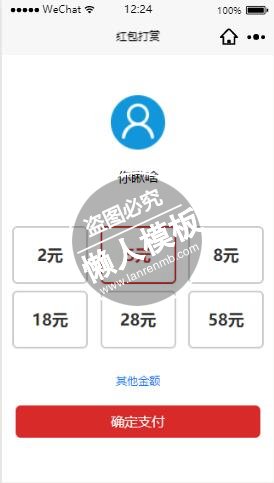
<!--用户信息  -->
<view class="user-contont">
    <view class="user-name">
        <image src="{{imageSrc}}"></image>
        <text>{{imageName}}</text>
    </view>
</view>
<!--金额  -->
<view class="moeny">
    <view class="{{index == value ?  'action' : '' }}"  wx:for="{{Marr}}" wx:key="{{index}}" bindtap="actionFn" id="{{index}}" >{{item}}</view>
</view>
<!--其他金额  -->
<view class="other" bindtap="otherFn">其他金额</view>
<!-- 确定打赏  -->
<view class="smreward" bindtap="smReward">确定支付</view>
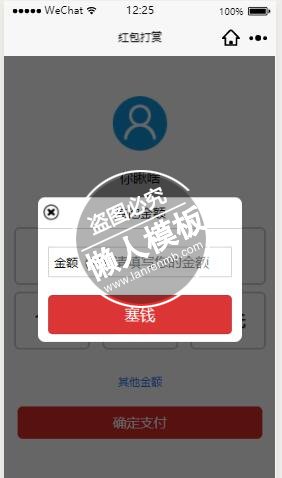
<!--遮罩层  -->
<view class="mask" wx:if="{{close}}">
    <view class="mask-back"></view>
    <view class="mask-text">
        <view class="title">
            <image src="/images/close.png" bindtap="closeFn"></image>
            <text >其他金额</text>
        </view>
        <view class="txmoeny">
            <text>金额(元)</text>
            <input placeholder="请填写您的金额" bindinput="inputFn"/>
        </view>
        <view class="sumbtn" bindtap="sumbtn"><button>塞钱</button></view>
    </view>
</view>
|
.user-contont {
    display: flex;
    align-items: center;
    justify-content: center;
    height: 40%;
}
.user-name {
    width: 500rpx;
    display: flex;
    flex-wrap: wrap;
    align-items: center;
    justify-content: center;
}
.user-name image {
    height: 150rpx;
    width: 150rpx;
    margin-bottom: 50rpx;
}
.user-name  text {
    width: 100%;
    text-align: center;
}
.moeny {
    padding: 0 30rpx;
    display: flex;
    flex-wrap: wrap;
    justify-content: space-between;
}
.moeny view{
    height: 150rpx;
    width: 200rpx;
    border:2px solid #ccc;
    display: flex;
    align-items: center;
    justify-content: center;
    margin-bottom: 20rpx;
    border-radius: 15rpx;
    font-size: 46rpx;
    color: #333;
    font-weight: bold;
}
.moeny view.action{
    color: #d92a2a;
    border-color: #d92a2a;
}
.other {
    color: #1679f3;
    font-size: 32rpx;
    display: flex;
    justify-content: center;
    padding-top: 50rpx;
}
.mask-back {
    height: 100%;
    width: 100%;
    background: #000;
    opacity: 0.6;
    position: fixed;
    top: 0;
    left: 0;
    z-index: 1;
}
.mask-text {
    height: 400rpx;
    width:75%;
    background-color: #fff;
    position: fixed;
    top:0;
    right: 0;
    left: 0;
    bottom: 0;
    margin: auto;
    z-index: 2;
    border-radius: 20rpx;
}
.title {
    padding: 20rpx 0;
    display: flex;
    position: relative;
    justify-content: center;
    align-items: center;
    border-bottom: 1px solid #ccc;
}
.title image {
    height: 45rpx;
    width: 45rpx;
    position: absolute;
    top: 20rpx;
    left: 15rpx;
}
.title text {
    font-size: 36rpx;
}
.txmoeny {
    position: relative;
    display:flex;
    height: 80rpx;
    margin: 50rpx 30rpx;
    border:1px solid #ccc;
    padding: 0 15rpx;
}
.txmoeny  text {
  display: flex;
  align-items: center;
  font-size: 34rpx;

}
.txmoeny input {
    flex: 1;
    height: 100%;
}
.sumbtn {
    height: 80rpx;
    padding: 0 30rpx;
}
.sumbtn button {
    background-color: #db3535;
    color: #fff;
}
.smreward {
    height: 90rpx;
    width: 90%;
    display: flex;
    justify-content: center;
    align-items: center;
    color: #fff;
    margin: 0 auto;
    background-color: #d92a2a;
    border-radius: 15rpx;
    margin-top: 50rpx;
    font-size: 38rpx;
}
|
//  引入函数库
var Utils = require("../../utils/util.js");
var payModel = {};
// 定义数据
var data  = {
    Marr: ['2元', '5元', '8元', '18元', '28元', '58元'],   // 打赏的金额
    value:"2",   // 选中的id、进行对比
    money:"",  // 选中的金钱
    close:false,  // 是否关闭其他金额的弹层
    imageSrc:"/images/user.png",    // 打赏头像
    imageName:"你瞅啥",   // 打赏name
    dataJson:"",        // load过来的数据
    txmoeny:"",     // 其他金额输入值
    ismoney:"0",    // 判断金额是否正确
}
Page({
  data: data,
  onLoad: function (options) {
      if (JSON.stringify(options) == "{}") return false;
      this.setData({
          dataJson : JSON.parse(options.data)
      })
      this.loadValue(this.data.dataJson); // 加载数据
  },
  loadValue(obj){  // 点击红包进来加载头像、name
    var _this = this;
    this.setData({
          imageSrc: obj.img,
          imageName: obj.name,
          money: _this.data.Marr[_this.data.value].split("元")[0]
    })
  },
  actionFn(e){   // 选择金额
      var Doid = e.target.id;
      var Marr = this.data.Marr;
      this.setData({
          value: Doid,
          money: Marr[Doid].split("元")[0]
      })
  },
  otherFn(){    // 其他金额
      this.setData({ close:true });
  },
  closeFn(){     //关闭其他金额的弹层
      this.setData({ close: false });
  },
  smReward(){   // 确定支付
      var money = this.data.money;
      this.request(money);
  },
  request(money){    // 请求接口
      var _this = this;
      Utils.requestFn({ // 重新获取数据
          url: '/index.php/redfaq?server=1',
          method: "POST",
          data: {
              sdk: _this.data.dataJson.sdk,
              uid: _this.data.dataJson.uid,
              faqid: _this.data.dataJson.faqid,
              ansid: _this.data.dataJson.ansid,
              attid: _this.data.dataJson.attid,
              money: money,
              openid: _this.data.dataJson.openid,
          },
          success: function (res) {
              if (res.data.status) {
                //  返回的支付信息
                  var data = res.data.data;
                  payModel = {
                      appId: data.appId,
                      nonceStr: data.nonceStr,
                      package: data.package,
                      paySign: data.paySign,
                      signType: data.signType,
                      timeStamp: data.timeStamp
                  }
                  _this.requestPayment(payModel);
              }else{
                  Utils.showModal(res.data.message);
              }
          }
      })
  },
  sumbtn(){ // 其他金额塞钱
      var isBool = this.data.ismoney;
      var txmoeny = this.data.txmoeny
      if (isBool){
          this.request(txmoeny);
      }else{
          Utils.showModal("请输入正确的金额、谢谢");
      }
  },
  inputFn(e){    // 输入金额
    var value =  e.detail.value;
    var re = Utils.Verification.money;
    this.setData({
        ismoney: re.test(value),
        txmoeny: value
    })
  },
  requestPayment(payModel){
      //  获取微信支付的数据
      wx.requestPayment({
          'timeStamp': payModel.timeStamp,
          'nonceStr': payModel.nonceStr,
          'package': payModel.package,
          'signType': 'MD5',
          'paySign': payModel.paySign,
          "total_fee": "8",
          'success': function (res) {   // 成功的状态
              Utils.reLaunch("支付成功", "/pages/Consultation/Consultation");
          },
          'fail': function (res) {      // 失败的状态
              Utils.reLaunch("支付失败", "/pages/Consultation/Consultation");
          }
      })
  },
  onReady: function () {

  },
  onShow: function () {

  },
  onHide: function () {

  },
  onUnload: function () {

  },
  onPullDownRefresh: function () {

  },
  onReachBottom: function () {

  },
  onShareAppMessage: function () {

  }
})
|
模板简介:该模板名称为【微信小程序开发自定义金额红包打赏充值页面设计与制作教程】,大小是,文档格式为.,推荐使用打开,作品中的图片,文字等数据均可修改,图片请在作品中选中图片替换即可,文字修改直接点击文字修改即可,您也可以新增或修改作品中的内容,该模板来自用户分享,如有侵权行为请联系网站客服处理。欢迎来懒人模板【小程序教程】栏目查找您需要的精美模板。
.jpg)
.jpg)




