
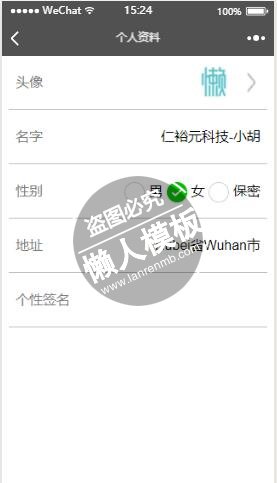
<view class="container">
<view class="avatar">
  <text>头像</text>
  <view class="real">
    <image class="n" bindtap="chooseimage" src="../../image/avatar_next.png"></image>
    <image class="a" src="{{userInfoAvatar}}"/>

  </view>
</view>
<view class="nickName">
  <text>名字</text>
  <view class="real">{{nickName}}</view>
</view>
<view class="sex">
  <text>性别</text>
  <view class="real">
   <radio-group class="radio-group" bindchange="radioChange">
     <label class="radio" wx:for="{{items}}">
       <radio value="{{item.name}}" checked="{{item.checked}}"/>{{item.value}}
     </label>
   </radio-group>
  </view>
</view>
<view class="area">
  <text>地址</text>
  <view class="real">{{province}}省{{city}}市</view>
</view>
<view class="signature">
  <text>个性签名</text>
  <view class="real"></view>
</view>
</view>
|
.container{
  width: 95%;
  height: 100%;
  margin: 0 auto;
  overflow-y: scroll;
}
.avatar{
  width: 100%;
  height: 150rpx;
  line-height: 150rpx;
  position: relative;
}
.avatar::after{
  content: '';
  position: absolute;
  bottom: 0;
  left: 0;
  right: 0;
  height: 1px;
  transform: scaleY(.5);
  background-color: #9D9D9D;
}

.nickName{
  width: 100%;
  height: 150rpx;
  line-height: 150rpx;
  vertical-align: middle;
  position:relative;
}
.nickName::before{
  content: '';
  position: absolute;
  bottom: 0;
  left: 0;
  right: 0;
  height: 1px;
  transform: scaleY(.5);
  background-color: #9D9D9D;
}
.sex{
  width: 100%;
  height: 150rpx;
  line-height: 150rpx;
  position: relative;
}
.sex::before{
  content: '';
  position: absolute;
  bottom: 0;
  left: 0;
  right: 0;
  height: 1px;
  transform: scaleY(.5);
  background-color: #9D9D9D;
}
.area{
  width: 100%;
  height: 150rpx;
  line-height: 150rpx;
  position: relative;
}
.area::before{
  content: '';
  position: absolute;
  bottom: 0;
  left: 0;
  right: 0;
  height: 1px;
  transform: scaleY(.5);
  background-color: #9D9D9D;
}
.signature{
  width: 100%;
  height: 150rpx;
  line-height: 150rpx;
  position: relative;
}
.signature::after{
  content: '';
  position: absolute;
  bottom: 0;
  left: 0;
  right: 0;
  height: 1px;
  transform: scaleY(.5);
  background-color: #9D9D9D;
}
.container text{
  float: left;
  color: #7B7B7B;
  vertical-align: middle;
  margin-left: 20rpx;
}
.container .real{
  float: right;
  margin-right: 20rpx;
  vertical-align: middle;
}
.a{
  float: right;
  width: 100rpx;
  height: 100rpx;
  margin-top:25rpx;
  margin-right: 30rpx;
  border-radius: 50%;
}
.n{
  float: right;
  width: 50rpx;
  height: 100rpx;
  margin-top: 25rpx;
  vertical-align: middle;
}
|
Page({
  data: {
   tempFilePaths: '',
   nickName:'',
   userInfoAvatar:'',
   sex:'',
   province:'',
   city:'',
   items: [
       {name: 'man', value: '男'},
       {name: 'femail', value: '女', checked: 'true'},
       {name: 'bm', value: '保密'}
     ]
   },
   chooseimage: function () {
       var _this = this;
       wx.chooseImage({
         count: 1, // 默认9
         sizeType: ['original', 'compressed'], // 可以指定是原图还是压缩图,默认二者都有
         sourceType: ['album', 'camera'], // 可以指定来源是相册还是相机,默认二者都有
         success: function (res) {
           // 返回选定照片的本地文件路径列表,tempFilePath可以作为img标签的src属性显示图片
           _this.setData({
             userInfoAvatar:res.tempFilePaths
           })
         },
         radioChange: function(e) {
          console.log('radio发生change事件,携带value值为:', e.detail.value)
        },
      })
    },
  onLoad: function () {
    var that=this;
    wx.getUserInfo({
      success: function(res){
        // success
        that.setData({
          nickName:res.userInfo.nickName,
          userInfoAvatar:res.userInfo.avatarUrl,
          province:res.userInfo.province,
          city:res.userInfo.city
        })

        switch(res.userInfo.gender){
          case 0:
            that.setData({
              sex:'未知'
            })
          break;
          case 1:
            that.setData({
              sex:'男'
            })
          break;
          case 2:
            that.setData({
              sex:'女'
            })
          break;
        }
      },
      fail: function() {
        // fail
        console.log("获取失败!")
      },
      complete: function() {
        // complete
        console.log("获取用户信息完成!")
        console.log(this.province)
      }
    })
  }
})
|
模板简介:该模板名称为【微信小程序开发会员中心个人资料修改页面制作与设计教程】,大小是,文档格式为.,推荐使用打开,作品中的图片,文字等数据均可修改,图片请在作品中选中图片替换即可,文字修改直接点击文字修改即可,您也可以新增或修改作品中的内容,该模板来自用户分享,如有侵权行为请联系网站客服处理。欢迎来懒人模板【小程序教程】栏目查找您需要的精美模板。
.jpg)
.jpg)




