
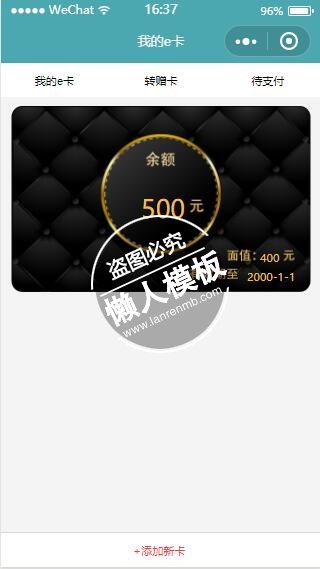
<view class="page-body">
<!--导航操作栏-->
    <view class = "nav-view">
        <view class="mycard category" bindtap="selectCategory" data-index="1">
            <text>我的e卡</text>
            <block wx:if="{{current_id == 1}}">
            <view class="select-line"></view>
            </block>
        </view>
        <view class="sendcard category" bindtap="selectCategory" data-index="2">
            <text>转赠卡</text>
            <block wx:if="{{current_id == 2}}">
            <view class="select-line"></view>
            </block>
        </view>
        <view class="waitforpay category" bindtap="selectCategory" data-index="3">
            <text>待支付</text>
            <block wx:if="{{current_id == 3}}">
            <view class="select-line"></view>
            </block>
        </view>
    </view>
    <!--e卡列表-->
    <view class="content-view">
        <block wx:for="{{ecards}}" wx:for-item="card" wx:key="{{id}}">
            <view class= "card-item">
                <image src="../../images/my_ecard_bg.png" mode="scaleToFill"></image>
                <text class="price">{{card.price}}</text>
                <text class="left">{{card.left}}</text>
                <text class="date_validity">{{card.date_validity}}</text>
            </view>
        </block>
    </view>
    <!--添加新卡按钮-->
    <view class="addcard-button" bindtap="addCard">
        <text>+添加新卡</text>
    </view>
</view>
<!--添加新卡的视图-->
<block wx:if="{{show_addcard}}">
    <view class="toast-view" bindtap="cancal_add">
        <image src="../../images/guigeClose.png"></image>
        <view class="option-view" catchtap="option_tap">
            <input placeholder="请输入礼品卡密码" placeholder-style="font-size:28rpx;color:#d4d4d4" />
            <view class="line"></view>
            <button>确定</button>
        </view>
    </view>
</block>
|
page{
    background-color: #f5f4f4;
}
.nav-view{
    width: 100%;
    height: 80rpx;
    background-color: white;
    font-size: 26rpx;
    display: flex;
    flex-direction: row;
    justify-content: space-around;
}
.category{
    display: flex;
    flex-direction: column;
    align-items: center;
    height: 100%;
    width: 33%;
    position: relative;
    justify-content: space-between;
}
.category text{
    margin-top: 25rpx;
}
.select-line{
    width: 80rpx;
    height: 2rpx;
    background-color: #ed4040;
}
.addcard-button{
    font-size: 26rpx;
    color: #ed4040;
    /*text-align: center;*/
    position: fixed;
    bottom: 0;
    width: 100%;
    background-color: white;
    height: 80rpx;
    border-top: solid #d8d8d8 1rpx;
}
.addcard-button text{
    position: absolute;
    top: 25rpx;
    left: 310rpx;
}
.toast-view{
    position: fixed;
    top: 0;
    bottom: 0;
    left: 0;
    right: 0;
    background-color: rgba(0, 0, 0, 0.6);
    z-index: 1000;
}
.toast-view image{
    width: 40rpx;
    height: 40rpx;
    margin: 300rpx 0  10rpx 670rpx;
}
.option-view{
    background-color: white;
    width: 90%;
    height: 360rpx;
    margin-left: 5%;
    /*margin: 350rpx 5% 0;*/
    border-radius: 8rpx;
    display: flex;
    flex-direction: column;
    align-items: center;
}
.option-view input{
    border: solid #d8d8d8 1rpx;
    width: 85%;
    margin-top: 80rpx;
    padding-left:20rpx;
}
.option-view .line{
    width: 100%;
    height: 1rpx;
    background-color: #d8d8d8;
    margin-top: 80rpx;
}
.option-view button{
    background-color: #ed4040;
    width: 85%;
    height: 80rpx;
    color: white;
    margin-top: 40rpx;
}
.content-view{
    display: flex;
    flex-direction: column;
    align-items: center;
    margin-bottom: 80rpx;
}
.content-view .card-item{
    margin-top: 20rpx;
    width: 95%;
    height: 439rpx;
    color: #ecbe5b;
    position: relative;
}
.content-view .card-item image{
    position: absolute;
    width: 100%;
    height: 100%;
}
.price{
    font-size: 60rpx;
    position: absolute;
    top: 205rpx;
    left: 310rpx;
}
.left{
    font-size: 28rpx;
    position: absolute;
    top: 340rpx;
    left: 590rpx;
}
.date_validity{
    font-size: 28rpx;
    position: absolute;
    top: 385rpx;
    left: 560rpx;
}
|
Page({
  data:{
    current_id:1,
    show_addcard:false,
    ecards:[
      {
        "price":500,
        "left":400,
        "date_validity":"2000-1-1",
        "id":1
      }
    ]
  },
  onLoad:function(options){
    // 页面初始化 options为页面跳转所带来的参数

  },
  onReady:function(){
    // 页面渲染完成

  },
  onShow:function(){
    // 页面显示

  },
  onHide:function(){
    // 页面隐藏

  },
  onUnload:function(){
    // 页面关闭

  },
  selectCategory:function(event){
      let index = parseInt(event.currentTarget.dataset.index);
      this.setData({current_id:index})
  },
  addCard:function(){
    this.setData({show_addcard:true})
  },
  cancal_add:function(){
    this.setData({show_addcard:false})
  },
  option_tap:function(event){

  }
})
|
模板简介:该模板名称为【微信小程序绿色顶部我的e卡黑色卡面样式模板制作设计下载】,大小是,文档格式为.,推荐使用打开,作品中的图片,文字等数据均可修改,图片请在作品中选中图片替换即可,文字修改直接点击文字修改即可,您也可以新增或修改作品中的内容,该模板来自用户分享,如有侵权行为请联系网站客服处理。欢迎来懒人模板【小程序教程】栏目查找您需要的精美模板。
.jpg)
.jpg)




