
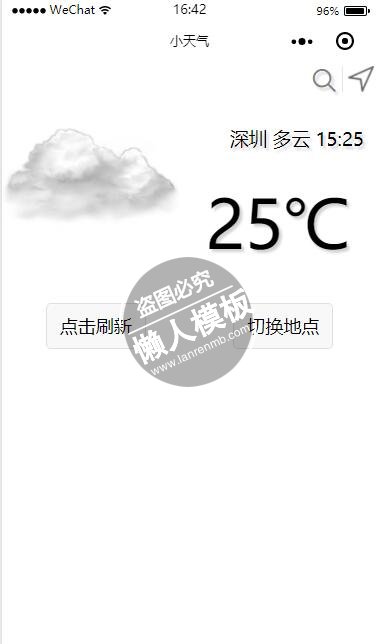
<view class="msgCard">
  <!--天气实况-->
  <view class="msgPanel">
    <!--第一个面板-->
    <image src="{{now.nowPic + now.code + '.png'}}" mode="aspectFit"></image>
    <!--https://www.seniverse.com/api-->
    <!--第一个面板-->

    <!--第二个面板-->
    <view class="nowPanel">
      <view class="searchLoc">
        <icon bindtap="changeLoc" type="search" color="gray"></icon>
        <image mode="aspectFit" bindtap="autoLoc" src="http://omh7cqphx.bkt.clouddn.com/NAVIGATION_32px.png"></image>
      </view>
      <!--https://portal.qiniu.com/-->
      <view class="nowTime">
        <text>{{location.name}} </text>
        <text>{{now.text}} </text>
        <text>{{last_update}} </text>
      </view>
      <view class="nowText">
        <text>{{now.temperature}}℃</text>
      </view>
    </view>
    <!--第二个面板-->
  </view>
  <!--天气实况-->

  <!--天气预报-->
  <view class="msgPanel">
    <button bindtap="">点击刷新</button>
    <button bindtap="">切换地点</button>
  </view>
  <!--天气预报-->

</view>
|
.msgCard {
  border-radius: 2pt;
  /*background-image: linear-gradient(white, deepskyblue);*/
}

.msgPanel {
  display: flex;
  flex-direction: row;
  align-items: flex-start;
}
.msgPanel > image {
  width: 160pt;
}
.nowPanel {
  display: flex;
  flex-direction: column;
  align-items: flex-end;
  justify-content: space-between;
  color: black;
  text-shadow: 2pt 2pt 2pt lightgray;
}

.searchLoc {
  padding: 2pt;
}
.searchLoc image {
  width: 20pt;
  height: 20pt;
  opacity: 0.6;
  margin-left: 5pt;
  border-left: 1pt solid lightgray;
  padding-left: 3pt;
}

.nowTime {
  padding-top: 20pt;
  padding-right: 10pt;
  font-size: 14pt;
}
.nowText {
  padding: 20pt;
  font-size: 50pt;
}

/*.
*/
|
//index.js
//获取应用实例
var app = getApp()
Page({
  data: {
    location: {
      id: "WS10730EM8EV",
      name: "下拉刷新",
      country: "CN",
      path: "深圳,深圳,广东,中国",
      timezone: "Asia/Shanghai",
      timezone_offset: "+08:00"
    },
    now: {
      nowPic: "http://omh7cqphx.bkt.clouddn.com/",
      text: "...",
      code: "99",
      temperature: ""
    },
    last_update: "",

    currentQueryObj: {
      key: "bixmpxjottltdf7l",
      location: "shenzhen",
      language: "zh-Hans",
      unit: "c"
    },
    api: {
      nowUrl: "https://api.thinkpage.cn/v3/weather/now.json",
      dailyUrl: "https://api.thinkpage.cn/v3/weather/daily.json",
      suggestion: "https://api.thinkpage.cn/v3/life/suggestion.json"
    }

  },

  //发送请求数据
  sendRequest: function(url, queryObj, callback) {
    wx.request({
      url: url,
      data: queryObj,
      method: 'GET',
      success: function(res) {
        callback(res);
      },
      fail: function(e) {
        console.log("******error******: ", e);
      },
      complete: function(e) {
        console.log("******请求完成****** ", e);
      }
    })
  },
  //发送请求数据

  //下拉刷新
  refreashNow: function(e) {
    var that = this;
    console.log(that.data.location);
    //更新实况天气
    this.sendRequest(this.data.api.nowUrl, this.data.currentQueryObj, function(res) {
      var result = res.data.results[0];
      that.refreashData(result); //下拉更新动作后的数据刷新
    });
    //更新实况天气
  },
  //下拉刷新

  //更新数据
  refreashData: function(result) {
    // 更新实况天气数据
    var result = result;
    result.last_update = result.last_update.slice(-14, -9);
    result.now.nowPic = "http://omh7cqphx.bkt.clouddn.com/";
    // 更新实况天气数据

    //刷新数据
    this.setData({
      location: result.location,
      now: result.now,
      last_update: result.last_update
    });
    //刷新数据
  },
  //更新数据

  //改变地点
  changeLoc: function(e) {
    var that = this;
    wx.chooseLocation({
      success: function(res){
        console.log(JSON.stringify(res)); //{"name":"天安门广场","address":"北京市东城区广场东侧路","latitude":39.90323,"longitude":116.39772,"errMsg":"chooseLocation:ok"}
        var currentQueryObj = {
          key: "bixmpxjottltdf7l",
          location: res.latitude + ":" + res.longitude,
          language: "zh-Hans",
          unit: "c"
        };
        that.setData({
          currentQueryObj: currentQueryObj
        });
        that.refreashNow();
      }
    })
  },
  //改变地点

  //定位地点
  autoLoc: function(e) {
    var that = this;
    wx.getLocation({
      type: 'wgs84', // 默认为 wgs84 返回 gps 坐标,gcj02 返回可用于 wx.openLocation 的坐标
      success: function(res){
        var currentQueryObj = {
          key: "bixmpxjottltdf7l",
          location: res.latitude + ":" + res.longitude,
          language: "zh-Hans",
          unit: "c"
        };
        that.setData({
          currentQueryObj: currentQueryObj
        });
        that.refreashNow();
      },
      fail: function() {
        // fail
      },
      complete: function() {
        // complete
      }
    })
  },
  //定位地点

  onShow: function(e) {

  },

  logmsg: function(res) {
    console.log(res);
  },

  onPullDownRefresh: function(){
    this.refreashNow();
    wx.stopPullDownRefresh();
  }

})
|
模板简介:该模板名称为【微信小程序小天气下拉刷新天气显示样式模板制作设计下载】,大小是,文档格式为.,推荐使用打开,作品中的图片,文字等数据均可修改,图片请在作品中选中图片替换即可,文字修改直接点击文字修改即可,您也可以新增或修改作品中的内容,该模板来自用户分享,如有侵权行为请联系网站客服处理。欢迎来懒人模板【小程序教程】栏目查找您需要的精美模板。
.jpg)
.jpg)




